Hi
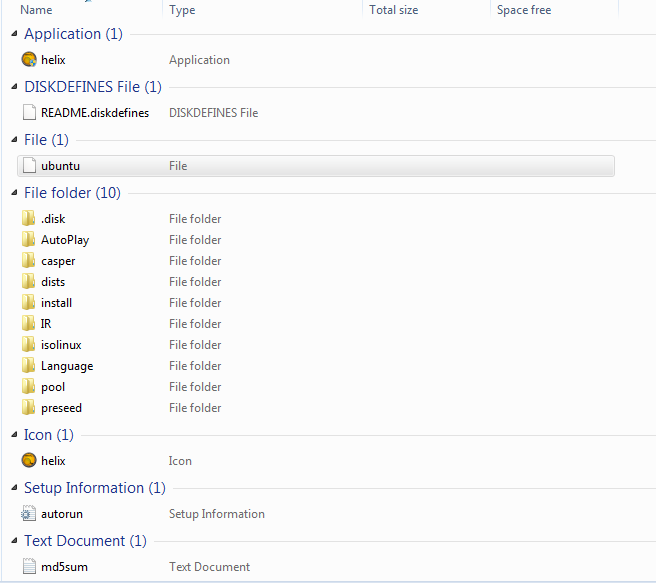
I ‘m working with forensics tool Helix (helix.iso) right now (Incident Response), I would like to copy the necessary files
And directories to the USB flash drive that is required to run helix.exe and programs
Can be started via the Helix dialog window.
I do not need also to copy all necessary system dll files that the programs are dependent from any malware-free computer
I don’t need to build a bootable USB because I have I have another forensics tools
Which files and directories must I copy that helix.exe work in USB flash drive? ba00f5d5ddd561dddb8781b2dc947827ba00f5d5ddd561dddb8781b2dc947827
Dani AI

Generated

Short answer for : the Windows “side” of Helix was packaged so many of its IR binaries will run straight from removable media without copying OS system DLLs, and you can often get helix.exe and the /IR toolset onto a USB and launch them on a healthy Windows host. For background on how Helix ships a separate Windows toolset and the typical /IR layout, see the Helix3 overview and tutorials. (Helix3 overview, Helix getting‑started tutorial). (forensics.wiki)

Important caution: running any live‑response tools on a “suspect” machine will change that machine (registry entries, SetupAPI logs, mounts, etc.). Some Helix/Live‑Response builds have been documented to automount or recover filesystems and to leave registry footprints — this is why imaging with a hardware write‑blocker or booting the target from trusted read‑only media is the preferred forensic method. Review published notes on live‑CD risks before using helix.exe directly on evidence. (Forensic live‑CD issues, Live Response review / registry notes). (forensics.wiki)

If the goal is a portable toolkit (not a bootable forensic environment) — on a clean, trusted machine: mount the Helix ISO, copy the Windows/IR folder plus helix.exe to a formatted USB (test FAT32 and NTFS), and test on a non‑evidence VM first. If you want a preserved live environment (recommended), write the ISO to USB so its boot structure and permissions are intact (tools such as Rufus make this simple). Always build the media on a known‑good workstation and verify the ISO before use. (Rufus guide, Helix USB/IR how‑to). (rufus.ie)

If helix.exe fails on a target because of missing runtime components, do not harvest system DLLs from another machine — instead use the bootable Helix image or a maintained modern distro (SIFT, CAINE) for acquisitions and analysis. Test workflows in a VM and document every step to preserve your chain‑of‑custody and defensibility. (SIFT Workstation, CAINE). (sans.org)

I mean how can I install Helix 3 on USB memory stick ?

Be a part of the DaniWeb community

We're a friendly, industry-focused community of developers, IT pros, digital marketers, and technology enthusiasts meeting, networking, learning, and sharing knowledge.