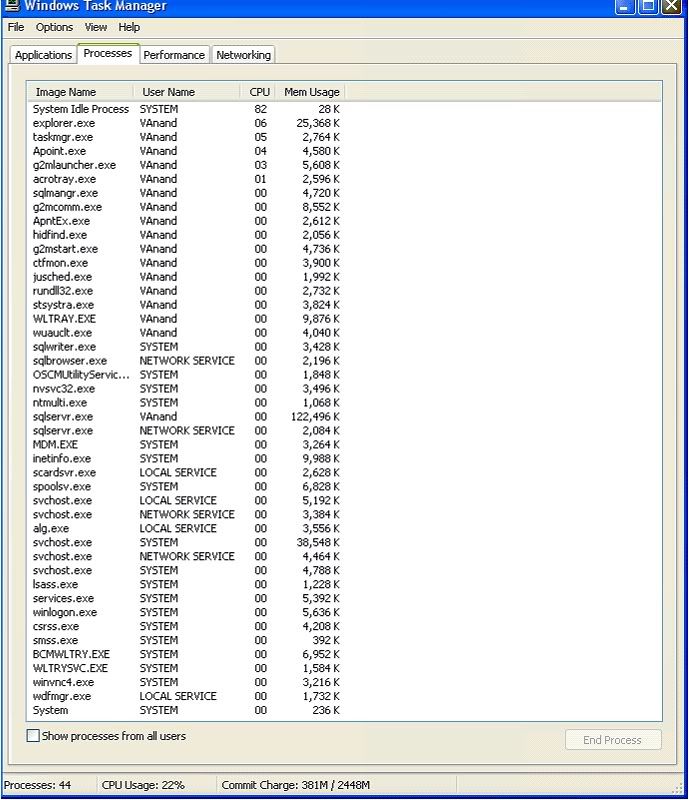
Hey all, I'm having problems with my laptop. Usually around 3ish where i work my laptop CPU usage shoots up to 90% even when i'm not working on anything. here is a copy of my log:
Logfile of Trend Micro HijackThis v2.0.2
Scan saved at 3:55:31 PM, on 10/4/2007
Platform: Windows XP SP2 (WinNT 5.01.2600)
MSIE: Internet Explorer v6.00 SP2 (6.00.2900.2180)
Boot mode: Normal
Running processes:
C:\WINDOWS\System32\smss.exe
C:\WINDOWS\system32\winlogon.exe
C:\WINDOWS\system32\services.exe
C:\WINDOWS\system32\lsass.exe
C:\WINDOWS\system32\svchost.exe
C:\WINDOWS\System32\svchost.exe
C:\WINDOWS\system32\spoolsv.exe
C:\WINDOWS\system32\inetsrv\inetinfo.exe
C:\Program Files\Common Files\Microsoft Shared\VS7DEBUG\MDM.EXE
C:\notes\ntmulti.exe
C:\WINDOWS\system32\nvsvc32.exe
C:\Program Files\Novatel Wireless\Sprint\Sprint PCS Connection Manager\OSCMUtilityService.exe
c:\Program Files\Microsoft SQL Server\90\Shared\sqlwriter.exe
C:\Program Files\RealVNC\VNC4\WinVNC4.exe
C:\WINDOWS\System32\WLTRYSVC.EXE
C:\WINDOWS\System32\bcmwltry.exe
C:\WINDOWS\Explorer.EXE
C:\WINDOWS\system32\WLTRAY.exe
C:\WINDOWS\stsystra.exe
C:\Program Files\Apoint\Apoint.exe
C:\WINDOWS\system32\rundll32.exe
C:\Program Files\Adobe\Acrobat 7.0\Distillr\Acrotray.exe
C:\Program Files\Java\jre1.5.0_10\bin\jusched.exe
C:\WINDOWS\system32\ctfmon.exe
C:\Program Files\Citrix\GoToMeeting\190\g2mstart.exe
C:\Program Files\Apoint\HidFind.exe
C:\Program Files\Apoint\Apntex.exe
C:\Program Files\Microsoft SQL Server\80\Tools\Binn\sqlmangr.exe
C:\Program Files\Citrix\GoToMeeting\190\g2mcomm.exe
C:\Program Files\Citrix\GoToMeeting\190\g2mlauncher.exe
C:\WINDOWS\system32\wuauclt.exe
\\h\RESTORE\Vincent\HiJackThis.exe
R3 - URLSearchHook: Yahoo! Toolbar - {EF99BD32-C1FB-11D2-892F-0090271D4F88} - (no file)
O2 - BHO: Adobe PDF Reader Link Helper - {06849E9F-C8D7-4D59-B87D-784B7D6BE0B3} - C:\Program Files\Adobe\Acrobat 7.0\ActiveX\AcroIEHelper.dll
O2 - BHO: SSVHelper Class - {761497BB-D6F0-462C-B6EB-D4DAF1D92D43} - C:\Program Files\Java\jre1.5.0_10\bin\ssv.dll
O2 - BHO: Adobe PDF Conversion Toolbar Helper - {AE7CD045-E861-484f-8273-0445EE161910} - C:\Program Files\Adobe\Acrobat 7.0\Acrobat\AcroIEFavClient.dll
O3 - Toolbar: Adobe PDF - {47833539-D0C5-4125-9FA8-0819E2EAAC93} - C:\Program Files\Adobe\Acrobat 7.0\Acrobat\AcroIEFavClient.dll
O4 - HKLM\..\Run: [Broadcom Wireless Manager UI] C:\WINDOWS\system32\WLTRAY.exe
O4 - HKLM\..\Run: [igfxtray] C:\WINDOWS\system32\igfxtray.exe
O4 - HKLM\..\Run: [igfxhkcmd] C:\WINDOWS\system32\hkcmd.exe
O4 - HKLM\..\Run: [igfxpers] C:\WINDOWS\system32\igfxpers.exe
O4 - HKLM\..\Run: [SigmatelSysTrayApp] stsystra.exe
O4 - HKLM\..\Run: [Apoint] C:\Program Files\Apoint\Apoint.exe
O4 - HKLM\..\Run: [NvCplDaemon] RUNDLL32.EXE C:\WINDOWS\system32\NvCpl.dll,NvStartup
O4 - HKLM\..\Run: [nwiz] nwiz.exe /installquiet
O4 - HKLM\..\Run: [NVHotkey] rundll32.exe nvHotkey.dll,Start
O4 - HKLM\..\Run: [Acrobat Assistant 7.0] "C:\Program Files\Adobe\Acrobat 7.0\Distillr\Acrotray.exe"
O4 - HKLM\..\Run: [SunJavaUpdateSched] "C:\Program Files\Java\jre1.5.0_10\bin\jusched.exe"
O4 - HKLM\..\Run: [QuickTime Task] "C:\Program Files\QuickTime\qttask.exe" -atboottime
O4 - HKCU\..\Run: [updateMgr] "C:\Program Files\Adobe\Acrobat 7.0\Acrobat\AdobeUpdateManager.exe" AcStd7_0_8 -reboot 1
O4 - HKCU\..\Run: [ctfmon.exe] C:\WINDOWS\system32\ctfmon.exe
O4 - HKCU\..\Run: [GoToMeeting] C:\Program Files\Citrix\GoToMeeting\190\g2mstart.exe "/Trigger RunAtLogon"
O4 - HKCU\..\Run: [Uniblue RegistryBooster 2] C:\Program Files\Uniblue\RegistryBooster 2\RegistryBooster.exe /S
O4 - Global Startup: Adobe Acrobat Speed Launcher.lnk = ?
O4 - Global Startup: Service Manager.lnk = C:\Program Files\Microsoft SQL Server\80\Tools\Binn\sqlmangr.exe
O8 - Extra context menu item: Convert link target to Adobe PDF - res://C:\Program Files\Adobe\Acrobat 7.0\Acrobat\AcroIEFavClient.dll/AcroIECapture.html
O8 - Extra context menu item: Convert link target to existing PDF - res://C:\Program Files\Adobe\Acrobat 7.0\Acrobat\AcroIEFavClient.dll/AcroIEAppend.html
O8 - Extra context menu item: Convert selected links to Adobe PDF - res://C:\Program Files\Adobe\Acrobat 7.0\Acrobat\AcroIEFavClient.dll/AcroIECaptureSelLinks.html
O8 - Extra context menu item: Convert selected links to existing PDF - res://C:\Program Files\Adobe\Acrobat 7.0\Acrobat\AcroIEFavClient.dll/AcroIEAppendSelLinks.html
O8 - Extra context menu item: Convert selection to Adobe PDF - res://C:\Program Files\Adobe\Acrobat 7.0\Acrobat\AcroIEFavClient.dll/AcroIECapture.html
O8 - Extra context menu item: Convert selection to existing PDF - res://C:\Program Files\Adobe\Acrobat 7.0\Acrobat\AcroIEFavClient.dll/AcroIEAppend.html
O8 - Extra context menu item: Convert to Adobe PDF - res://C:\Program Files\Adobe\Acrobat 7.0\Acrobat\AcroIEFavClient.dll/AcroIECapture.html
O8 - Extra context menu item: Convert to existing PDF - res://C:\Program Files\Adobe\Acrobat 7.0\Acrobat\AcroIEFavClient.dll/AcroIEAppend.html
O8 - Extra context menu item: E&xport to Microsoft Excel - res://C:\PROGRA~1\MICROS~2\OFFICE11\EXCEL.EXE/3000
O9 - Extra button: (no name) - {08B0E5C0-4FCB-11CF-AAA5-00401C608501} - C:\Program Files\Java\jre1.5.0_10\bin\ssv.dll
O9 - Extra 'Tools' menuitem: Sun Java Console - {08B0E5C0-4FCB-11CF-AAA5-00401C608501} - C:\Program Files\Java\jre1.5.0_10\bin\ssv.dll
O9 - Extra button: Research - {92780B25-18CC-41C8-B9BE-3C9C571A8263} - C:\PROGRA~1\MICROS~2\OFFICE11\REFIEBAR.DLL
O9 - Extra button: Messenger - {FB5F1910-F110-11d2-BB9E-00C04F795683} - C:\Program Files\Messenger\msmsgs.exe
O9 - Extra 'Tools' menuitem: Windows Messenger - {FB5F1910-F110-11d2-BB9E-00C04F795683} - C:\Program Files\Messenger\msmsgs.exe
O16 - DPF: {3DC2E31C-371A-4BD3-9A27-CDF57CE604CF} (MSN Money Charting) -
O16 - DPF: {6E32070A-766D-4EE6-879C-DC1FA91D2FC3} (MUWebControl Class) -
O16 - DPF: {E06E2E99-0AA1-11D4-ABA6-0060082AA75C} (GpcContainer Class) -
O17 - HKLM\System\CCS\Services\Tcpip\Parameters: Domain =
O17 - HKLM\Software\..\Telephony: DomainName =
O17 - HKLM\System\CS1\Services\Tcpip\Parameters: Domain =
O17 - HKLM\System\CS1\Services\Tcpip\Parameters: SearchList = trinityconsultants.com
O17 - HKLM\System\CCS\Services\Tcpip\Parameters: SearchList = trinityconsultants.com
O23 - Service: InstallDriver Table Manager (IDriverT) - Macrovision Corporation - C:\Program Files\Common Files\InstallShield\Driver\1050\Intel 32\IDriverT.exe
O23 - Service: LiveUpdate - Symantec Corporation - C:\PROGRA~1\Symantec\LIVEUP~1\LUCOMS~1.EXE
O23 - Service: Multi-user Cleanup Service - Unknown owner - C:\notes\ntmulti.exe
O23 - Service: NVIDIA Display Driver Service (NVSvc) - NVIDIA Corporation - C:\WINDOWS\system32\nvsvc32.exe
O23 - Service: opsComAdminService - Unknown owner - C:\Program Files\ESP\opsEnvironmental 6.1\Services\opsComAdminService.exe
O23 - Service: opsDataTklMnComService - Electric Software Products, Inc. - C:\Program Files\ESP\opsEnvironmental 6.1\Services\opsDataTklMnComService.exe
O23 - Service: opsGarbageCollector - Electric Software Products, Inc. - C:\Program Files\ESP\opsEnvironmental 6.1\Services\opsGarbageCollector.exe
O23 - Service: opsRoverMnComService - Electric Software Products, Inc. - C:\Program Files\ESP\opsEnvironmental 6.1\Services\opsRoverMnComService.exe
O23 - Service: opsTaskMnComService - Electric Software Products, Inc. - C:\Program Files\ESP\opsEnvironmental 6.1\Services\opsTaskMnComService.exe
O23 - Service: opsTickMnComService - Electric Software Products, Inc. - C:\Program Files\ESP\opsEnvironmental 6.1\Services\opsTickMnComService.exe
O23 - Service: OSCM Utility Service - Sprint Spectrum, L.L.C - C:\Program Files\Novatel Wireless\Sprint\Sprint PCS Connection Manager\OSCMUtilityService.exe
O23 - Service: VNC Server Version 4 (WinVNC4) - RealVNC Ltd. - C:\Program Files\RealVNC\VNC4\WinVNC4.exe
O23 - Service: Dell Wireless WLAN Tray Service (wltrysvc) - Unknown owner - C:\WINDOWS\System32\WLTRYSVC.EXE
--
End of file - 8166 bytes
Thx for any help!