i have ubuntu 8.10 .
how can share any folder from a drive such that every person in lan network computer can see that.
(in xp we can just share in one right click)
but how can we share in ubuntu.

please would you guide me from begining.

Dani AI

Generated

This thread shows the two usual roadblocks when sharing from Ubuntu to Windows: filesystem ownership (common when the files live on an NTFS volume) and Samba’s authentication model (Windows will prompt unless a matching Samba credential or an anonymous share is allowed). Practical approaches: put the shared data on a native Linux filesystem for real Unix permissions, or mount the NTFS volume so the desired Linux account appears as the owner; manage SMB access either by adding Samba-level passwords for accounts or by deliberately enabling an anonymous/guest share and making the filesystem permissions allow it.

Quick, practical steps and useful commands:

sudo mkdir -p /srv/samba/shared
sudo chown 1000:1000 /srv/samba/shared
sudo chmod 2775 /srv/samba/shared

If the data must stay on NTFS, map files to a Linux owner in fstab (replace UUID and UID/GID):

UUID=XXXX-XXXX /mnt/Backup ntfs-3g defaults,uid=1000,gid=1000,dmask=027,fmask=137 0 0

Samba user credentials are separate from the Linux password database; add a Samba password for an existing account:

sudo smbpasswd -a username

Quick checks:

testparm
smbclient -L //hostname -U username

Troubleshooting notes: verify the SMB services are running and that the local firewall allows SMB ports. If Windows keeps asking for credentials, either supply the Samba account password or switch to a properly configured anonymous share (only on trusted LANs). Avoid share names that include a trailing dollar sign if the intention is a visible share. As highlighted by the root cause in this thread was ownership mapping; ’s workgroup reminder explains Windows discovery; was correct that Samba is the right tool. Given the age of Ubuntu 8.10, consider upgrading to a supported release for improved tools and security.

Recommended Answers

All 17 Replies

You need to setup and configure "samba"

First, see if this hasn't been done already.
Open Network on the Ubuntu box and see if you have a share defined. If not, right-click to share a folder.
Open Network places on the XP box. Windows network. I believe Ubuntu defaults to Workgroup, and you should find your Linux share in there.
You can edit the Samba config file to change the Workgroup:
http://www.linuxquestions.org/questions/linux-networking-3/how-to-network-ubuntu-to-and-xp-network-454120/
Or, just change the XP workgroup name to "Workgroup".
This is much easier than it used to be.

i just want to share a folder to lan from ubuntu such that my friends in this lan can visit my shared folder

Did you try any of my suggestions?
They were written to be of assistance, and we won't get very far without your participation.

i cant get ubuntu box or xp

Have you installed Samba using synaptic?

yes
when i try to share a folder "Tools" from a NTFS partition /media/Backup i get this information
'net usershare' returned error 255: net usershare add: cannot share path /media/Backup/Tools as we are restricted to only sharing directories we own.
Ask the administrator to add the line "usershare owner only = False"
to the [global] section of the smb.conf to allow this.
I had tried this by right clicking on the folder then sharing options then mark on share this folder then click on create share. aftr that i see the above information. now i think you can fix the problem

The problem is exactly as it says, you dont own the folder you are trying to share.

go to the console and type "sudo nautilus" then navigate using that window to the folder, and try sharing it again. (using the sudo command will give that explorer window admin privileges)

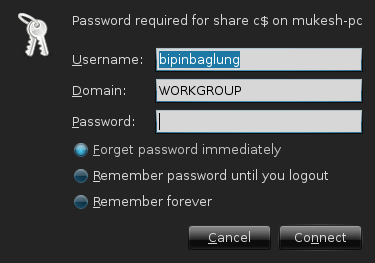
now i can share my folders but i cant access others shared folders. it ask for username domain and password. where username is already filled with mine domain is also filled.
now the asked password is theirs'?? and i have to get password by other medium?
again when my friend try to access my shared folders the same problem persists.
But i do not have set any password in sharing what may be the default password or from where do i have to set ?

you use their password and username for thiers, and your username and password for yours, obviously.

now i dont know mine password also.
Is that the administrator password or i can set other ? how can i set password?

its the password and username of your user

but the user password doesnt work

In your smb.conf try changing security=user to security=share

In Samba, the dollar sign has special meaning (something to do with netbios and/or hidden shares). Try sharing the name on the 'doz box without a $, and try to connect to it. You MIGHT be able to escape the $ or replace it with \044 or something crazy, but you might as well just make a share without the $, and use it.

I am satisfied with JBENNET . Thanks a lot.

Be a part of the DaniWeb community

We're a friendly, industry-focused community of developers, IT pros, digital marketers, and technology enthusiasts meeting, networking, learning, and sharing knowledge.