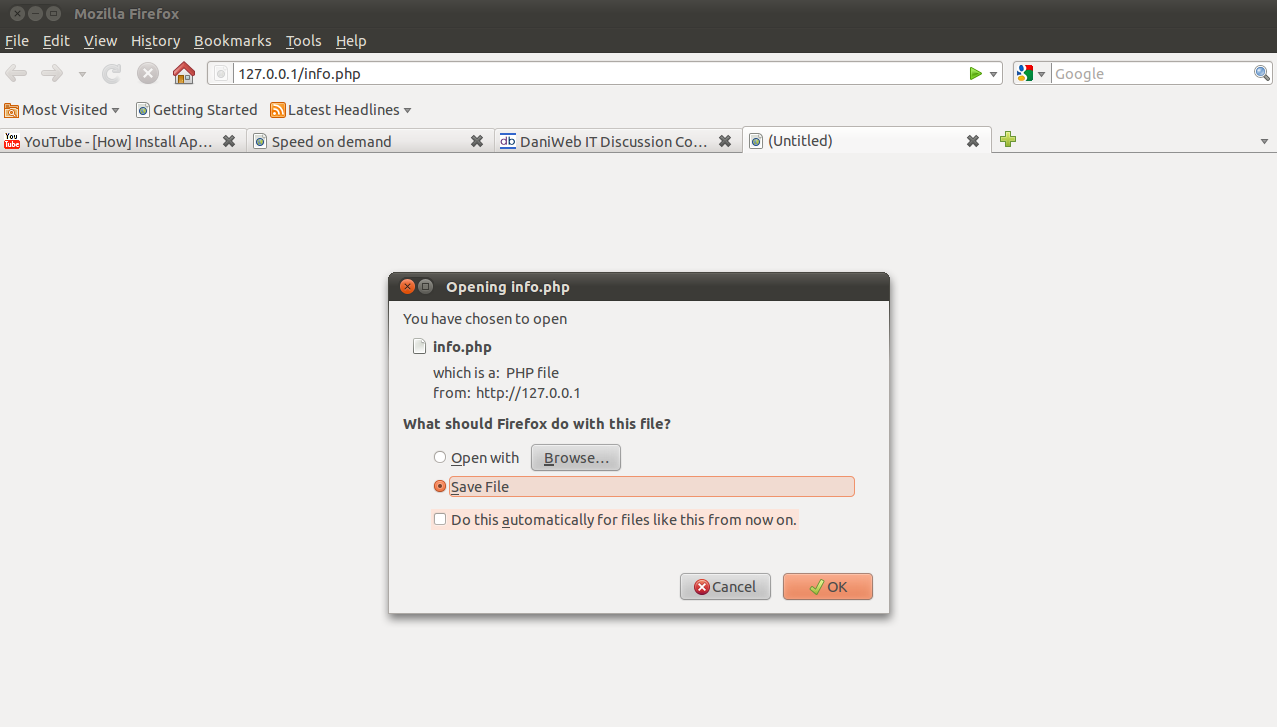
I'm working on ubuntu 10.10 , n have installed php5 and apache 2 but when I try to open a .php file by giving the complete url in the browser it pops up the window( refer thumbnail).Please help.I'm a beginner and I'm stuck on this god knows since when.

geekme 0 Junior Poster in Training
Dani AI
Generated
As notes, the usual cause is that Apache is serving the file as static instead of passing it to PHP. The checklist below complements the Ubuntu guide by focusing on quick, verifiable diagnostics and a few often-missed causes (short tags, handler overrides, CGI/FPM vs mod_php).
Useful diagnostics (collect these outputs for diagnosis):
sudo apache2ctl -M
curl -I http://localhost/path/to/file.php
sudo tail -n 200 /var/log/apache2/error.log
sudo grep -R --line-number "AddHandler\|SetHandler\|x-httpd-php" /etc/apache2 /etc/apache2/sites-enabled /etc/apache2/mods-enabled
How to interpret the results:
- If the loaded-modules list contains a PHP module (eg. a php*_module) then Apache knows how to run PHP; absence means requests won’t be handed to a PHP interpreter.
- The response headers from
curl -Ireveal whether the server returned a download-type MIME (application/octet-stream) or a normal HTML content-type — a download-type header indicates the request was not processed as PHP. - Error logs often show handler or permission problems; grep output can reveal an overriding
AddHandler/SetHandlerin a site file or.htaccessthat maps.phpto the wrong handler.
Other common pitfalls not covered above:
- Files using short tags (
<?) won’t be parsed unlessshort_open_tagis enabled; convert to full<?phptags when possible. - On Ubuntu, Apache normally runs as
www-data; web files must be readable by that account. - If PHP is provided via FastCGI/PHP‑FPM rather than mod_php, ensure Apache’s proxy/fcgi configuration actually forwards
.phprequests to the FPM socket.
These checks narrow down whether the issue is module/handler configuration, MIME mapping, PHP tag usage, or file-access permissions.

JasonHippy 739 Practically a Master Poster
First up, you might want to try using 'http://' in front of your URL to avoid the URL being interpreted as a 'file://' request. Otherwise, if that doesn't help take a look this. It describes the exact problem you are experiencing and the steps required to solve it:
Troubleshooting PHP 5
Does your browser ask if you want to download the php file instead of displaying it? If Apache is not actually parsing the php after you restarted it, install libapache2-mod-php5. It is installed when you install the php5 package, but may have been removed inadvertently by packages which need to run a different version of php.
If sudo a2enmod php5 returns "$ This module does not exist!", you should purge (not just remove) the libapache2-mod-php5 package and reinstall it.
Be sure to clear your browser's cache before testing your site again. To do this in Firefox 4: Edit → Preferences … Privacy → History: clear your recent history → Details : choose "Everything" in "Time range to clean" and check only "cache", then click on "Clear now".
Remember that, for Apache to be called, the URI in your web browser must begin with "http://". If it begins with "file://", then the file is read directly by the browser, without Apache, so you get (X)HTML and CSS, but no PHP. If you didn't configure any host alias or virtual host, then a local URI begins with "http://localhost", "http://127.0.0.1" or http://" followed by your IP number.
If the problem persists, check your PHP file authorisations (it should be readable at least by Ubuntu user "apache"), and check if the PHP code is correct. For instance, copy your PHP file, replace your whole PHP file content by "<?php phpinfo(); ?>" (without the quotation marks): if you get the PHP test page in your web browser, then the problem is in your PHP code, not in Apache or PHP configuration nor in file permissions. If this doesn't work, then it is a problem of file authorisation, Apache or PHP configuration, cache not emptied, or Apache not running or not restarted. Use the display of that test file in your web browser to see the list of files influencing PHP behaviour.
Taken from the 'Troubleshooting PHP 5' section of this page:
https://help.ubuntu.com/community/ApacheMySQLPHP
It's published under a Creative Commons Licence, so I guess it's OK to use like this!
Be a part of the DaniWeb community
We're a friendly, industry-focused community of developers, IT pros, digital marketers, and technology enthusiasts meeting, networking, learning, and sharing knowledge.