I've uploaded two files, one is a screen shot of my the ftp address to my server and the other is the ftp settings files that is sitting on my ubuntu server. I'M not understanding how it works. Where in the ftp settings to I designate a directory for the ftp downloads/uploads? I don't see it anywere in the setting. I'M not really sure how this works. The screen shot was taken from a windows desktop, the ubuntu server is another machine here in the house.

lewashby 56 Junior Poster
# Allow anonymous FTP? (Beware - allowed by default if you comment this out).
anonymous_enable=YES
#
# Uncomment this to allow local users to log in.
local_enable=YES
#
# Uncomment this to enable any form of FTP write command.
write_enable=YES
#
# Default umask for local users is 077. You may wish to change this to 022,
# if your users expect that (022 is used by most other ftpd's)
#local_umask=022
#
# Uncomment this to allow the anonymous FTP user to upload files. This only
# has an effect if the above global write enable is activated. Also, you will
# obviously need to create a directory writable by the FTP user.
#anon_upload_enable=YES
#
# Uncomment this if you want the anonymous FTP user to be able to create
# new directories.
#anon_mkdir_write_enable=YES
#
# Activate directory messages - messages given to remote users when they
# go into a certain directory.
dirmessage_enable=YES
#
# If enabled, vsftpd will display directory listings with the time
# in  your  local  time  zone.  The default is to display GMT. The
# times returned by the MDTM FTP command are also affected by this
# option.
use_localtime=YES
#
# Activate logging of uploads/downloads.
xferlog_enable=YES
#
# Make sure PORT transfer connections originate from port 20 (ftp-data).
connect_from_port_20=YES
#
# If you want, you can arrange for uploaded anonymous files to be owned by
# a different user. Note! Using "root" for uploaded files is not
# recommended!
#chown_uploads=YES
#chown_username=whoever
#
# You may override where the log file goes if you like. The default is shown
# below.
#xferlog_file=/var/log/vsftpd.log
#
# If you want, you can have your log file in standard ftpd xferlog format.
# Note that the default log file location is /var/log/xferlog in this case.
#xferlog_std_format=YES
#
# You may change the default value for timing out an idle session.
#idle_session_timeout=600
#
# You may change the default value for timing out a data connection.
#data_connection_timeout=120
#
# It is recommended that you define on your system a unique user which the
# ftp server can use as a totally isolated and unprivileged user.
#nopriv_user=ftpsecure
#
# Enable this and the server will recognise asynchronous ABOR requests. Not
# recommended for security (the code is non-trivial). Not enabling it,
# however, may confuse older FTP clients.
#async_abor_enable=YES
#
# By default the server will pretend to allow ASCII mode but in fact ignore
# the request. Turn on the below options to have the server actually do ASCII
# mangling on files when in ASCII mode.
# Beware that on some FTP servers, ASCII support allows a denial of service
# attack (DoS) via the command "SIZE /big/file" in ASCII mode. vsftpd
# predicted this attack and has always been safe, reporting the size of the
# raw file.
# ASCII mangling is a horrible feature of the protocol.
#ascii_upload_enable=YES
#ascii_download_enable=YES
#
# You may fully customise the login banner string:
#ftpd_banner=Welcome to blah FTP service.
#
# You may specify a file of disallowed anonymous e-mail addresses. Apparently
# useful for combatting certain DoS attacks.
#deny_email_enable=YES
# (default follows)
#banned_email_file=/etc/vsftpd.banned_emails
#
# You may restrict local users to their home directories.  See the FAQ for
# the possible risks in this before using chroot_local_user or
# chroot_list_enable below.
#chroot_local_user=YES
#
# You may specify an explicit list of local users to chroot() to their home
# directory. If chroot_local_user is YES, then this list becomes a list of
# users to NOT chroot().
# (Warning! chroot'ing can be very dangerous. If using chroot, make sure that
# the user does not have write access to the top level directory within the
# chroot)
#chroot_local_user=YES
#chroot_list_enable=YES
# (default follows)
#chroot_list_file=/etc/vsftpd.chroot_list
#
# You may activate the "-R" option to the builtin ls. This is disabled by
# default to avoid remote users being able to cause excessive I/O on large
# sites. However, some broken FTP clients such as "ncftp" and "mirror" assume
# the presence of the "-R" option, so there is a strong case for enabling it.
#ls_recurse_enable=YES
#
# Customization
#
# Some of vsftpd's settings don't fit the filesystem layout by
# default.
#
# This option should be the name of a directory which is empty.  Also, the
# directory should not be writable by the ftp user. This directory is used
# as a secure chroot() jail at times vsftpd does not require filesystem
# access.
secure_chroot_dir=/var/run/vsftpd/empty
#
# This string is the name of the PAM service vsftpd will use.
pam_service_name=vsftpd
#
# This option specifies the location of the RSA certificate to use for SSL
# encrypted connections.
rsa_cert_file=/etc/ssl/private/vsftpd.pem
garrett@GastonMedia:/etc$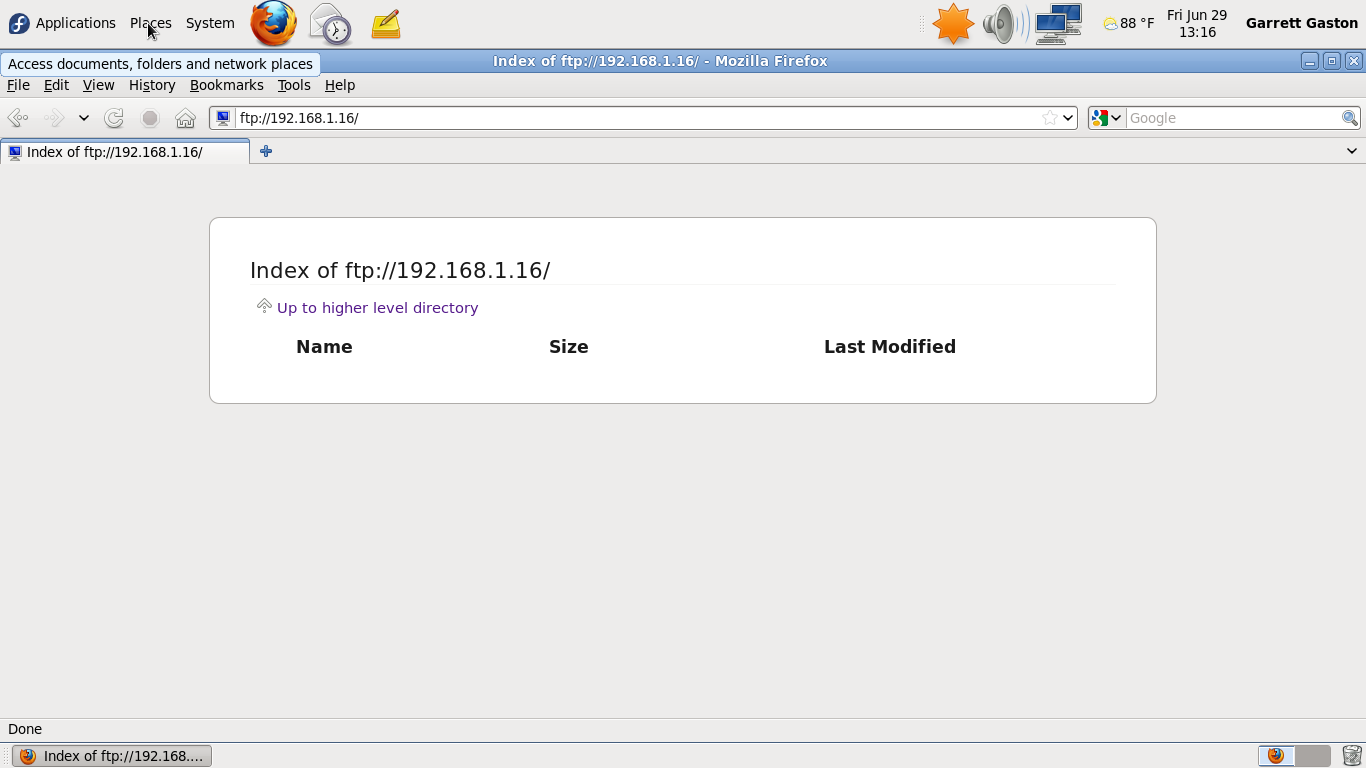
Dani AI
Generated
Brief summary tied to the thread: reported that visiting ftp://ipaddress in a browser produced no login prompt and only an empty table header. correctly pointed toward the account-to-filesystem relationship. Two common causes for the behavior described are (1) the client landed in an anonymous session whose root is empty, or (2) the FTP data channel failed so the client shows headers but never receives the file list. The checklist below shows concise, practical checks and fixes.
Server-side checks (verify actual values in the server config and filesystem):
- Inspect the FTP server config for anonymous/login and upload settings. For a quick view:
sudo grep -E '^(anonymous_enable|local_enable|local_root|anon_root|chroot_local_user|write_enable|pasv_)' /etc/vsftpd.conf - Confirm the target directory actually contains files and that the FTP user has read permission:
sudo ls -la /home/<username> # or the path shown by local_root - Check logs for connection/listing errors (vsftpd may log to its own file or to syslog).
Network / client-mode issues (control vs data channel):
- FTP uses port 21 for control and additional ports for the data channel. If only port 21 is reachable, directory listings can fail. If the server is behind NAT/firewall, configure a passive port range and forward it, for example:
pasv_enable=YES
pasv_min_port=40000
pasv_max_port=50000
and forward 21 plus that range on the router/firewall.
Configuration notes and safer alternatives:
- To change the folder clients land in, set
local_rootfor the user or change the user's home. To allow uploads, ensurelocal_enable=YESandwrite_enable=YESand considerchroot_local_user=YESto confine users:local_enable=YES write_enable=YES chroot_local_user=YES local_root=/srv/ftp/uploads - For Windows clients, use a dedicated FTP client (e.g., FileZilla) or prefer SFTP (
sftp username@ipaddress) to avoid FTP/NAT/passive headaches and to protect credentials (FTP is cleartext).
Recommended Answers
Jump to Post— cereal 1,524From from the manual:
By default vsftpd is configured to authenticate system users and allow them to download files
so if you log with garrett user the directory will be located in /home/garrett/, the configuration for the anonymous account is different, here the link to the manual with …
All 2 Replies

cereal 1,524 Nearly a Senior Poster Featured Poster
From from the manual:
By default vsftpd is configured to authenticate system users and allow them to download files
so if you log with garrett user the directory will be located in /home/garrett/, the configuration for the anonymous account is different, here the link to the manual with some basic information for config:
bye! :)
lewashby 56 Junior Poster
Well I was just going to my web browser and typing in it wouln't ask for a user name or password. If the directory is simply /home/garrett that page should be shoing a lot of files, but isntead it's blank except for the heading Name, Size, Date Modified.
Be a part of the DaniWeb community
We're a friendly, industry-focused community of developers, IT pros, digital marketers, and technology enthusiasts meeting, networking, learning, and sharing knowledge.