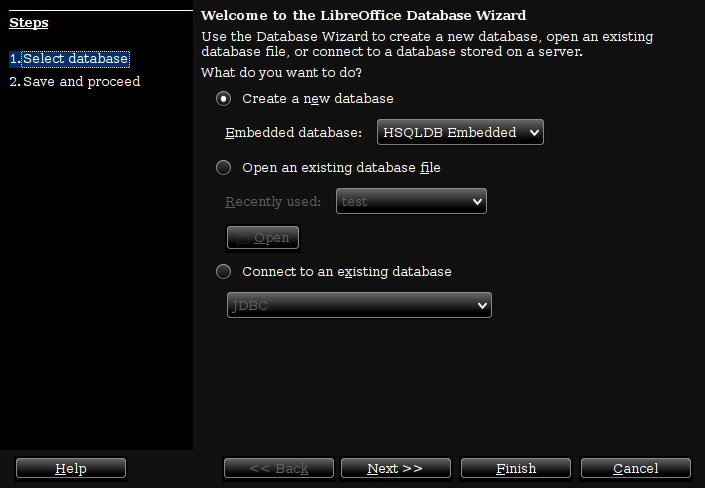
I am trying to create databases in Ubuntu 14.04 running LibreOffice 4.4.3 and can not due to not connecting with JRE or JDK.

Research carried out and things I have tried lead me to understand I need JDK-8 now instead of JRE. Is this accurate?

JDK-8 and Java 8 are installed. From the command prompt:

$ sudo update-alternatives --config java

  Selection    Path                                           Priority   Status
------------------------------------------------------------
  0            /usr/lib/jvm/java-8-oracle/jre/bin/java         1081      auto mode
  1            /usr/lib/jvm/java-6-openjdk-i386/jre/bin/java   1061      manual mode
  2            /usr/lib/jvm/java-7-openjdk-i386/jre/bin/java   1071      manual mode
* 3            /usr/lib/jvm/java-8-openjdk-i386/jre/bin/java   1069      manual mode
  4            /usr/lib/jvm/java-8-oracle/jre/bin/java         1081      manual mode

$ sudo update-alternatives --config javac

  Selection    Path                                        Priority   Status
------------------------------------------------------------
  0            /usr/lib/jvm/java-8-oracle/bin/javac         1081      auto mode
  1            /usr/lib/jvm/java-6-openjdk-i386/bin/javac   1061      manual mode
  2            /usr/lib/jvm/java-7-openjdk-i386/bin/javac   1071      manual mode
* 3            /usr/lib/jvm/java-8-openjdk-i386/bin/javac   1069      manual mode
  4            /usr/lib/jvm/java-8-oracle/bin/javac         1081      manual mode

From LibreOffice Menu Tools -> Options -> Advanced the following is chosen

Oracle Corporation 1.8.0_111 with path /usr/lib/jvm/java-8-openjdk-i386/jre

Parameters and Class Path sub-dialog boxes are empty also

Since I have several entries for java, I have tried each of them as an alternative and the corresponding entry under Tools -> Options -> Advanced

Thanks for taking the time to read this. Can anyone offer insight how to solve this?

Dani AI

Generated

Quick, practical summary for with pointers tied to earlier replies by and .

The two most common causes on Ubuntu are (A) the HSQLDB SDBC driver is not installed by default in some distro builds, and (B) LibreOffice cannot use the installed JVM because the Java runtime and LibreOffice must match (bitness and compatible JRE/JDK). 's point about 32‑bit vs 64‑bit Java is relevant; ’s Mint experience shows a distro that pulls the needed pieces together for you. See LibreOffice documentation on Java and Base and the Debian/Ubuntu packaging notes for the HSQLDB driver. (books.libreoffice.org)

Suggested steps (safe, minimal):

sudo apt update
sudo apt install --no-install-recommends libreoffice-base libreoffice-base-drivers libreoffice-sdbc-hsqldb default-jre

After installing, restart LibreOffice, open Tools → Options → LibreOffice → Advanced and confirm a JRE is listed and selected. If LibreOffice is 32‑bit, install a 32‑bit JRE; if 64‑bit, install a 64‑bit JRE. If the package install fails on older Ubuntu releases, try the official LibreOffice build, snap, or flatpak. (packages.debian.org)

Notes and followups: HSQLDB has been deprecated in favor of embedded Firebird (migration tools are available), so consider migrating long term; but for immediate use the SDBC driver package or a matching JRE/JDK is the usual fix. Also check for the presence of hsqldb.jar under LibreOffice's program/classes if problems continue. (wiki.documentfoundation.org)

Links:

Recommended Answers

All 6 Replies

Isn't version 5 of LibreOffice out?
Also, doesn't it take more than JDK? Some SQL? MySQL?

Just pulling from memory here, did not google this.

I have libreoffice 5.1.6.2 on my Mint system. Works fine with the default Java runtime. No JRE required.

commented: Bring out your dead (versions.) +12

Doesn't matter if it is LO 4 or 5. Java of some form is required.

At the least, Java is required to use the internal database engine of LO. I am not trying to connect through a JDBC or ODBC to a MySQL database. I would need to resolve this anyway if I was connecting to an external database.

Still looking and hoping for help.

OK, so you get the latest LO and watch the tutorial at https://www.youtube.com/watch?v=jWU0WdMJ2Kw

What happens when you bring up that first dialog box?

I have to admit that I did run into a person that refused to update LO. They were stuck in limbo for months searching for help.

I never said I was not in favour of upgrading to LibreOffice 5. This is not an issue whether upgrading to the most recent version has bearing. LibreOffice 5 like LibreOffice 4 still requires JRE or JDK to work which I stated from the outset is the challenge.

Side bar: There is indication LO developers will eliminate Java dependencies by moving to Python, but we have not reached that milestone yet.

I upgraded to LibreOffice 5 and am still getting the same message after going through the database wizard:

The connection to the data source "tst4" could 
not be established

SQL Status: HY000

The connection to the external data source could
not be established. No SDBC driver was found 
for the URL 'sdbc:embedded:hsqldb'.

You do the google research on that error and it comes back that Java is not working with LibreOffice 4 or 5.

I have tried both LibreOffice 4 or 5 with the various flavours of Java JDK or JRE installed on my system and nothing prevails as a solution.

: I looked at the video you suggested. Attached is a screen shot of when I start the database wizard LOBase.png

I'd hit the LO forums but it looks like that error has priors. Such as it may require the 32 bit version of Java. Just get the JDK as it will have the runtime and dev kit all in one.

Be a part of the DaniWeb community

We're a friendly, industry-focused community of developers, IT pros, digital marketers, and technology enthusiasts meeting, networking, learning, and sharing knowledge.