b62b330b33236e12160db60d6c858d9d booted from a flash drive to go into the live cd mode , there , as soon as i double clicked a flash video , the screen went all jumbled up , and my pc hanged up.

later i tried to check it in oracle virtual box , there its giving me the following message

VT-x/AMD-V hardware acceleration has been enabled, but is not operational. Your 64-bit guest will fail to detect a 64-bit CPU and will not be able to boot.
Please ensure that you have enabled VT-x/AMD-V properly in the BIOS of your host computer.

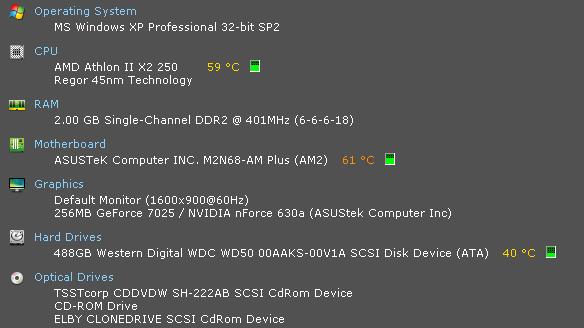
im attaching a speccy screenshot describing my system resources.

thanks in advance for your time. :)

regards
somjit.

Dani AI

Generated

Two separate failures are showing up in this thread and they need different fixes. The live-USB hang when a Flash video is opened points to the graphics stack (mode-setting / driver / hardware-accelerated video). The VirtualBox message about VT-x/AMD-V not being usable means the VM cannot get CPU virtualization support from the host. Both are common and solvable; below are practical, non-speculative steps tied to the things already mentioned by @somjit, and .

Virtualization checks and fixes:

  • Confirm the CPU actually exposes VT-x (Intel) or SVM (AMD) and enable it in the BIOS/UEFI (look for "Intel Virtualization", "VT-x", "VT-d" or "AMD SVM").
  • On Linux: run
    egrep -c "(vmx|svm)" /proc/cpuinfo

    a number > 0 indicates support.

  • On Windows, run msinfo32 or check Task Manager (Performance) for a Virtualization flag.
  • If the CPU supports VT-x/SVM but VirtualBox still reports it as unavailable, a host hypervisor or security feature may be holding it (Hyper-V, Device Guard, some AV features). Disable Hyper-V (or other hypervisors) and reboot; on Windows a common command to return to a non-hypervisor boot is:
    bcdedit /set hypervisorlaunchtype off

    (run as admin and reboot).

Live-USB / physical install troubleshooting:

  • Cinnamon uses 3D acceleration; a flaky GPU or driver will hang the live session. Boot with "nomodeset" or use the distro's "safe graphics/compatibility" option to avoid kernel mode-setting, then install. At the first boot install the proprietary NVIDIA/AMD driver if appropriate. After a crash, check dmesg and /var/log/Xorg.0.log for GPU errors.

32-bit vs 64-bit, Cinnamon vs MATE:

  • 64-bit is better when you need >4 GB RAM or modern apps; it uses a bit more RAM. In a VM or on a machine with 4 GB or less, 32-bit is acceptable and easier to get running. MATE is lighter and far less dependent on 3D drivers than Cinnamon; try MATE if graphics cause instability.

Quick checklist: verify CPU virtualization, enable it in BIOS, disable other hypervisors, boot live with nomodeset, and try MATE or proprietary GPU drivers if problems persist.

Recommended Answers

All 3 Replies

In the vm case, you are running a 32-bit host os. You need to run a 64-bit host os and enable the VT-x and such in the bios in order to run a 64-bit guest. Try running a 32-bit Linux system instead. It will give you a much better experience until you are ready to go full 64-bit operational.

is there some significant performance difference between a 32 bit and 64 bit mint cinnamon ? given my specifications , i was thinking maybe MATE would be a better option ... will it ?

I also want to know whether 64-bit is that much of an advantage over 32-bit, considering that my Mint Cinnamon 64-bit kept crashing after install so badly that I had to uninstall it. In my case it was a problem with my PCIE-16 graphics card.

Be a part of the DaniWeb community

We're a friendly, industry-focused community of developers, IT pros, digital marketers, and technology enthusiasts meeting, networking, learning, and sharing knowledge.