Hi. Can anyone tell me how to find and install IIS? I need it for developing my mobile application with SQL Server Mobile and create a database. Or if you have any suggestions... Do you know any other way on connecting from mobile applications to databases (other than MS SQL) that won't need IIS?? I'm really having a hard time looking for this component and I have yet to find it.

Dani AI

Generated

Nice catch by — that clarified the immediate install problem for . A quick, practical note that fills the gap in the thread: IIS itself is not a requirement of mobile apps per se, it’s usually needed because certain Microsoft mobile workflows (sync, RDA/replication or ASP.NET SOAP/HTTP services) expect a server-side HTTP endpoint. If all you need is a local on-device store, or a simple HTTP API, you can avoid IIS entirely.

Common, safer alternatives and when to use them:

  • Embedded local store: use SQLite or an embedded engine (SQL Server Compact on older Windows Mobile) when offline-first or single-device storage is fine.
  • Server API (recommended): expose data via a REST/JSON or SOAP endpoint and let the mobile app call that. The API can run on IIS, but it can also be hosted in other ways (cloud app service, Apache/PHP, or a self-hosted .NET service), removing the need to install IIS on a developer PC.
  • Self-hosting for development: use a lightweight self-host (HttpListener or a self-hosted WCF/service) or modern tooling like IIS Express for local testing without full IIS.
  • Direct DB connections: possible but not recommended — exposes ports, credentials and adds security/latency problems.

A short practical workflow to follow:

  1. Decide whether you need offline sync; if yes, choose local store + sync strategy.
  2. Design a thin server API (REST is easiest); secure it with HTTPS and tokens.
  3. For development, pick a hosting method that matches deployment (IIS/IIS Express or self-host).
  4. Avoid opening database ports to the Internet; always use parameterized queries and encrypted channels.

For reference on hosting options and lightweight servers see Microsoft’s IIS overview (learn more about hosting) and SQLite’s homepage for embedded DB choices:

Caution: IIS on workstation OSes (legacy XP IIS 5.1) has limits; for production, use a server OS or cloud-hosted services.

Recommended Answers

All 4 Replies

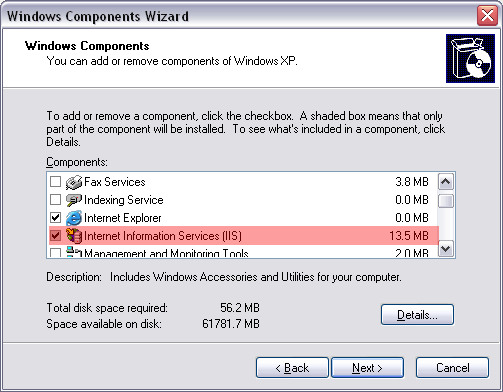
You can install IIS in Windows XP from Control Panel (select Add or Remove Programs >> Add/Remove Windows Components and make selection of IIS, default seting would be OK. You will need XP instalation CD), but there is no official support for XP Home also there are no download links for IIS. Here is official link from Microsoft on on Vista

PS: Are you Westminster Uni student by any chance? Just curious as I seen other your's questions on the forum...

I've tried that Control Panel installation instruction however, I can't seem to find IIS in the selection, but I'm certainly using Windows XP PRO SP2.

About your question. Nope. I am in another university somewhere here in South East Asia. And I'm honestly quite new to every question I'm asking since I have just tried developing my first mobile application for our dissertation. :) Anyways, why'd you ask?

Just curious as where you may be studing, and also sometimes I get accross same university students as me. In regards of IIS are you sure you looking in right place? See my attachment for what you should see if you wish to add new components to windows that are not part of default OS instalation

Oh my... MY BAD. I finally found it. You're right, I'm looking at the wrong place. THANKS SO MUCH!!!!! You've been a great help!!! :D

Be a part of the DaniWeb community

We're a friendly, industry-focused community of developers, IT pros, digital marketers, and technology enthusiasts meeting, networking, learning, and sharing knowledge.