hi :) can anyone tell me how to pass data from datagrid to several textboxes. I have a textbox where the user can search a data. The data searched would display in the datagrid, so when I clicked on a data from the datagrid, it will be distributed to their respective places. I've done searching for it but I can't seem to find the right way to do it.
I'm using MS Access 2003 and Visual Basic 6.0.

Hope you can help me. :)

Dani AI

Generated

Short answer: there are two clean ways to get a selected row into textboxes in VB6 + Access — bind the controls to the same data source (simplest for a bound DataGrid), or copy values programmatically from the grid/recordset (used for unbound grids or when you manage the recordset yourself). The replies from and point at those two options; below are practical, distinct steps and gotchas so the chosen approach actually works.

If the grid is bound to a data control (Adodc/Data control)

  • Bind each textbox to the same data control and the matching field. At design time set DataSource/DataField; at runtime use Set to assign the data control object and set DataField to the column name:
    Set txtName.DataSource = Adodc1
    txtName.DataField = "CustomerName"

    This keeps the textbox showing the current record row automatically as the selection changes.

If the grid is unbound (MSFlexGrid populated manually) or you use ADO without an ADODC

  • Handle the grid selection-change event (FlexGrid: RowColChange; otherwise use the grid Click handler) and copy values from the backing ADO recordset or from the grid cells into textboxes. Example (using your recordset rs):
    If Not rs.EOF Then
      If IsNull(rs.Fields("CustomerName").Value) Then
          txtName.Text = ""
      Else
          txtName.Text = rs.Fields("CustomerName").Value
      End If
    End If

Troubleshooting / pitfalls

  • Make sure you actually know which grid control you have (MSFlexGrid vs Microsoft DataGrid Control); TextMatrix works for FlexGrid but not for a bound DataGrid.
  • If bound controls show the “last row” only, the recordset cursor was likely moved (MoveLast/iterated) during population — reposition (MoveFirst) or rebind after filling.
  • For bookmark/absolute-position features use a client cursor (CursorLocation = adUseClient) on ADO recordsets.
  • Keep bindings consistent: grid and textboxes must share the same DataSource object to stay in sync.

These targeted checks usually resolve the “select a row → populate textboxes” problem in VB6 + Access 2003.

Recommended Answers

All 6 Replies

Hi Problematic. It seems that I have missed your post being new year and all.:)

You can try the following -

Text1.Text = Datagrid1.TextMatrix(Datagrid1.Row, 1) 'The 1 at the end refers to the coloumn value in the grid, in this case coloumn 1...

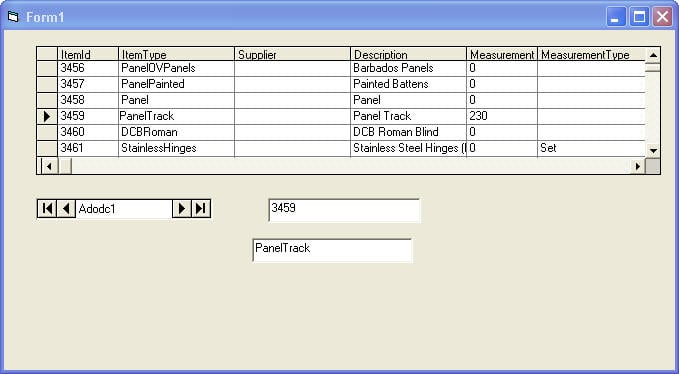
Have you tried binding the text box to a column in the datasource that supplies the datagrid.

@Chris, I think if you bind the textbox to the recordsource, it will only load the data from the last row. Once the data has been loaded to the grid there i no more interaction with the datasource.

The code that I have supplied above will load the text box with a value every time a row is selected in the datagrid.

That is not my understanding. A bound textbox displays the data at the cursor, ie the current row in the datagrid.

further to earlier comment see attached screen capture for example

commented: Nice! +6

I do apologize, I did not know that you were making use of a data control. That way the bound text boxes will show the values. This will however not work in making use of ADO etc.

Some kudos for overseeing the obvious.:)

Be a part of the DaniWeb community

We're a friendly, industry-focused community of developers, IT pros, digital marketers, and technology enthusiasts meeting, networking, learning, and sharing knowledge.