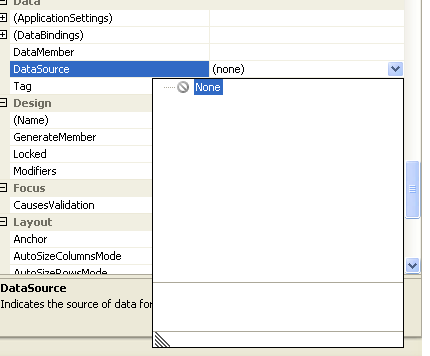
Hi,

I cannot add data source in my window applciation;...There is no menu for me to add a new datasource.
What is shown there is none

What should I do?
Kindly assist
Need your immeadiate attention...

Dani AI

Generated

As reports the Data Sources window showing “None” and the smart‑tag option missing, the situation usually points to environment or project-type issues rather than a single bug. ’s path (Data → Add New Data Source) is the normal route and ’s tutorial is useful, but if the menu or smart tag isn’t present the following checks and fallbacks will resolve it in most cases.

Quick checklist (in order):

  • Confirm the project is a Windows Forms Application (the design-time Data Sources and the DataGridView smart‑tag operate from the WinForms designer; Console, Class Library or Website projects behave differently).
  • Open the form in Designer (double‑click Form1.vb in Solution Explorer) and select the DataGridView control. The smart tag (small triangle) should expose Choose Data Source → Add Project Data Source….
  • If the Data menu or the smart‑tag option is not visible, open View → Other Windows → Data Sources; if that panel shows “None” use its Add New Data Source… link.
  • If menu items are missing entirely, try Tools → Import and Export Settings → Reset all settings (restore default VB settings) and restart Visual Studio. If that fails, run a Repair from the Visual Studio installer to restore missing design-time components.

Programmatic fallback (works regardless of the designer/wizard):

Imports System.Data
Imports System.Data.SqlClient

Dim conn As String = "Data Source=SERVER;Initial Catalog=MyDB;Integrated Security=True"
Dim sql As String = "SELECT * FROM MyTable"
Dim dt As New DataTable()

Using cn As New SqlConnection(conn)
    Using da As New SqlDataAdapter(sql, cn)
        da.Fill(dt)
    End Using
End Using

DataGridView1.DataSource = dt

Extra tips: compare this new project to the previously working one (project type, presence of a typed .xsd DataSet, and app.config connection string). Creating a typed DataSet manually (Add → New Item → DataSet) or using the code fallback will get the grid populated while the designer issues are fixed.

Recommended Answers

All 8 Replies

You need to read this.

I can't see the menu for "Add Project Data Source"

What I can see is "none"

kindly llok through the attachment for clearer understanding

mybe u must add new datasource from menu bar,choose Data...

urm...u binding data to ??

still cannot..

Im creating a datagridview. So I want data pump in to the gridview. So I need to create a datasource in order to create the binding....

still cannot..

u mean, u dont hve add data source in yr data menu bar or what??

u should reinstall yr vb...

previously i have it....previous project that i created have this function....

found this so weird when i want to create another new project using datgridview, something happen regarding this...
hmmmmm

Be a part of the DaniWeb community

We're a friendly, industry-focused community of developers, IT pros, digital marketers, and technology enthusiasts meeting, networking, learning, and sharing knowledge.