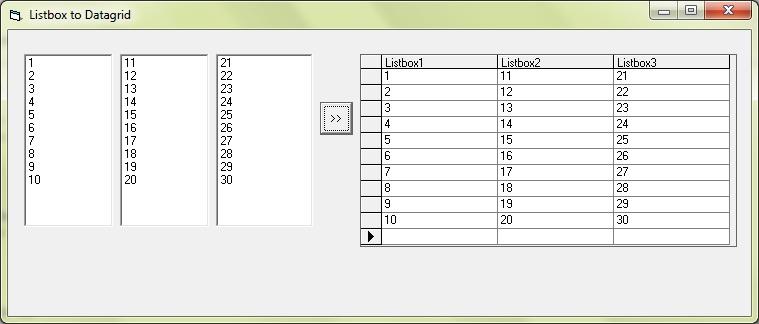
Hi,

Currently, I have 3 listboxs' data, but I don't know how to create 3 columns and show them with datagrid control.
Does anyone give me a guid line how to show listbox's data with datagrid?

regards

Dani AI

Generated

Good question, . In VB6 the DataGrid 6.0 is a data-aware control, so you do not push values into cells directly. Instead, build an ADO Recordset in memory that has three string fields, fill it from your three ListBoxes, then bind the grid to that Recordset. That approach also avoids the 7005 "Rowset not available" error you saw when trying to write to cells before the grid is bound. Key points: use a client-side cursor, append fields while the Recordset is closed, call Open, then use AddNew to insert rows. (learn.microsoft.com)

Here is a reusable helper that fabricates a Recordset from three ListBoxes:

Private Function BuildRsFromLists(l1 As ListBox, l2 As ListBox, l3 As ListBox) As ADODB.Recordset
    Dim rs As ADODB.Recordset: Set rs = New ADODB.Recordset
    rs.CursorLocation = adUseClient
    rs.CursorType = adOpenStatic
    With rs.Fields
        .Append "Col1", adVarChar, 255
        .Append "Col2", adVarChar, 255
        .Append "Col3", adVarChar, 255
    End With
    rs.Open

    Dim i As Long, n As Long
    n = l1.ListCount: If l2.ListCount < n Then n = l2.ListCount
    If l3.ListCount < n Then n = l3.ListCount

    For i = 0 To n - 1
        rs.AddNew Array("Col1","Col2","Col3"), Array(l1.List(i), l2.List(i), l3.List(i))
    Next
    Set BuildRsFromLists = rs
End Function

How to use it:

  • Bind the returned Recordset to your grid’s DataSource at run time.
  • If your lists are different lengths, the function only takes rows up to the shortest list to prevent index errors.
  • Watch the loop bounds. As a small improvement to ’s working sample, VB6 list indexes run 0..ListCount-1, so iterate to n - 1, not ListCount.

If the grid shows nothing, confirm the Recordset is open and client-side (adUseClient) before binding. The ADO docs on client-side cursors, appending fields, and opening/adding rows cover the pattern above. (learn.microsoft.com)

Recommended Answers

All 4 Replies

Hi RvSon,

I am using VB6.0. So, your information will not be related with my case directly. Normally, system should have a property to set how many columns we want to use.
But, I can't find it. So, I use default to update "DataGrid". Then, system will prompt error message like

Run time error 7005: RowSet not avaliable

This is my sample code.

DataGrid1.Row = 1
DataGrid1.Columns(2).Text = "12"

Do you know how to make a setting?

regards

Currently, I have 3 listboxs' data, but I don't know how to create 3 columns and show them with datagrid control.
Does anyone give me a guid line how to show listbox's data with datagrid?

You can fill recordset with listbox items then you can set datagrid source with current recordset.

see this example :

Private Sub Command1_Click()
Dim rsTest As New ADODB.Recordset

' create new column in recordset named listbox1, listbox2, listbox3
' every column has unique name

With rsTest.Fields
.Append "Listbox1", adBSTR
.Append "Listbox2", adBSTR
.Append "Listbox3", adBSTR
End With

rsTest.Open
For i = 0 To List1.ListCount

' add every listbox items into each column

    With rsTest
        .AddNew
        .Fields("Listbox1") = List1.List(i)
        .Fields("Listbox2") = List2.List(i)
        .Fields("Listbox3") = List3.List(i)
        .Update
    End With
Next i

Set DataGrid1.DataSource = rsTest
End Sub

Private Sub Form_Load()
With List1
    For i = 1 To 10
        .AddItem i
    Next i
End With

With List2
    For j = 11 To 20
        .AddItem j
    Next j
End With

With List3
    For k = 21 To 30
        .AddItem k
    Next k
End With

End Sub

1da39ad35d02cd7d27315d1fb6cad87f

commented: nice example +8

Hi Jx Max,

That is the information what I want. It is working fine.

Thanks.

Be a part of the DaniWeb community

We're a friendly, industry-focused community of developers, IT pros, digital marketers, and technology enthusiasts meeting, networking, learning, and sharing knowledge.