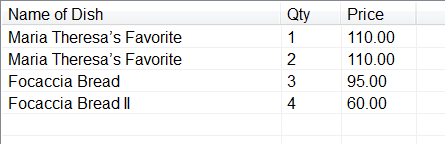
hi, I want to Count how many times i click a button and display the number in listview.
but i dont know the syntax for counting a button, can someone help me with this problem?

Dani AI

Generated

If your goal is to track how many times each product button is clicked and show that as the product’s quantity, avoid using Items.Count + 1 (that is a serial number, not a per-product quantity). Instead, keep a per-product counter and update only that product’s row in the ListView. In WinForms, a simple approach is a dictionary keyed by a stable product id (use the button’s Tag or Name). Set the ListViewItem.Name to the same key so you can find the row quickly with Items.Find docs. Example:

' Form-level state
Private ReadOnly _qtyByProduct As New Dictionary(Of String, Integer)(StringComparer.OrdinalIgnoreCase)

Private Sub ProductButton_Click(sender As Object, e As EventArgs)
    Dim btn = DirectCast(sender, Button)
    Dim key As String = If(TryCast(btn.Tag, String), btn.Name)

    Dim qty As Integer = If(_qtyByProduct.TryGetValue(key, qty), qty + 1, 1)
    _qtyByProduct(key) = qty

    Dim match = lvorder.Items.Find(key, False)
    If match.Length > 0 Then
        match(0).SubItems(1).Text = qty.ToString()
    Else
        Dim li = New ListViewItem(key) With {.Name = key}
        li.SubItems.Add(qty.ToString())
        lvorder.Items.Add(li)
    End If
End Sub

If this is ASP.NET Web Forms, keep the per-user counters in Session so values persist across postbacks, then rebind the ListView after each click. Use a dictionary the same way and project it to an anonymous list for binding. See session state and ASP.NET ListView docs. Tip: always key by an internal product id, not button text, to avoid duplicates when captions change.

Recommended Answers

All 12 Replies

If you intend to do it with .Net then you would need to post back the button click to the server side code. There you would instantiate a class variable or session variable that held the current count and on each postback when the button was clicked you would increment the variable by.
To display it you just pass the current count variable to whatever control you want to use to display the result, a listview in your case.

, sorry bu i really dont understand what youre tryin to say :( im only a biggener in vb.net

Declare an integer at the class level as in

Private ButtonClickCount As Integer = 0

Then in the button click event handler do

ButtonClickCount += 1
Me.Text = "Current count = " & ButtonClickCount

This will display the count in the title bar. Replace the last line to copy the value to a ListView.

If you try to hold the number, how many times you clicked a button, then Reverend Jim's technic is the perfect one.

But, if you want to show the numbers as an item in a listview like a serial no, simply add the ListView.Items.Count() + 1 as a item of the listview control.

Dim litm As New ListViewItem

litm = ListView1.Items.Add((ListView1.Items.Count() + 1).ToString)

@Shark_1, @Reverend Jim, Thank you, its working now. my only problem now is 1 just have a 1 product but instead of increasing the qty of it , it just duplicating.. heres my code:

 Private Sub clickMe(sendr As Object, ByVal e As EventArgs)
        Dim btn As Button
        Dim qty As Integer = ((lvorder.Items.Count() + 1).ToString) 
        btn = CType(sendr, Button)
        Dim item As ListViewItem

        With lvorder
            On Error Resume Next
            item = lvorder.Items.Add(btn.Name)
            item.SubItems.Add(qty)
            item.SubItems.Add(btn.Tag)
            lblstotal.Text = "0.00"
        End With

    End Sub

What do you mean by "Qty" ? Is this the ordered/stock quantity?

(lvorder.Items.Count() + 1).ToString

You can use it to generate serial no, but not for quantity.
Take a textbox to input the ordered quantity and the add it to the listview.

Do not understand, why do you use With lvorder at line no 7. No need to use it.
More consizely the codes should be

Private Sub clickMe(sender As Object, ByVal e As EventArgs)
    Dim btn As Button = CType(sender, Button)
    Dim item As ListViewItem

    item = lvorder.Items.Add(btn.Name)
    item.SubItems.Add((lvorder.Items.Count() + 1).ToString)
    item.SubItems.Add(btn.Tag)
    lblstotal.Text = "0.00"
End Sub

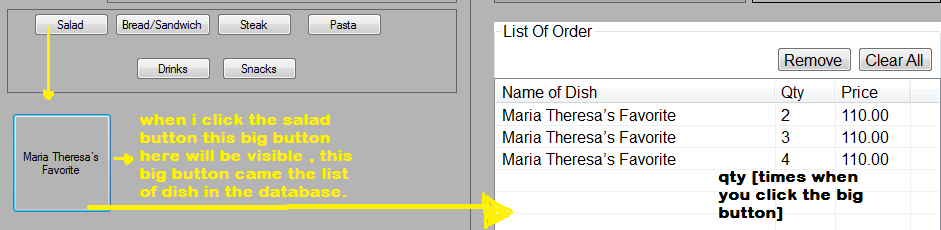
@Shark_1, [qty is the number of times you click the button/ ordered]
heres the pic of my form

Simply Declare

 Dim count As Integer

As global variable then under the buttonClick event handler at the very beginning of it add this.

 count = count +1
 lblDisplay.Text = count

That will keep on adding the number as you click the button starting from 0 upwards.

NOTE when you terminate the program and start again the count will also start afresh to keep the count going don't close the program.

Hope that answer your question.

As you say "qty" is the order number then you can use lvorder.Items.Count() + 1).ToString.

@ shark
No, she didn't write qty is order number but she wrote "qty is the number of times...."
@ jez9
Since your original questions has been answered by Jim you should close this thread as solved and open a new one with the new problem you are facing.
@ All of us
Since a lot of us are not native Englis speakers please write your questions as clearly as possible and also read questions and answer carefully. Otherwise threads will get endlessly long and confusing. Thanks

This is simple to count how many times you clicked each individual button. To do this you will have to make a loop through the listview item count. It should be

Private Sub clickMe(sender As Object, ByVal e As EventArgs)

        Dim btn As Button = CType(sender, Button)
        Dim ProdMatch As Boolean = False

        For i As Integer = 0 To lvorder.Items.Count() - 1
            If lvorder.Items(i).Text = btn.Text Then
                'change the click value
                lvorder.Items(i).SubItems(1).Text = (Val(lvorder.Items(i).SubItems(1).Text) + 1).ToString
                ProdMatch = True
                Exit For
            End If
        Next

        If Not ProdMatch Then
            'Add the item at first time
            Dim item As ListViewItem

            item = lvorder.Items.Add(btn.Name)
            item.SubItems.Add("1")
            item.SubItems.Add(btn.Tag.ToString)
            'lblstotal.Text = "0.00"
        End If

End Sub

Hope it can solve your click counting problem.

, Im sorry about that. i just carried away by my question :) ,
thank you for helping me guys :D
@Shark_1, i will try your code, thank you for helping me again.

Be a part of the DaniWeb community

We're a friendly, industry-focused community of developers, IT pros, digital marketers, and technology enthusiasts meeting, networking, learning, and sharing knowledge.