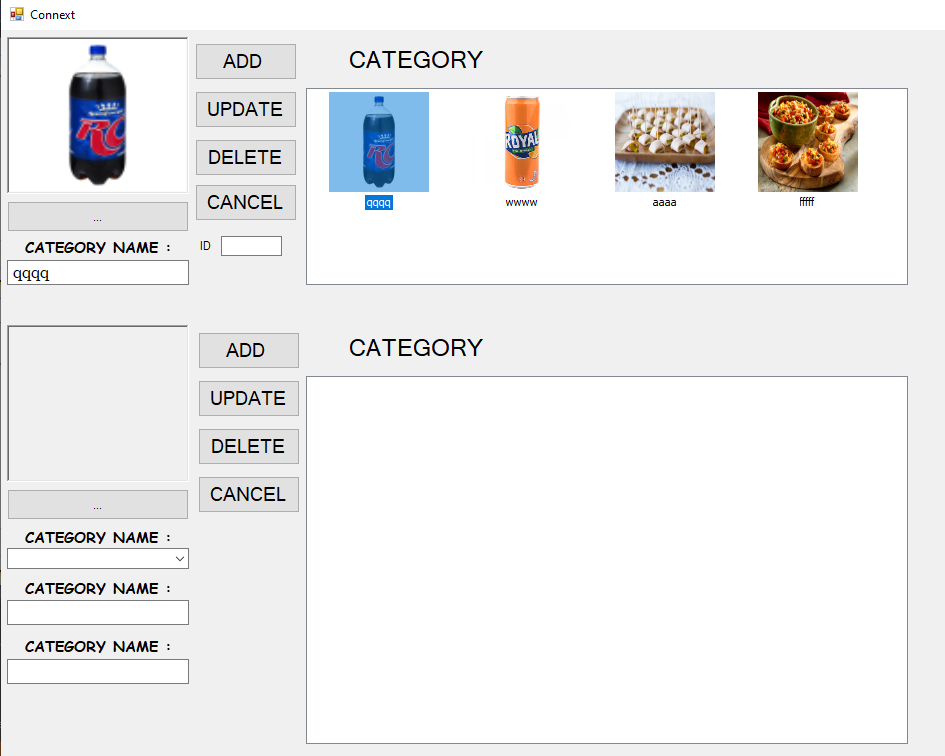
Hello guys , can you help me how to get the ID from mysql DB , if the listview is click the name and the ID well retrieve to textbox1 and textbox2, i dont know how to get the ID?, on the listview the ID wasnt retieve ,
can you help me how to retrieve the ID from db

Dani AI

Generated

As @MeoW already shows the name and image, the missing piece is to store the primary key when you build the ListView. The easiest, most reliable approach is to save the DB ID in each ListViewItem’s Tag (or as a hidden SubItem) when you populate the control. Then reading the ID on click is immediate and avoids extra queries or fragile lookups by name.

Example: populate the ListView while reading MySQL (store the ID in Tag)

Using cmd As New MySqlCommand("SELECT id, name, imagekey FROM mytable", conn)
    Using rdr As MySqlDataReader = cmd.ExecuteReader()
        While rdr.Read()
            Dim id As Integer = Convert.ToInt32(rdr("id"))
            Dim item As New ListViewItem(rdr("name").ToString())
            item.Tag = id
            item.ImageKey = rdr("imagekey").ToString()
            ListView1.Items.Add(item)
        End While
    End Using
End Using

Example: retrieve the stored ID when the user selects an item

Private Sub ListView1_SelectedIndexChanged(sender As Object, e As EventArgs) Handles ListView1.SelectedIndexChanged
    If ListView1.SelectedItems.Count = 0 Then Exit Sub
    Dim sel As ListViewItem = ListView1.SelectedItems(0)
    Dim idText As String = ""
    If sel.Tag IsNot Nothing Then idText = sel.Tag.ToString()
    TextBox2.Text = idText          ' ID
    TextBox1.Text = sel.Text        ' name
End Sub

If you already filled the ListView without IDs, either reload the items including the id, or run a parameterized query to fetch the id by a unique field (e.g. SELECT id FROM mytable WHERE name = @name LIMIT 1). Do not rely on non-unique fields (names) for critical lookups.

Troubleshooting: Tag holds an Object — check for Nothing and parse safely (Integer.TryParse). If you prefer visible columns, add an “ID” subitem and set that column width to 0 to hide it, but Tag is simpler and less error-prone.

this is my code

  Private Sub ListView1_ItemSelectionChanged(sender As Object, e As ListViewItemSelectionChangedEventArgs) Handles ListView1.ItemSelectionChanged
    If ListView1.SelectedItems.Count > 0 Then
        With ListView1.SelectedItems.Item(0)
            TextBox1.Text = ListView1.SelectedItems(0).Text
            '      TextBox4.Text = ListView1.SelectedItems(1).Text
            PictureBox1.Image = ListView1.LargeImageList.Images(e.Item.ImageKey)
        End With
    End If
End Sub

get_id.png

I dont know how to retrieve the ID to textbox4 but i already retrieve the name and the image

can you help me how to retrieve ID if ID primary was not retrieve on listview

Be a part of the DaniWeb community

We're a friendly, industry-focused community of developers, IT pros, digital marketers, and technology enthusiasts meeting, networking, learning, and sharing knowledge.