Hello Everybody

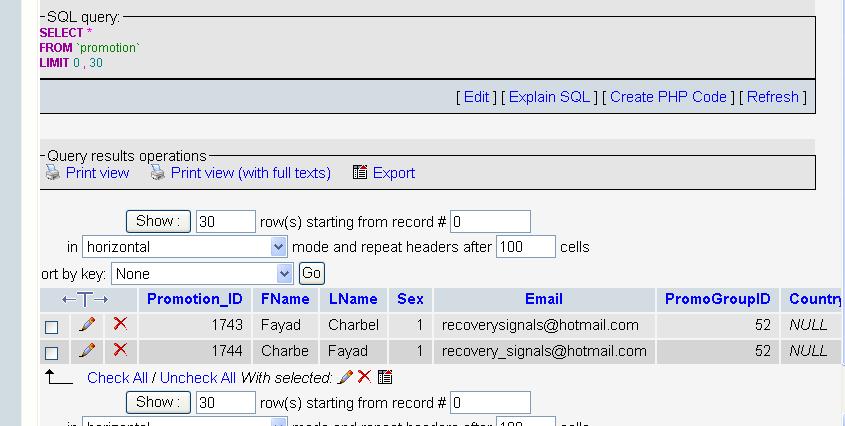
In Php iam using the checkbox and it has been one month i can not solve it; when i select one checkbox from several ones , and i click send e-mail= it is sending to all e-mails; it is not sending to the selected checkbox ; I need guys help with it pls,if you guy s need more info let me know and check attached files thks
regards

Dani AI

Generated

Most likely cause: the mail-sending script is not using the checked inputs from the selection form and is instead loading the full address list (or falling back to a default list) when the Send action runs. , and were on the right track about grouping checkboxes, but the real issue sits at the boundary between the selection form and the send script: confirm the selected values actually arrive at the sender and are used to filter the recipients.

Troubleshooting checklist (quick, practical steps):

  • Confirm all checkbox inputs are inside the same <form> whose submit button posts to the send file, and that the form method matches what the send script reads (POST vs GET).
  • Inspect what the send script actually receives: temporarily log or dump the request data on the send page to verify the selected list is present. If nothing is present, the problem is the form markup or placement.
  • Look for server-side logic that ignores the posted list — common mistakes are an unconditional "select all" database query or rebuilding the recipient list from the users table instead of using the posted IDs/emails.
  • Ensure checkbox values are simple identifiers (plain email or user ID), not HTML fragments, and validate/sanitize them before building mail headers. If JavaScript assembles recipients, test with JS disabled to rule out client-side bugs.

Fix approach summary: once the posted list is verified, either loop over those values to send individually or query the DB for only those IDs (WHERE id IN (...)) and send to that subset. Add small debug logging so each send run records which addresses were used — that immediately shows whether selection or sending is at fault.

Given the two-file setup mentioned by , focus first on verifying the POSTed data arrives and then ensure send.php uses that data rather than re-querying all users.

Recommended Answers

All 11 Replies

First of all, why do you have different name for checkboxes ? You can create a checkbox array by giving the same name for the checkboxes. Then, on page submit, only those checkboxes which were selected will be posted to the next page. I don't know what exactly your script does as I can't figure out what's the relation between users.php and checked.php .

i will put a small note: in the admin use; i add e-mails ; so each e-mail is added in my script will lead to an added email checkbox in the users.php thru sql, that has been done perfectly

my script is to send e-mail to clients to the selected one,
; BUT when i select one checkbox is still sending to all clients, while the checkbox is working fine but i can not prgram to select only one checkbox email at a time to select to only for example to 1 client= it keeps sending to all

i mean i do step 1 , users will open; will give me the list of e-mails and in

step 2 ; i choose from the list

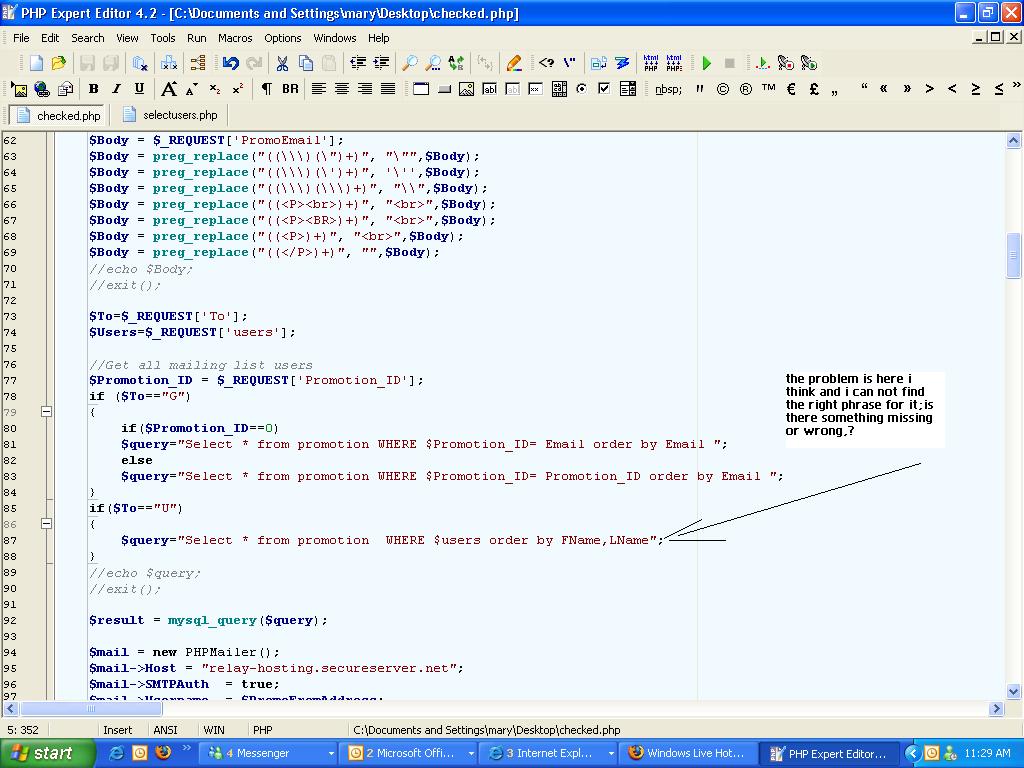
step 3 ; i click send - still sending to all or (if i chnage the phrase i included in the pic info ) will not send at all

and also thanks for having a reply from u

People anybody can help me in this;

what you can do is

<input type="checkbox" name="emails[]" value="" />

<input type="checkbox" name="emails[]" value="" />

<input type="checkbox" name="emails[]" value="" />

After the form submission you'll have an array with emails. The emails in checkboxes should be populated when you render the table.

You can access them using this:

<?php

$emails = empty($_REQUEST['emails']) ? array() : (array) $_REQUEST['emails'];

foreach ($emails as $email) {
   // do something
   send_email($email);
}
?>

Hi..
Try to do this....may be it will work..exactly i too dont know..

<form name=frm method =post>

what you can do is

<input type="checkbox" name="emails[]" value="" />

<input type="checkbox" name="emails[]" value="" />

<input type="checkbox" name="emails[]" value="" />

After the form submission you'll have an array with emails. The emails in checkboxes should be populated when you render the table.

You can access them using this:

<?php
$artwork =@addslashes($_POST['emails']);
$artwork=(!empty($_POST['emails'])? array_map('stripslashes',$_POST['emails']) : ''); 


echo $mail_body='<style type=text/css><!--td {font-family: Verdana, Arial, Helvetica, sans-serif; font-size: 12px;}--></style>
<table width="50%"  border="0" align="center" cellpadding="1" cellspacing="0" bgcolor="#E7E7E7">
  <tr>
    <td><table width="100%"  border="0" align="center" cellpadding="5" cellspacing="0" bgcolor="#FFFFFF">
        <input type="hidden" name="emails" value="ok">
        <tr>
<td>Services </td>
          <td>:</td>
          <td>		 
		  '.(is_array($artwork)? implode(",",$artwork) : '').'

		  
		  </td>
</tr>
?>

just do this...

Dear helpful guys; i thanks for having nice replies, i got your ideas

but the thing is that; in my php files i have one ; that will add my e-mails directly to sql and i will attach the pic, so when i come back to To Users and select one Email from it

in which checkbox is already created for the e-mail not to put that one by one; the selection still taking all selected e-mails and not one; something is easy and i can not figure that out yet; pls help is needed as much you can ; you can add me on
on msn so i be more helpful

dear guys

my script is based on 2 files of php; one is the SEND and one is the CHEKBOX selection
and the files are attached on the top of my forum and again thanks

regards

Helpful people

When i click send i got this message also when i select in To Users one e-mail ; and if i remove that phrase in php i get a green light ok ; but the e-mail is not send, selection still not working for one ;

pls see the pic

Any New Ideas guys

Be a part of the DaniWeb community

We're a friendly, industry-focused community of developers, IT pros, digital marketers, and technology enthusiasts meeting, networking, learning, and sharing knowledge.