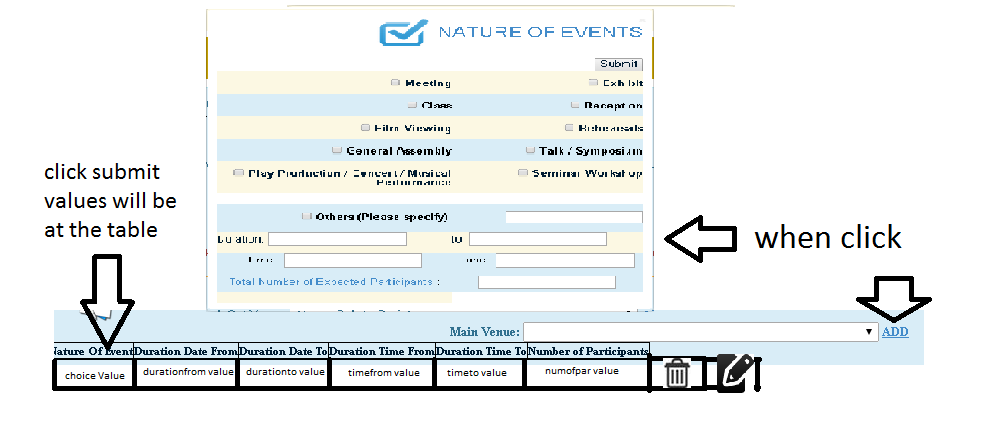
HI Sirs
need to pass Textbox Value to another page table.
I tried to used post and get in laravel but it doesnt resolve.
can anyone help me?
Thanks in advance

Quick diagnosis (based on 's snippets): the text input is inside a different form than the submit button, and several inputs (checkboxes) lack value attributes and array-style names. Browsers only send the "successful controls" that belong to the submitted FORM element — inputs outside that form are not included in the request. (w3.org)
Fix checklist and a minimal Blade-style form to try (keep every related input inside one form, give checkboxes values and an array name, and include a CSRF token for POST requests):
<form method="POST" action="/ateneo2">
    {{ csrf_field() }}   <!-- or @csrf in newer Laravel -->
    <input type="checkbox" name="choice[]" value="Meeting"> Meeting
    <input type="text" name="other" value="">
    <button type="submit">Submit</button>
</form>
Use array names for multiple checkboxes (name="choice[]") so Laravel receives an array of values. (stackoverflow.com) Include the CSRF hidden field for any non-GET form so Laravel's middleware will validate the request. (laravel.com)
Controller / route notes: retrieve posted values with the request helper (or Input facade in older 4.x apps) and pass them to the view. Example patterns:
/* Laravel 5+ */
public function store(Request $request) {
    $other = $request->input('other');
    $choices = $request->input('choice', []);
    return view('view2', compact('other','choices'));
}

/* Laravel 4.x */
$other = Input::get('other');
return View::make('view2')->with(compact('other','choices'));
See Laravel docs for request/input and view passing conventions. (laravel.com)
Quick debugging tips: view the browser Network panel to confirm what is sent, and dump the request (dd($request->all()) or dd(Input::all())) in the controller to inspect incoming data. If redirecting back on validation, use withInput() to keep values. (laravel.com)
can you show us your code a bit please
here is my View 1 :
NATURE OF EVENTS</span></p>
<div align="left">
<table width="517" border="1">
<tr class="alert-warning">
<td width="275"><h5 align="left">
<input type="checkbox" name="choice" id="Meeting" />
Meeting</h5></td>
<td width="226"><h5>
<input type="checkbox" name="choice" id="Exhibit" />
Exhibit</h5></td>
</tr>
<tr class="alert-info">
<td><h5 align="left">
<input type="checkbox" name="choice" id="Class" />
Class</h5></td>
<td><h5 align="left">
<input type="checkbox" name="choice" id="Reception" />
Reception</h5></td>
</tr>
<tr class="bg-warning">
<td><h5 align="left">
<input type="checkbox" name="choice" id="FilmViewing" />
Film Viewing</h5></td>
<td><h5 align="left">
<input type="checkbox" name="choice" id="Rehearsals" />
Rehearsals</h5></td>
</tr>
<tr class="alert-info">
<td><h5 align="left">
<input type="checkbox" name="choice" id="General Assembly" />
General Assembly</h5></td>
<td><h5 align="left">
<input type="checkbox" name="choice" id="Talk/Symposium" />
Talk / Symposium</h5></td>
</tr>
<tr class="alert-warning">
<td><h5>
<input type="checkbox" name="choice" id="PlayProduction/Concert/MusicalPerformance/" />
Play Production / Concert / Musical Performance</h5></td>
<td><h5>
<input type="checkbox" name="choice" id="SeminarWorkshop" />
Seminar Workshop</h5></td>
</tr>
<tr height="2">
<td> </td>
<td> </td>
</tr>
<tr class="alert-info">
<td><h5>
<input type="checkbox" name="choice" id="Others" />
Others (Please specify) </h5></td>
<td><form id="form1" name="form1" method="post" action="">
<h5>
<label>
<input type="text" name="textfield" id="Other" />
</label>
</h5>
</form></td>
</tr>
<tr class="alert-warning">
<td height="35">Duration:
<input type="text" name="datefrom" id="durationfromdate" /></td>
<td>to:
<input type="text" name="dateto" id="durationtodate" /></td>
</tr>
<tr class="alert-info">
<td height="37">Time :
<input type="text" name="timefrom" id="durationtimefrom" /></td>
<td>Time :
<input type="text" name="timeto" id="durationtimeto" /></td>
</tr>
<tr class="alert-info">
<td height="27"><span class="text-primary">Total Number of Expected Participants </span>:</td>
<td><input type="text" name="participants" id="numofparticipants" /></td>
</tr>
<tr class="alert-warning">
<td> </td>
<td><form id="form2" name="form2" method="get" action="/ateneo2">
<input name="button" type="submit" id="button" value="Submit" />
</form></td>
</tr>
</table>
</div></td></tr>
</table>
Here is my View 2 (View 2 is the receiver of the values from textbox
         <table id="myTable">
  <thead>
  <tr>
<td>Nature Of Event</td>
 <td>Duration Date From</td>
<td>Duration Date To</td>
<td>Duration Time From</td>
<td>Duration Time To</td>
<td>Number of Participants</td>
</tr>
</thead>
<tbody>
 <tr>
<td></td>
<td></td>
<td></td>
<td></td>
 <td></td>
  <td></td>
</tr>
 </tbody>
</table>
from View 1 i need to pass the textbox value to view2 on the table.
We're a friendly, industry-focused community of developers, IT pros, digital marketers, and technology enthusiasts meeting, networking, learning, and sharing knowledge.