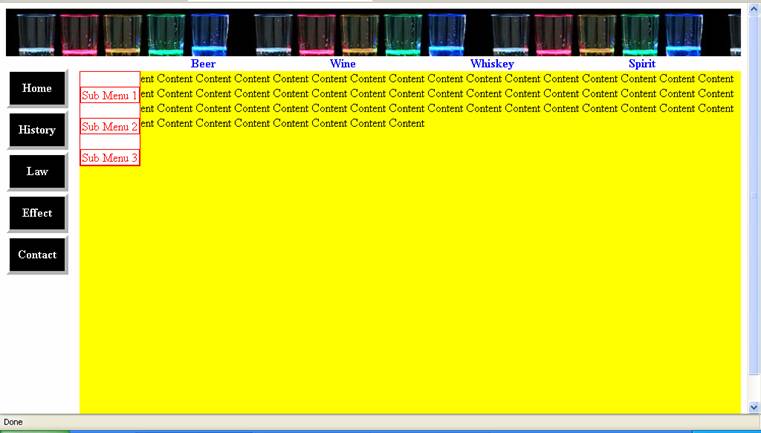
I'm in particular facing problem with Top Menu (#topMenu in my code).
In Firefox, every time I hover the mouse over Beer/Wine/Whiskey/Spirit link, the sub-menu ALWAYS stays at far left hand side (as seen in the attached file).
In Internet Explorer, every time I hover the mouse over Beer/Wine/Whiskey/Spirit link, ALTHOUGH, the sub-menu is shown straight underneat it but the very first "li" i.e. "sub menu 1" is shown different (as seen in the attached file).
Additionally, ONLY in Internet Explorer the left menu (#leftMenu in my code) is appearing SEPARATE from the "Content" rather than floating on left of the "Content".
Attached with this thread are 2 files i.e. the result achieved so far as seen in Microsoft Explorer & Firefox.
I've been checking browser compatibility for all the elements I've used & it all supports the latest Internte Explorer & Firefox browser, as well.
Wonder what's wrong with the result then. Can anyone around PLEASEEEEEEEEEEEEEEEEEEE help, since I'd tried my best for the past 4 days quite unsuccessfully. For readers' convenience, I indented the code so as to make it more easily readable.
FOLLOWING ARE MY CODES SO FAR
CSS STYLE
/* CSS Document */

<style type="text/css">

div
{
	text-align:center;
}

/* ........................................ Banner ........................................ */

div.banner
{
	background:url(glass_row.jpg);
	width:100%;
	height:4em;
}

/* ......................................... Top Menu .................................... */

#topMenu
{
	background-color:transparent;
	cursor:default;
	text-align:center;
	width:90%;
	float:right;
}

#topMenu ul
{
	list-style: none;
	text-align:center;
	float:left;
	position:relative;
	margin: 0;
	padding: 0;
}

#topMenu ul li
{
	display: inline;
	color:blue;
	position: relative;
	padding-left:150px;
}

#topMenu ul li ul
{
	position:absolute;
	display: none;
	top:20px;
	width:90px;
	background-color:white;
	border: 1px solid red;
}

#topMenu a
{
	color:red;
	display:block;
	border-width: 1px;
	border-style: solid;
	text-decoration:none;
}

#topMenu a:hover
{
	color:blue;
	background-color:red;
}

#topMenu ul li:hover ul {display:none;}
#topMenu ul li:hover ul {display:block;}

body {behavior: url(csshover.htc);}


/* ....................................... Left Menu .......................................... */

#leftMenu
{
	background-color:transparent;
	cursor:default;
	text-align:center;
	width:10%;
	float:left;
}

#leftMenu ul
{
	padding:0;
	list-style:none;
	width:12ex;
}

#leftMenu ul li
{
	background-color:black;
	border-width:thick;
	border-style:outset;
	color:white;
	display:block;
    position: relative;
	margin-top:2px;
	padding: 12px 6px;
}

#leftMenu a
{
	color: white;
	font-weight:bold;
	display: block;
	text-align:center;
    text-decoration: none;
}

#leftMenu a:hover {color:yellow;}

#leftMenu a:active {color:red;}

#leftMenu ul li:hover
{
	border-width:thick;
	border-style:inset;
}

/* This Code is for Microsoft Internet Explorer Browser
to it shows the effect of "li:hover" */

body { behavior: url(csshover.htc); }

/* Fix IE. Hide from IE Mac \*/
* html #leftMenu ul li {float:left; height:1%;}
* html #leftMenu ul li a {height:1%;}
/* End */

/* ................................... Content ................................................ */

div.content
{
	background-color:yellow;
	width:90%;
	height:30em;
	float:right;
}

/* ................................... Bottom Menu ......................................... */


div.bottomMenu
{
	background-color:green;
	width:100%;
	float:left;
	height:5%;
}
HOME.HTML
<!DOCTYPE html PUBLIC "-//W3C//DTD XHTML 1.1//EN" "http://www.w3.org/TR/xhtml11/DTD/xhtml11.dtd">
<html xmlns="http://www.w3.org/1999/xhtml">
<head>
<meta http-equiv="Content-Type" content="text/html; charset=iso-8859-1"/>
<title>Alcohol - Main Page</title>
<link rel="stylesheet" type="text/css" href="style.css"/>
</head>

<div class="banner">
</div>

<div id="topMenu">
  <ul>
		<li><strong>Beer</strong>
			<ul>
			  <li><a href="">Sub Menu 1</a></li>
			  <li><a href="">Sub Menu 2</a></li>
			  <li><a href="">Sub Menu 3</a></li>
	  		</ul>
		</li>

		<li><strong>Wine</strong>
			<ul>
			  <li><a href="">Sub Menu 1</a></li>
			  <li><a href="">Sub Menu 2</a></li>
			  <li><a href="">Sub Menu 3</a></li>
	  		</ul>
		</li>

		<li><strong>Whiskey</strong>
			<ul>
			  <li><a href="">Sub Menu 1</a></li>
			  <li><a href="">Sub Menu 2</a></li>
			  <li><a href="">Sub Menu 3</a></li>
	  		</ul>
		</li>

		<li><strong>Spirit</strong>
			<ul>
			  <li><a href="">Sub Menu 1</a></li>
			  <li><a href="">Sub Menu 2</a></li>
			  <li><a href="">Sub Menu 3</a></li>
	  		</ul>
		</li>
	</ul>
</div>

<div id="leftMenu">
	<ul>
		<li><a href"">Home</a></li>
		<li><a href"">History</a></li>
		<li><a href"">Law</a></li>
		<li><a href"">Effect</a></li>
		<li><a href"">Contact</a></li>
	</ul>
</div>

<div class="content">
Content Content Content Content Content Content Content Content Content Content Content Content Content Content Content Content Content Content Content Content Content Content Content Content Content Content Content Content Content Content Content Content Content Content Content Content Content Content Content Content Content Content Content Content Content Content Content Content Content Content Content Content Content Content Content Content Content Content Content Content
</div>

<div class="bottomMenu">
Bottom Menu
</div>


</html>