I seem to have Internet Explorer Compatibility Issue here.

My website can be seen perfectly well in Firefox but NOT in Internet Explorer. It can be seen on

It's a CSS based website & on an online tuturial, I was told to download a file "csshover.htc" in order for my menu & submenus appear on Internet Explorer (cos of some compatibility issue).

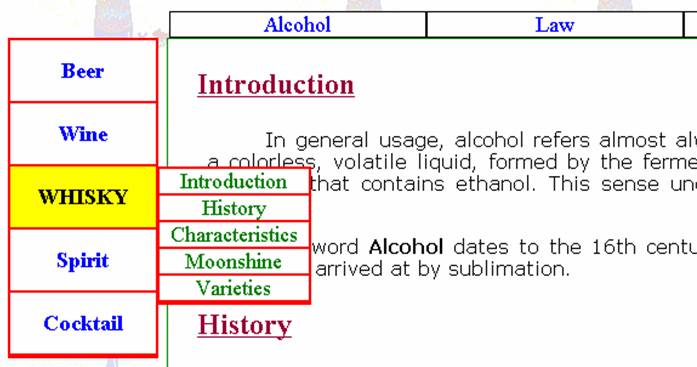
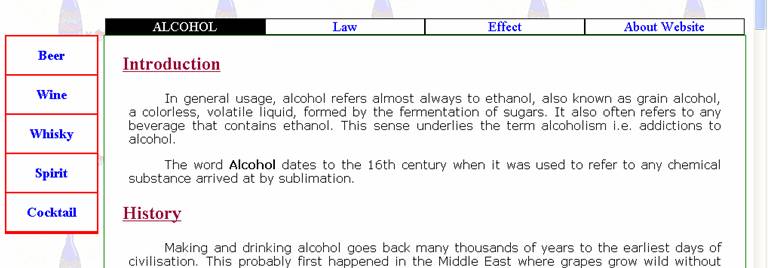
The attached picture shows the hover effect of one of the topMenu link (Alcohol) & one of the leftMenu link (Whisky), which is what it should've been doing.

You might get some understanding from this article:
http://www.xs4all.nl/~peterned/csshover.html

Interesting thing (although quite peculiar) is, all these menu hover links works perfectly well BOTH in Internet Explorer & in Firefox, if I test it using these 2 browser at home, but as soon as I uploaded my website on Internet, these menu hover effects DOES NOT work in Internet Explorer.

Below is that part of the code within my Style Sheet (the entire style sheet code is also provided at the end).

/* This Code is for Microsoft Internet Explorer Browser
as it shows the effect of "li:hover" */

body { behavior: url(csshover.htc); }


Now, I've uploaded all my files on my tripod websice along with "csshover.htc" file, as soon as the mouse is rolled over top or left menu, I can't see it's "hover" effect at all in Internet Explorer, but it's working OK in Firefox.

My Style Sheet code is:

/* CSS Document */

body 
{
background-image:url(background_champagne.gif);
background-attachment:fixed;
}

/* ........................................ Banner ........................................ */

div.banner
{
	width:40px;
	height:100px;
}


div.banner img
{
	width:40px;
	height:50px;
}

/* ......................................... Top Menu .................................... */

#topMenu
{
	background-color:transparent;
	cursor:default;
	text-align:center;
	width:980px;
	float:right;
}

#topMenu ul
{
	list-style: none;
	font-size:medium;
	float:right;
	position:relative;
	margin-left: 130px;
	width:850px;
	padding: 0;
}

#topMenu ul li 
{
	display: inline;
	border:1px solid black;
	width:210px;
	background-color:white;
	color:#FF00FF;
	float:left;
	position: relative;
	font-size:large;
}

#topMenu ul li:hover
{
	background-color:black;
}

#topMenu a
{
	display:block;
	text-decoration:none; 
	font-size:large;
	color:blue; 
}

#topMenu a:hover
{
	color:white;
	text-transform:uppercase;
}

body {behavior: url(csshover.htc);}


/* ....................................... Left Menu .......................................... */

#leftMenu
{
	background-color:transparent;
	cursor:default;
	text-align:center;
	width:100px;
	float:left;
}

#leftMenu ul
{
	text-align:center;
	list-style:none;
	margin:0px;
	position:relative;
	padding:0px;
	width:120px;
	border:thin solid red;
}

#leftMenu ul li 
{
	display: block;
	background-color:white;
	width:120px;
	border-bottom:thin solid red;
	color:blue;
	position: relative;
	font-size:large;
	line-height:50px; 
}

#leftMenu ul li:hover
{
	color:black;
	background-color:yellow;
	text-transform:uppercase;
}

#leftMenu ul li ul 
{
	position:absolute;
	display: none;
	text-transform:none;
	left:121px;
	width:123px;
	top:0px;
}

#leftMenu a
{
	display:block;
	position:relative;
	text-decoration:none; 
	background-color:white;
	line-height:20px; 
	font-size:large;
	width:123px;
	color:green;
	text-transform:none;
}

#leftMenu a:hover
{
	color:#00FFFF;
	background-color:black;
}

#leftMenu ul li ul {display:none;}
#leftMenu ul li:hover ul {display:block;}


/* This Code is for Microsoft Internet Explorer Browser 
as it shows the effect of "li:hover" */

body { behavior: url(csshover.htc); }


/* ........................... Left Menu Link Rollover Showing Image ....................... */

#leftMenu ul li img
{
position:absolute;
top:340px;
left:20px;
}

#leftMenu ul li img {display:none;}
#leftMenu ul li:hover img {display:block;}


/* ................................... Content ................................................ */

#content
{
	background-color:white;
	width:850px; 
	border:1px solid green;
	float:right;
}

#content h2
{
font-family:"Times New Roman", Times, serif;
text-align:justify;
margin:1em;
color:#990033;
text-decoration:underline;
}

#content h3
{
font-family:Georgia, "Times New Roman", Times, serif;
text-align:left;
font-size:large;
margin-left:20px;
color:blue;
text-decoration:none;
}

#content h4
{
font-family:"Courier New", Courier, monospace;
text-align:left;
font-size:large;
color:red;
margin-left:20px;
text-decoration:none;
}

#content h5
{
font-family:"Courier New", Courier, monospace;
text-align:left;
font-size:large;
color:fuchsia;
margin-left:20px;
text-decoration:none;
}

#content h6
{
font-family:"Courier New", Courier, monospace;
text-align:left;
font-size:medium;
color:black;
margin-left:20px;
text-decoration:underline;
}

#content table
{
font-family:Verdana, Arial, Helvetica, sans-serif;
text-align:left;
font-size:medium;
color:black;
margin-left:20px;
}

#content h2+p:first-letter
{
color:red;
float:left;
font-size:xx-large;
margin: 0 3px 3px 0;
}

#content p
{
font-family:Verdana, Arial, Helvetica, sans-serif;
text-align:justify;
text-indent:3em;
margin:1em 2em;
color:black;
}

#content ul
{
font-family:Verdana, Arial, Helvetica, sans-serif;
text-align:justify;
color:black;
margin:10px 50px;
list-style-image:url(list_icon.gif);
}

#content ul li
{
margin-top:15px;
}

#content ol
{
font-family:Verdana, Arial, Helvetica, sans-serif;
text-align:justify;
color:black;
margin:1em 1em 2em 3em;
list-style-type:decimal;
}

#content ol li
{
margin-top:20px;
}

#content img.left
{
float:left;
padding:10px;
}

#content img.right
{
float:right;
padding:10px;
}

/* ................................... Bottom Menu ......................................... */


#bottomMenu
{
	border:1px solid red;
	float:left;
	background-color:black;
	color:#FFFFFF;
	text-align:center;
	font-family:"Times New Roman", Times, serif;
	font-size:large;
	width:100%; 
	height:5%; 
	margin:0px;
}
Dani AI

Generated

Quick diagnosis (why it works on your machine but not when uploaded)
The hover polyfill (csshover.htc) is an Internet Explorer DHTML “behavior” — IE only runs that file if the browser actually downloads and executes it. Common causes for “works locally / fails on host” are: the behavior URL resolving differently once uploaded, the server not serving the .htc with the required MIME type, or the .htc being on a different host (IE enforces same‑domain rules for HTCs). The behavior URL is resolved relative to the HTML page (not the CSS file), and IE expects .htc files to be served as Content-Type: text/x-component. (webplatform.github.io)

Quick troubleshooting steps (apply in this order)

  1. Verify the browser actually requests the file. Open IE’s network tools (or use Fiddler) while loading your live page — if there’s no request for csshover.htc the path is wrong. The behavior URL should be root‑ or page‑relative (or a full same‑domain URL). (stackoverflow.com)
  2. Check the response headers. From a command line run, for example:
    curl -I https://yourdomain/path/to/csshover.htc

    look for Content-Type: text/x-component. If it’s different the file will be ignored. If your host won’t set that type, add AddType text/x-component .htc to .htaccess or use a small wrapper (PHP) that sends the correct header. (webplatform.github.io)

  3. Make sure the .htc is on the same domain as the page (IE won’t use cross‑domain HTC files). (dev.w3.org)

IE-specific and fallback fixes

  • Old IEs (IE6) only apply :hover reliably to anchors; for other elements you need the HTC or a JS fallback. (stackoverflow.com)
  • If the HTC loads but effects are still missing, ensure affected elements have layout (try position:relative or zoom:1) — many IE polyfills require it. (stackoverflow.com)
  • If your host (Tripod/shared host) can’t serve .htc correctly, add a tiny JS fallback instead of relying on HTC. Example jQuery fallback (attach a class on hover and style .hover in your CSS):
    $('#topMenu li, #leftMenu li')
    .on('mouseenter', function(){ $(this).addClass('hover'); })
    .on('mouseleave', function(){ $(this).removeClass('hover'); });

Notes on other replies in this thread

  • ’s idea to target IE with conditional CSS is fine for delivering IE-only fixes, but it won’t help if the server isn’t serving the .htc correctly.
  • ’s 0px comment isn’t the cause here — omitting units for a zero value is syntactically fine; that won’t stop an HTC from loading. (smashingmagazine.com)

If these checks still don’t show the .htc being requested or executed, capture the HTTP headers (curl/Fiddler) and the exact behavior URL being emitted by the page — that output will pinpoint whether it’s a path, MIME, or hosting restriction.

Recommended Answers

All 3 Replies

I seem to have Internet Explorer Compatibility Issue here.

My website can be seen perfectly well in Firefox but NOT in Internet Explorer. It can be seen on

It's a CSS based website & on an online tuturial, I was told to download a file "csshover.htc" in order for my menu & submenus appear on Internet Explorer (cos of some compatibility issue).

The attached picture shows the hover effect of one of the topMenu link (Alcohol) & one of the leftMenu link (Whisky), which is what it should've been doing.

You might get some understanding from this article:
http://www.xs4all.nl/~peterned/csshover.html

Interesting thing (although quite peculiar) is, all these menu hover links works perfectly well BOTH in Internet Explorer & in Firefox, if I test it using these 2 browser at home, but as soon as I uploaded my website on Internet, these menu hover effects DOES NOT work in Internet Explorer.

Below is that part of the code within my Style Sheet (the entire style sheet code is also provided at the end).

/* This Code is for Microsoft Internet Explorer Browser
as it shows the effect of "li:hover" */

body { behavior: url(csshover.htc); }


Now, I've uploaded all my files on my tripod websice along with "csshover.htc" file, as soon as the mouse is rolled over top or left menu, I can't see it's "hover" effect at all in Internet Explorer, but it's working OK in Firefox.

My Style Sheet code is:

/* CSS Document */

body 
{
background-image:url(background_champagne.gif);
background-attachment:fixed;
}

/* ........................................ Banner ........................................ */

div.banner
{
	width:40px;
	height:100px;
}


div.banner img
{
	width:40px;
	height:50px;
}

/* ......................................... Top Menu .................................... */

#topMenu
{
	background-color:transparent;
	cursor:default;
	text-align:center;
	width:980px;
	float:right;
}

#topMenu ul
{
	list-style: none;
	font-size:medium;
	float:right;
	position:relative;
	margin-left: 130px;
	width:850px;
	padding: 0;
}

#topMenu ul li 
{
	display: inline;
	border:1px solid black;
	width:210px;
	background-color:white;
	color:#FF00FF;
	float:left;
	position: relative;
	font-size:large;
}

#topMenu ul li:hover
{
	background-color:black;
}

#topMenu a
{
	display:block;
	text-decoration:none; 
	font-size:large;
	color:blue; 
}

#topMenu a:hover
{
	color:white;
	text-transform:uppercase;
}

body {behavior: url(csshover.htc);}


/* ....................................... Left Menu .......................................... */

#leftMenu
{
	background-color:transparent;
	cursor:default;
	text-align:center;
	width:100px;
	float:left;
}

#leftMenu ul
{
	text-align:center;
	list-style:none;
	margin:0px;
	position:relative;
	padding:0px;
	width:120px;
	border:thin solid red;
}

#leftMenu ul li 
{
	display: block;
	background-color:white;
	width:120px;
	border-bottom:thin solid red;
	color:blue;
	position: relative;
	font-size:large;
	line-height:50px; 
}

#leftMenu ul li:hover
{
	color:black;
	background-color:yellow;
	text-transform:uppercase;
}

#leftMenu ul li ul 
{
	position:absolute;
	display: none;
	text-transform:none;
	left:121px;
	width:123px;
	top:0px;
}

#leftMenu a
{
	display:block;
	position:relative;
	text-decoration:none; 
	background-color:white;
	line-height:20px; 
	font-size:large;
	width:123px;
	color:green;
	text-transform:none;
}

#leftMenu a:hover
{
	color:#00FFFF;
	background-color:black;
}

#leftMenu ul li ul {display:none;}
#leftMenu ul li:hover ul {display:block;}


/* This Code is for Microsoft Internet Explorer Browser 
as it shows the effect of "li:hover" */

body { behavior: url(csshover.htc); }


/* ........................... Left Menu Link Rollover Showing Image ....................... */

#leftMenu ul li img
{
position:absolute;
top:340px;
left:20px;
}

#leftMenu ul li img {display:none;}
#leftMenu ul li:hover img {display:block;}


/* ................................... Content ................................................ */

#content
{
	background-color:white;
	width:850px; 
	border:1px solid green;
	float:right;
}

#content h2
{
font-family:"Times New Roman", Times, serif;
text-align:justify;
margin:1em;
color:#990033;
text-decoration:underline;
}

#content h3
{
font-family:Georgia, "Times New Roman", Times, serif;
text-align:left;
font-size:large;
margin-left:20px;
color:blue;
text-decoration:none;
}

#content h4
{
font-family:"Courier New", Courier, monospace;
text-align:left;
font-size:large;
color:red;
margin-left:20px;
text-decoration:none;
}

#content h5
{
font-family:"Courier New", Courier, monospace;
text-align:left;
font-size:large;
color:fuchsia;
margin-left:20px;
text-decoration:none;
}

#content h6
{
font-family:"Courier New", Courier, monospace;
text-align:left;
font-size:medium;
color:black;
margin-left:20px;
text-decoration:underline;
}

#content table
{
font-family:Verdana, Arial, Helvetica, sans-serif;
text-align:left;
font-size:medium;
color:black;
margin-left:20px;
}

#content h2+p:first-letter
{
color:red;
float:left;
font-size:xx-large;
margin: 0 3px 3px 0;
}

#content p
{
font-family:Verdana, Arial, Helvetica, sans-serif;
text-align:justify;
text-indent:3em;
margin:1em 2em;
color:black;
}

#content ul
{
font-family:Verdana, Arial, Helvetica, sans-serif;
text-align:justify;
color:black;
margin:10px 50px;
list-style-image:url(list_icon.gif);
}

#content ul li
{
margin-top:15px;
}

#content ol
{
font-family:Verdana, Arial, Helvetica, sans-serif;
text-align:justify;
color:black;
margin:1em 1em 2em 3em;
list-style-type:decimal;
}

#content ol li
{
margin-top:20px;
}

#content img.left
{
float:left;
padding:10px;
}

#content img.right
{
float:right;
padding:10px;
}

/* ................................... Bottom Menu ......................................... */


#bottomMenu
{
	border:1px solid red;
	float:left;
	background-color:black;
	color:#FFFFFF;
	text-align:center;
	font-family:"Times New Roman", Times, serif;
	font-size:large;
	width:100%; 
	height:5%; 
	margin:0px;
}

Hi copy and paste the following css in head of your html file and rest of the thing will be same. Hope, it will help you!

<!--[if IE]>
<style type="text/css" media="screen">
 #menu ul li {float: left; width: 100%;}
</style>
<![endif]-->
<!--[if lt IE 7]>
<style type="text/css" media="screen">
body {
behavior: url(csshover.htc);
font-size: 100%;
} 
#menu ul li {float: left; width: 100%;}
#menu ul li a {height: 1%;} 

#menu a, #menu h2 {
font: bold 0.7em/1.4em arial, helvetica, sans-serif;
} 

</style>
<![endif]-->

I'm surprised it works in Firefox. 0px is an invalid style in FF.

FF wants zero values to be just a 0, without the units of measure.

I'm surprised it works in Firefox. 0px is an invalid style in FF.

FF wants zero values to be just a 0, without the units of measure.

Thank you very helpful

Be a part of the DaniWeb community

We're a friendly, industry-focused community of developers, IT pros, digital marketers, and technology enthusiasts meeting, networking, learning, and sharing knowledge.