Am I just clueless, or where can I find the coordinates of the cursor in the latest version of Photoshop or Illustrator when I have View Rulers turned on?

Dani AI

Generated

Short answer: the live X/Y readout isn’t on the rulers themselves — use the Info/Transform panels.

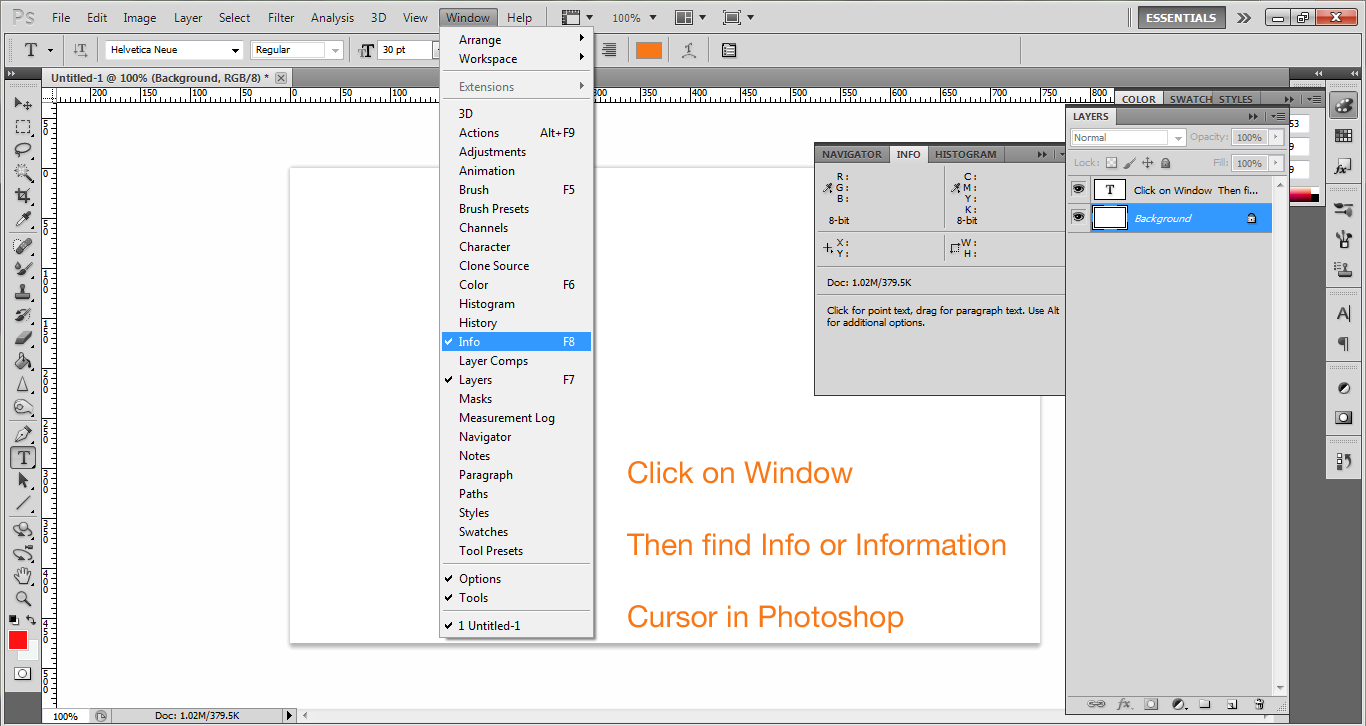
In Photoshop open Window > Info to see cursor coordinates update as you move the pointer. Rulers (Ctrl/Cmd+R) only show scale; right‑click a ruler or go to Preferences > Units & Rulers to change units. The document origin (0,0) is at the top‑left by default; you can reposition the origin by dragging the small square where the horizontal and vertical rulers meet, and double‑click that square to reset to the default. For object or layer positions, read the Properties or Transform values when a layer/selection is active.

In Illustrator the Info panel also reports pointer coordinates, and Window > Transform gives the exact X/Y for the selected object (you can choose the reference point in the Transform panel). Ruler units are changeable the same way. Because Illustrator’s origin/orientation can differ by document profile, confirm the active zero point before transferring coordinates between apps.

Practical tips: set rulers to pixels for web work, disable Snap/Smart Guides when you need raw fractional values, and use Transform/Properties for precise placement. As ’s screenshot illustrates, the Info panel is the quickest way to get live coordinates — which should address the question asked.

Recommended Answers

All 2 Replies

Member Avatar for Member #949455

Am I just clueless, or where can I find the coordinates of the cursor in the latest version of Photoshop or Illustrator when I have View Rulers turned on?

What version are you using? I have Photoshop CS5 Extend version.

I attached an image so you can see how to do that:

64f80f53700f4793a1cfb1940fdbb124

commented: Helpful :) +15
Be a part of the DaniWeb community

We're a friendly, industry-focused community of developers, IT pros, digital marketers, and technology enthusiasts meeting, networking, learning, and sharing knowledge.