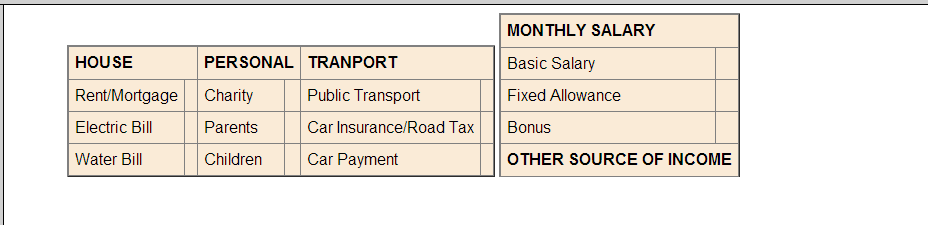
hey guys, so i have 2 tables and i want to align them side by side but no idea how. right now i have one table below the other.
my tables :

<center><p>
        <table border="1" rules="all"  cellspacing="6" cellpadding="6" style="background-color:AntiqueWhite">
            <tr>
                <td colspan="2"><b>HOUSE</b></td>
                <td colspan="2"><b>PERSONAL</b></td>
                <td colspan="2"><b>TRANPORT</b></td>
            </tr>
            <tr>
                <td>Rent/Mortgage</td>
                <td><?php if(@$house) {echo "RM ".@$results['rent'];} ?></td>
                <td>Charity</td>
                <td><?php if(@$personal) {echo "RM ".@$query['charity'];} ?></td>
                <td>Public Transport</td>
                <td><?php if(@$transport) {echo "RM ".@$info['public'];} ?></td>
            </tr>
            <tr>
                <td>Electric Bill</td>
                <td><?php if(@$house) {echo "RM ".@$results['electric'];} ?></td>
                <td>Parents</td>
                <td><?php if(@$personal) {echo "RM ".@$query['parent'];} ?></td>
                <td>Car Insurance/Road Tax</td>
                <td><?php if(@$transport) {echo "RM ".@$info['insurance'];} ?></td>
            </tr>
            <tr>
                <td>Water Bill</td>
                <td><?php if(@$house) {echo "RM ".@$results['water'];} ?></td>
                <td>Children</td>
                <td><?php if(@$personal) {echo "RM ".@$query['child'];} ?></td>
                <td>Car Payment</td>
                <td><?php if(@$transport) {echo "RM ".@$info['pay'];}?></td>
            </tr>
        </table>
    </p></center>

    <center><p>
    <table rules="all" border="1" cellspacing="6" cellpadding="6" style="background-color:AntiqueWhite">
        <tr>
            <td colspan="2"><b>MONTHLY SALARY</b></td>
        <tr>
        <tr>
            <td>Basic Salary</td>
            <td><?php if(@$sql){echo ("RM ".@$result['basic']);}?></td>
        </tr>
        <tr>
            <td>Fixed Allowance</td>
            <td><?php if(@$sql) {echo ("RM ".@$result['allowance']);}?></td>
        </tr>
        <tr>
            <td>Bonus</td>
            <td><?php if(@$sql) {echo ("RM ".@$result['bonus']);}?></td>
        </tr>
        <tr>
            <td colspan="2"><b>OTHER SOURCE OF INCOME<b></td>
        <tr>
    </table>
    </p></center>

any help is appreciated :)

Dani AI

Generated

Good answers so far — ’s parent-table will work, and and are right to push away from layout tables. For modern, maintainable markup the cleanest approach is to keep each data table as a table and place them in a simple wrapper that handles layout. Flexbox gives predictable, top-aligned side-by-side layout and stacks gracefully on small screens without clearfix hacks.

<div class="two-tables">
  <table class="data"> … </table>
  <table class="data"> … </table>
</div>
.two-tables {
  display: flex;
  gap: 16px;
  justify-content: center;
  align-items: flex-start; /* keep tables top-aligned */
  flex-wrap: wrap;         /* allow stacking on narrow viewports */
}
.two-tables table {
  max-width: 340px; /* or whatever fits your design */
  width: auto;
}
@media (max-width: 600px) {
  .two-tables { flex-direction: column; align-items: stretch; }
  .two-tables table { max-width: 100%; }
}

Practical notes: remove deprecated presentational tags (no <center>) and move inline styles (border, bgcolor) into CSS. Add semantic table structure: use <caption>, <thead>, <tbody> and <th scope="col|row"> so screen readers understand the layout. If you must support very old browsers, fallback to display:inline-block or floats, but prefer a feature-detect/polyfill approach today.

Small troubleshooting tips: if one table is taller, use align-items:flex-start (above) or set the table cells’ vertical-align: top. Check colspan/header cells for expected widths (and correct the header typo "TRANPORT" to "TRANSPORT"). Following this keeps markup semantic, accessible, and easy to adjust later — a better long-term solution than nesting layout tables.

Recommended Answers

All 4 Replies

You need one more parent table with 2 cells

<table border=0> 
<tr>
<td>


<center><p>
<table border="1" rules="all"  cellspacing="6" cellpadding="6" style="background-color:AntiqueWhite">
            <tr>
                <td colspan="2"><b>HOUSE</b></td>
                <td colspan="2"><b>PERSONAL</b></td>
                <td colspan="2"><b>TRANPORT</b></td>
            </tr>
            <tr>
                <td>Rent/Mortgage</td>
                <td><?php if(@$house) {echo "RM ".@$results['rent'];} ?></td>
                <td>Charity</td>
                <td><?php if(@$personal) {echo "RM ".@$query['charity'];} ?></td>
                <td>Public Transport</td>
                <td><?php if(@$transport) {echo "RM ".@$info['public'];} ?></td>
            </tr>
            <tr>
                <td>Electric Bill</td>
                <td><?php if(@$house) {echo "RM ".@$results['electric'];} ?></td>
                <td>Parents</td>
                <td><?php if(@$personal) {echo "RM ".@$query['parent'];} ?></td>
                <td>Car Insurance/Road Tax</td>
                <td><?php if(@$transport) {echo "RM ".@$info['insurance'];} ?></td>
            </tr>
            <tr>
                <td>Water Bill</td>
                <td><?php if(@$house) {echo "RM ".@$results['water'];} ?></td>
                <td>Children</td>
                <td><?php if(@$personal) {echo "RM ".@$query['child'];} ?></td>
                <td>Car Payment</td>
                <td><?php if(@$transport) {echo "RM ".@$info['pay'];}?></td>
            </tr>
        </table>
    </p></center>


</td>
<td>


<center><p>
    <table rules="all" border="1" cellspacing="6" cellpadding="6" style="background-color:AntiqueWhite">
        <tr>
            <td colspan="2"><b>MONTHLY SALARY</b></td>
        <tr>
        <tr>
            <td>Basic Salary</td>
            <td><?php if(@$sql){echo ("RM ".@$result['basic']);}?></td>
        </tr>
        <tr>
            <td>Fixed Allowance</td>
            <td><?php if(@$sql) {echo ("RM ".@$result['allowance']);}?></td>
        </tr>
        <tr>
            <td>Bonus</td>
            <td><?php if(@$sql) {echo ("RM ".@$result['bonus']);}?></td>
        </tr>
        <tr>
            <td colspan="2"><b>OTHER SOURCE OF INCOME<b></td>
        <tr>
    </table>
    </p></center>


</td>
</tr>
</table>

Nested tables for layout??!!
It's not 1996 any longer - the world has moved on.

Wrap each table of data in a div and give it a width that matches the table's width.

Style each table to float:left.

You might need to add a clear:both to the next item below the tables.

Normally i'd agree with drjohn about using tables for the purpose of presentation, but in your case, you are already using tables to display data so I dont see an issue with you wrapping the tables in another table.

Anyway, the div concept with the float is definately good.

There are various ways..

You could also wrap the two tables in one div and style accordingly..

 <style>
  table {display:inline-block}
  #wrapper {width:800px;margin:0 auto;}
 </style>

Remove the center and paragraph tags..

<div id="wrapper">
  <table>
   <tr>
    ...
   </tr>
  </table>

  <table>
   <tr>
    ...
   </tr>
  </table>
</div>

7358137cf01903177bbc2d500325902c

cool. thanks guys

Be a part of the DaniWeb community

We're a friendly, industry-focused community of developers, IT pros, digital marketers, and technology enthusiasts meeting, networking, learning, and sharing knowledge.