New App Will Extend Blackberry Battery Life

Updated VanessaRyan 0 Tallied Votes 493 Views Share

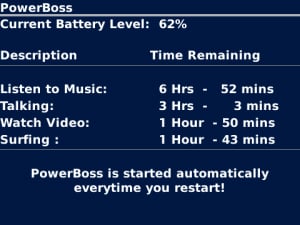
A new utility app, officially released August 6, 2010, makes it possible for Blackberry users to get more life out of their battery by allowing them to decide how to use the remaining power left before recharging. Instead of hearing warning beeps and seeing a screen that doesn't show how much power is left, users can now see how much juice they still have left. , made by JaredCo. can be configured to existing settings on all Blackberry models and has the ability to override BlackBerry’s system default that typically shuts down all communication at 5% battery life left. The company states that by over-riding this default, PowerBOSS provides more warning time to enable users to make or take that last call, email or text before having to recharge. The app also extends battery life by cutting down on signal searches when you’re off the grid. The interface is intuitive with screen color changes as the battery power drains. The app enables the user to shut down all unnecessary functions to extend battery life during a "must-have" Blackberry connection.

This app is fully supported by the Blackberry support team. It's so new that at this writing there have been only eight reviews, but most Blackberry customers are giving this app a 5-star rating. And according to Blackberry, the app gives "automated updates on available battery life for everything from talking to taking in the latest blockbuster."
Dani AI

Generated

Good catch, . The post highlights a utility that hands more user control over remaining charge; the practical value depends on device model, battery condition, and how the app is configured. The notes below give a concise, repeatable way to evaluate claims, plus configuration and safety checks to use before changing system-level behavior.

Baseline test (repeatable)

  • Fully charge the phone to 100% and let it sit 10 minutes to stabilise.
  • Define one clear usage scenario (example: 30 min voice, 15 min web, push mail enabled, screen timeout 30s) and run it until shutdown.
  • Record elapsed time, last shown percentage, and signal conditions (strong/weak).
  • Reset, install/configure the utility, and run the identical scenario three times; average the results.
  • Keep the environment (location, SIM, network) consistent so radio-search variability is minimised.

Quick configuration & monitoring checklist

  • Lower screen brightness and shorten screen timeout; prefer auto-brightness off during tests.
  • Reduce background sync frequency or switch to manual fetch for email/apps.
  • Turn off GPS/Bluetooth/Wi‑Fi when not needed; weak cellular signal causes heavy radio use, so test in both strong and weak-signal conditions.
  • Watch CPU/wake-lock behaviour with the device's battery-usage screen; some tools save juice but keep the CPU active and negate benefits.
  • Confirm what permissions and system hooks the utility uses; an app that needs deep system access should come from a reputable developer.

Safety and compatibility notes

  • Overriding system low-power protections can keep radios active and may increase risk of data loss or unexpected shutdowns; treat changes as reversible and test them during non-critical times.
  • Worn or aged batteries will not be "fixed" by software — battery replacement is the definitive remedy.
  • Verify vendor credibility, recent user reports, and compatibility with the exact OS build before relying on the tool for important calls.

Practical judgment comes from measured before/after data and a healthy dose of caution when altering system defaults.

Be a part of the DaniWeb community

We're a friendly, industry-focused community of developers, IT pros, digital marketers, and technology enthusiasts meeting, networking, learning, and sharing knowledge.