Virtual servers are a security black hole

Updated happygeek 3 Tallied Votes 597 Views Share

Research published today by data governance software developer Varonis reveals that, when it comes to the virtualized environment, security awareness appears to be something of a black hole.

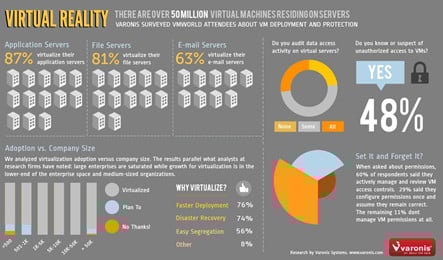
The found that data security in these virtualized environments can all too often be totally neglected, and some 48% of IT organisations reported or suspected there had been unauthorised access to files kept on virtual servers. The findings suggest that when it comes to awareness of security matters regarding virtualized servers and the data stored upon them, the harsh truth of the matter is that there is very little. Indeed, the survey found that 70% of those questioned had 'little or no' auditing in place for example.

When you consider that Gartner reckons there are now in excess of 50 million Virtual Machines installed on servers, it should come as no surprise to discover that 87% of respondents to the Varonis study said their application servers were already virtualized. The reasons for this virtualization being mainly a combination of deployment speed (76%) and disaster recovery potential (74%). Yet file security appears to be neglected almost across the board.
dweb-virtualservers

Sure, nearly 60% did claim to be "very careful about setting permissions and controlling subsequent updates" there's no escaping from the fact that 70% had implemented little or no auditing regardless of the company size. A statistic made all the more surprising by the revelation that in enterprises of more than 5,000 employees some 20% admitted to having "no file logging capabilities in place" at all.

Yet, against this backdrop of security ignorance, 48% had either reported or suspected that unauthorized access to files on those virtualized servers had taken place, putting sensitive company information at risk. Even when it comes to those companies that do audit their virtualized environments, a rather large 68% thought there had been unauthorized access.

"We suspect that for IT departments, virtualization may be something of a black box. We have found that, after a workload is virtualized, the actual details of managing file permissions and monitoring access is considered to be automatically ‘taken care of’. It is also quite possible that the teams managing virtualization projects see file security and governance as outside their discipline. The security team may have no visibility of what is happening”, said David Gibson, VP of Strategy at Varonis.

Dani AI

Generated

Virtual servers often become a visibility gap when teams treat the hypervisor as a "set‑and‑forget" layer. The posts above correctly call out missing auditing, permissive ACLs and the temptation to rely only on perimeter controls. Below is a compact, practical checklist plus small examples to bring file-level visibility and control back into virtual estates without needing a forklift change.

  • Inventory and ownership: track every VM and the data it holds; assign an owner and retention policy.
  • Centralize logs: forward guest OS and hypervisor logs to a syslog/SIEM and correlate file events with host events.
  • File‑level auditing: enable SACLs in Windows or auditd rules in Linux so file reads/writes aren’t invisible.
  • Least privilege: implement RBAC on hypervisor consoles and remove shared/local admin accounts in guests.
  • Network separation: isolate management networks, use internal firewalls or microsegmentation for east‑west traffic.
  • Harden images and templates: patch, disable unused services, and bake security settings into golden images.
  • Protect backups/snapshots: limit who can create/restore, and make backup stores immutable where possible.
  • Periodic reviews and automation: run automated permission checks, detect excessive or inherited "Everyone" permissions and remove orphaned accounts.

Example commands (test in lab; back up ACLs before changing anything):

# Windows: enable file auditing and back up ACLs
auditpol /set /subcategory:"File System" /success:enable /failure:enable
icacls "C:\Data" /save "C:\acl-backup.txt" /t

# PowerShell: add a simple SACL (example identity)
$path = 'C:\Data'
$ident = 'CONTOSO\Domain Users'
$rule = New-Object System.Security.AccessControl.FileSystemAuditRule($ident,
  [System.Security.AccessControl.FileSystemRights]::ReadAndExecute,
  [System.Security.AccessControl.InheritanceFlags]::ContainerInherit -bor [System.Security.AccessControl.InheritanceFlags]::ObjectInherit,
  [System.Security.AccessControl.PropagationFlags]::None,
  [System.Security.AccessControl.AuditFlags]::Success)
$acl = Get-Acl $path
$acl.AddAuditRule($rule)
Set-Acl $path $acl
# Linux: adhoc audit rule and search
auditctl -w /srv/data -p wa -k vm_data_watch
ausearch -k vm_data_watch
# make rules persistent in /etc/audit/rules.d/ for reboot survival

A host firewall alone (as suggests) helps but does not show who opened or read a file. is correct that OS hardening still matters — add hypervisor controls (management‑plane isolation, RBAC, 2FA) on top. ’s point about bad ACLs enabling cross‑site compromise is important: schedule permission audits, automate remediation, and always test changes in staging while retaining ACL backups.

Member Avatar for Member #949455
Member #949455

Yet, against this backdrop of security ignorance, 48% had either reported or suspected that unauthorized access to files on those virtualized servers had taken place, putting sensitive company information at risk.

That's not good there's no firewall how can no one not install a firewall and a filter that will not let people access those files.

What a kind of business runs like that.

Member Avatar for Member #1080279
Member #1080279

Great article. I would add that incorrect file system permissions
provide a way to infect other domains as well in addition to the
hacked one.

Shared Hosting issues; hacked website allows access to all websites installed on the same server

We named this as one of the seven reasons for successful hacking research:

frellnet 0 Newbie Poster

I am not sure why people would view a virtualized server any differently than a physical server when it comes to security. It is still the same OS as it was when it was physical and should still be operated the same way. VMware, Citrix, KVM, or whatever hypervisor you are using does not automate the operation of the server itself. Normal sysadmin best practices still apply.

vibinpattuath 0 Newbie Poster

active directory uninstall command

Be a part of the DaniWeb community

We're a friendly, industry-focused community of developers, IT pros, digital marketers, and technology enthusiasts meeting, networking, learning, and sharing knowledge.