Dear pals,
I am using Virtual Box of Oracle in my Windows 7 pc for running Red Hat Enterprise server 6.1 . But When
I try to install using Yum i got error as below:
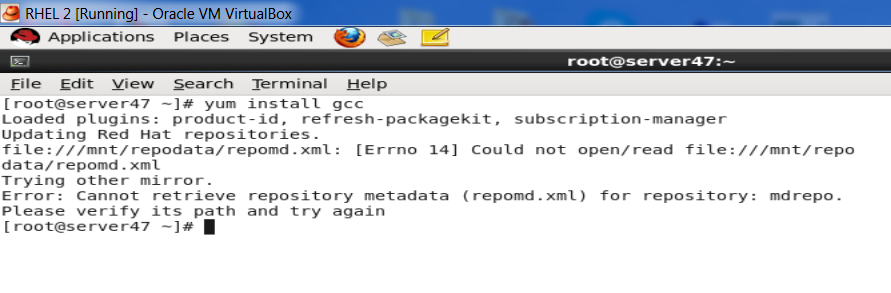
207e0048c89145c5ec335ea15f718872

Please advise me fast . I am trying it for 2 days

Thanks
Anes

Dani AI

Generated

Quick diagnosis and actionable checks (based on ’s report and ’s observation): Yum is failing because repository metadata under a path like /mnt/repodata cannot be read. The standard metadata file is named repomd.xml (common mistype: repmod.xml). Typical causes are: the ISO/DVD or repo directory is not actually mounted at the path referenced by the .repo file, the repodata directory is missing (no repomd.xml), wrong baseurl syntax, file-permission/SELinux denial, or an entitlement/registration required for Red Hat-hosted repos.

Steps to diagnose (run as root or with sudo):

mount | grep ' /mnt '
ls -l /mnt/repodata/repomd.xml
grep -R "/mnt" /etc/yum.repos.d || grep -R "baseurl" /etc/yum.repos.d
yum clean all
yum repolist -v

If the file is missing or the ISO/DV D was not mounted, these fixes are typical:

  • Mount an ISO/DVD that contains repodata:
    mount -o loop /path/to/RHEL-Server-6.1-x86_64-DVD.iso /mnt
  • If building a custom local repo, generate metadata with createrepo:
    createrepo /path/to/repo-dir
  • Example minimal local repo file (/etc/yum.repos.d/local.repo):
    [local]
    name=Local DVD
    baseurl=file:///mnt
    enabled=1
    gpgcheck=0

Additional pointers: confirm permissions with ls -ld /mnt /mnt/repodata and check SELinux mode with getenforce (setenforce 0 only as a temporary test). If the system is registered to Red Hat, ensure the subscription/entitlement is active (otherwise remote RHN repos will be blocked). Using the install DVD as a local repo or a maintained RHEL-compatible rebuild are common alternatives when subscription access is not available.

Recommended Answers

All 4 Replies

This appears to be a system configuration problem. The file /mnt/repodata/repmod.xml is either not available, not readable, or not writeable. In any case, normally, it would not be in /mnt, so I expect that you did something to alter the configuration of yum that caused this.

Since I don't find anything like this on my RHEL systems, I suspect that you may want to create the directory /mnt and try again. FWIW, what version of RHEL are you running?

Dear rubber,,
I am using Redhat Enterprise Server 6.1 . please advise my problem is still exist

Thanks
Anes

Is your subscription up to date? If not, then you will need to install a free version such as CentOS, or update your support subscription.

hi dear Rubber,,
I don't know abt it . This copy of OS image is got from my collegue .
I think Oracle linux is enough for same . Is it ? Subscribe for free CD kit now , waiting for it

Please advise
Thanks
Anes

Be a part of the DaniWeb community

We're a friendly, industry-focused community of developers, IT pros, digital marketers, and technology enthusiasts meeting, networking, learning, and sharing knowledge.