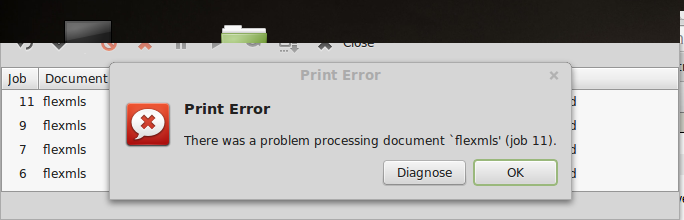
I have I Brother Laser printer and it seems to be pring everytying just fine. But when I go print some property listings from a realesate company it all the sudden will not print at all and I get the following error. -> There was a problem processing documents 'flexmls'(job 11). Does anyone see anything that would suggest Linux incompatability? Image attached. bcea2376ebbe702e3e95b82f4aa26f1d
Dani AI

Generated

Short expert note and practical steps

This kind of CUPS error (the job name shows the site generator, here "flexmls") usually means the document being handed to the print filters contains PostScript/PDF constructs the filters (most often Ghostscript) can't parse — not a hardware fault with the Brother laser itself. 's virtual‑PDF workaround is a common, effective short term fix because it forces a re‑encode of the page into a simpler PDF the printer filters accept.

Useful diagnostics to confirm the cause and capture the exact error lines:

sudo cupsctl --debug-logging
sudo tail -n 200 /var/log/cups/error_log
sudo journalctl -u cups -n 200 --no-pager

Look for lines containing "filter failed", "syntaxerror", "Ghostscript", or "invalid PDF" — those point to a malformed PDF/PS from the site.

Practical ways to produce a printable file (sanitise the output):

gs -sDEVICE=pdfwrite -dCompatibilityLevel=1.4 -dPDFSETTINGS=/printer \
   -dNOPAUSE -dBATCH -dSAFER -sOutputFile=sanitized.pdf original.pdf

qpdf --linearize original.pdf sanitized.pdf

pdftocairo -pdf original.pdf sanitized.pdf

Reprinting the sanitized.pdf usually eliminates the filter failure because fonts and complex objects are flattened.

Other quick options: use a different PDF viewer or browser to "Save as PDF" / "Print to File"; try a generic PostScript driver or the open‑source Brother driver (brlaser) if available; as a last resort rasterise the pages to images and print those. For persistent problems, the most useful artifacts for diagnosis are the exact CUPS error_log excerpt and a sample of the site‑generated PDF/PS.

Recommended Answers

All 2 Replies

Sometimes there are errors in a postscript or pdf document. There are several things you can try. If you can open the document with several programs, it may print with one of these programs and not with another. For example a pdf may print from a qpdfview window but not from an okular window.

Another thing you can try is to install a pdf printer. In ubuntu, it is done with

sudo apt-get install cups-pdf

You can then select the pdf printer when you want to print a document. It will create a pdf file in a folder (probably ~/PDF), then you can open this pdf with say qpdfview and try to print again with your printer.

Gribouillis thanks, that worked perfectly.

Be a part of the DaniWeb community

We're a friendly, industry-focused community of developers, IT pros, digital marketers, and technology enthusiasts meeting, networking, learning, and sharing knowledge.