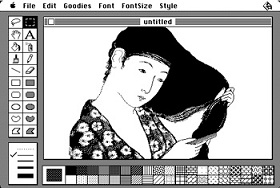
Apple has kindly donated the source code for the original MacPaint software to the Computer History Museum in Mountain View, CA. This is in large part thanks to the exhausting efforts of Andy Hertzfeld, one of the original members of the developmental team for the original Macintosh in 1984. When Bob Knuth started writing his book, The Art of Programming, he knew that MacPaint had to be included, as he considered it to be the,”...best program ever written.” That is without a doubt, a very broad statement, but considering what a revolution it was for UI design and graphic editors, he may not be that far off his rocker.
It all began with with Apple's Lisa in 1983, the computer for which MacSketch and QuickDraw were initially created. QuickDraw was the component that was responsible for managing, digitally redrawing, and buffering all the pixels that the user would see on their monitor. Around 1983, Bill Atkinson re-badged MacSketch as MacPaint and introduced the now familiar tool bar on the left hand side of most image editing software. Shortly thereafter, he began the process of diligently upgrading the user experience and potential of MacPaint. Atkinson took the tools and palettes out of the the dreaded menu tree, and out into the virtual wild. Common tools such as the paint bucket and lasso, debuted during Atkinson's stream of daily updates. MacPaint is heralded as a revolutionary piece of code by Knuth, and its inclusion in the book owes credit to Atkinson's passion for creating concise, decipherable source code. Atkinson once said about software, "It's an art form, like any other art form... I would spend time rewriting whole sections of code to make them more cleanly organized, more clear. I'm a firm believer that the best way to prevent bugs is to make it so that you can read through the code and understand exactly what it's doing… And maybe that was a little bit counter to what I ran into when I first came to Apple... If you want to get it smooth, you've got to rewrite it from scratch at least five times." His obsession with organization and clarity seems to have rubbed off on Apple's current team of hardware designers.
Head over to the Computer History Museum's website to learn more about MacPaint/QuickDraw and download the source for the now historic pieces of software. Engadget notes that the source for both programs consists of roughly 9,000 lines of code(5,822 lines of Pascal, 3,583 of assembly code), still no small feat, but definitely a small number relative to the impact QuickDraw had on the computing community.