I am trying to connect to a wireless router and i dont understand what I need to do to allow the router to recognize my laptop (Mac Powerbook G4, version 10.3.9) .. any hints?!
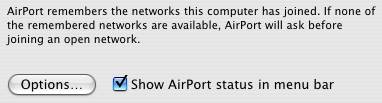
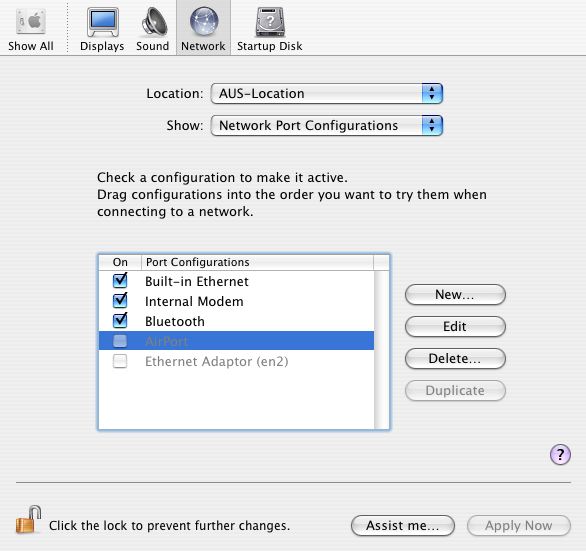
A friend asked me to check if I have an Airport card, and I guess I do have an AirPort card installed , because before I had no problem in connecting wirelessly at the office and in my friend's house?!! Lately I noticed that I don't see the AirPort icon in the toolbar and when I went back to the Network Port Configurations, the airport checkbox wasnt selected and the weird thing is that I cant even select it? I have no idea why?! I can select and unselect the rest of my network ports (internal modem, bluetooth, etc ) but not the Airport icon!!!! I'm so confused, it was working fine before !? Why I cant select the checkbox?! HELP ME

Dani AI

Generated

Useful follow-up (builds on , and )

The AirPort entry being dimmed usually comes from either corrupted network preferences or the AirPort hardware not being visible to the system. Start by confirming whether Apple System Profiler actually lists an AirPort device (as suggested). If the card is listed, try a targeted software reset first; if the card is absent the problem is likely hardware (loose/failed card) and reseating or service will be needed.

A safe, commonly effective software fix is to back up and remove the network preference files so macOS recreates them on boot. Back up first, then reboot and test Wi‑Fi again:

sudo mkdir -p ~/wifi-backup
sudo cp /Library/Preferences/SystemConfiguration/*.plist ~/wifi-backup/
sudo rm /Library/Preferences/SystemConfiguration/com.apple.airport.preferences.plist \
  /Library/Preferences/SystemConfiguration/NetworkInterfaces.plist \
  /Library/Preferences/SystemConfiguration/preferences.plist
sudo reboot

This forces fresh network configs to be generated and fixes many cases where the AirPort control is dimmed. (osxdaily.com)

Because this is a PowerBook G4 (10.3.9), also try zapping PRAM (hold Command+Option+P+R at startup until you hear the chime again). The official service steps for older PowerBooks list PRAM zaps and reseating the AirPort card as standard troubleshooting before replacing hardware. If you’re comfortable opening the machine, reseating the card (power off, remove battery/cover per service manual) can cure a loose connector; otherwise have an Apple-authorized shop do it. (manualzilla.com)

If software fixes don’t help, check that AirPort kernel extensions are present in /System/Library/Extensions (AppleAirPort*.kext). If missing or corrupt, reinstall the AirPort software or use the OS combo installer / Software Update to restore the AirPort drivers. If the card still does not appear in System Profiler after these steps, it’s almost certainly a hardware fault and requires service. (scribd.com)

Notes: keep copies of any files you remove, avoid random deletions, and proceed to hardware reseat only if you’re comfortable working inside a laptop.

Recommended Answers

All 5 Replies

>i dont understand what I need to do to allow the router to recognize my laptop
That's very vague. Can you elaborate on the exact problem you're experiencing? Post any error messages you receive.

>the airport checkbox wasnt selected and the weird thing is that I cant even select it?
You mean this checkbox is disabled?

Try going under 'options' and hitting 'restore defaults'.

Forgive me John....I’m not that expert when it comes to computers and technical stuff. My main problem is that I cant turn my AirPort on and I think in order to do that I have to go system preferences > network> drop down the Show box and choose Network Port Configurations> then select the AirPort checkbox....Right?! When I try to select the AirPort checkbox, nothing happened because simply I CANT select it and I dont know why?! It seems like its not activated !!? Anyway check out the pic I attached to see what I mean.

What happens when you change your location back to 'Automatic'? If Airport is still grayed out, delete it, and then recreate with the 'New...' button. The next thing you should do is look at 'Network Status' and see if there are any error messages printed out for Airport.

Just curious.... Does the AirPort card show up in Apple System Profiler? It will be in the Hardware section.

If it doesn't, then it's either not connected properly (might have jarred loose) or may be defective. That may explain why it no longer appears in the Network pane.

Try deleting the greyed out ones. After a restart they are there again and acessible.

best redage

Be a part of the DaniWeb community

We're a friendly, industry-focused community of developers, IT pros, digital marketers, and technology enthusiasts meeting, networking, learning, and sharing knowledge.