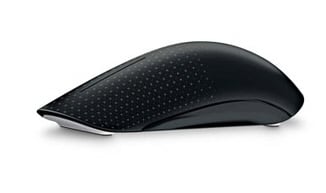
Windows 7 Touch Mouse: can you feel the Microsoft love?

happygeek 0 Tallied Votes 460 Views Share
Manufacturer
Microsoft
URL Screenshot of http://www.m…se/microsite/ http://www.microsoft.com/hardware/en-us/products/touch-mouse/microsite/
Price
$79.95
Pros
Multi-touch gesture interface is innovative
Cons
Windows 7 only, not the most comfortable or intuitive mouse on the planet, price
Summary
A mouse that was born as a result of collaboration between Microsoft Research and the Applied Sciences Group stinks a little of being designed by a nerd committee, and that's not far from the truth. There's no doubting sheer geek brilliance of the touch interfacing with the device itself, a thing of nerd beauty indeed. But back in the real world the fact that it's costly, not the most comfortable nor intuitive thing to use all day long and limited to use with Windows 7 only makes it less than the perfect desktop pet.
Rating

If you are a Windows 7 user then maybe you have longed for a mouse designed just for you and your Operating System, but somehow I doubt it. What you want is a mouse that just works the way you expect and doesn't leave your wrist feeling like you've been shaking hands with Hulk Hogan for a fortnight at the end of the day. So what was Microsoft thinking of when it decided to launch a Windows 7 only mouse into the market that's unlike any other in the way you use it?

Actually, Microsoft was trying to push the envelope a little when it comes to PC mousing, and maybe play a little bit of catch up with Apple at the same time. Neither are necessary bad things, and nor is the resulting Touch Mouse per se.

How can a mouse be different? Good question, and best answered by grabbing hold of the Touch Mouse (with either hand as it's a totally ambidextrous device) and stroking it. A single finger stroke becomes a scroll wheel, use two fingers and you can maximise, minimise and restore windows, while a full three-fingered swiping in an upwards motion tiles all open applications on-screen. It is, without doubt, very cool. As cool as the Apple Magic Mouse which does a very similar thing in a fairly similar way, it has to be said.


The BlueTrack technology built into the mouse enables it to be used on pretty much any surface without losing focus or sharpness. It works as well as you would expect, with every surface I attempted it on becoming the perfect mouse mat, and that included my naked and hairy thigh. Sorry for the visual image folks, don't panic it will fade in time. Just like your ability to hold the Touch Mouse all day without getting tired as it's not the lightest mouse on the market (a couple of AA batteries inside the thing not helping in this regard).

Talking of discomfort, I would recommend finding a shop that will let you have a play with the Touch Mouse before purchase as it is not best suited for all sizes of hand. My stumpy little hands were OK with the somewhat-on-the-small-side mouse, but others I got to try it out, who had proper man-sized hands for example, found it rather uncomfortable after a few minutes. Then there's the ergonomics of actually using the multi-touch gesturing which felt very hit and miss even after much practise. I was continually maximising windows when I didn't want to, and forever moving back to previous web pages courtesy of forgetting that wiping your thumb on the side of the thing did that. All in all, I just really want my mous to act like a mouse in the way I expect. What I do not expect is to have to re-educate myself in what a mouse is and how to use one.

And finally, that price. In the US you can hunt around and get the price down to under $70 which is still, perhaps, a little pricey for non-gaming mouse. But things are much worse here in the UK where the a Dollar translates into a Pound and the Touch Mouse costs seventy quid. Way too steep for a Windows 7 only mouse that leaves my hands feeling a bit tired after an hour of using it. It's an interesting device, but I feel it needs a bit more work before it is ready for mass consumer consumption. Roll on, or rather swipe upwards, Touch Mouse 2.0

Dani AI

Generated

posted a useful hands-on impression and flagged the two big practical concerns — gesture reliability and fit for larger hands. The configuration side of the story is often missing from these first-look pieces: Microsoft provides the Microsoft Mouse and Keyboard Center (MKC) as the official way to update drivers and change how touch-enabled mice behave. MKC is the place to look first for disabling or remapping touch actions and for getting the correct driver for older hardware. (microsoft.com)

When gestures feel "hit and miss" the usual troubleshooting path is driver-first. Install the latest Mouse and Keyboard Center, open the app and check for the Touch Mouse (or similar model) entry, then disable or reassign any gestures that trigger by accident. If MKC does not detect the device, Microsoft documentation and community answers note that some legacy mice are best-served by older MKC 2.3 or by the earlier IntelliPoint/IntelliType packages — try those as a fallback. (windowscentral.com)

Given the ergonomics comment, the other practical gap is what to test when trying one in a shop. A sensible evaluation covers fit (rest the whole palm during common tasks), gesture palm-rejection (rest and move a single finger), and hand-switching (left and right). For people who still find the Touch Mouse uncomfortable, larger Microsoft ergonomic models and several Logitech options provide different shapes and configurable controls better suited to long sessions; those product pages document alternate shapes and customization options. (support.microsoft.com)

Concise assessment checklist for the thread: confirm MKC detects the mouse and that gesture controls can be turned off or remapped; test for accidental triggers with a rested palm; try both hands and a few common tasks in-store; if tuning fails, favor a larger ergonomic mouse. That sequence fills the gaps between ’s experiential notes and ’s desire to try before buying.

pseudorandom21 166 Practically a Posting Shark

Very interesting, I wish I had one to play with so I could pass judgement on it too.

happygeek 2,411 Most Valuable Poster Team Colleague Featured Poster

Pop to your nearest computer peripherals retailer and I'm sure they will have one for you to play with, they seem to have launched pretty much everywhere now.

Be a part of the DaniWeb community

We're a friendly, industry-focused community of developers, IT pros, digital marketers, and technology enthusiasts meeting, networking, learning, and sharing knowledge.