i have a php web on my IIS , address is ' http://localhost/myapp/index.php ' .

My question is, can i access the site on my Laptop using LAN or wifi if yes , plz tell me how . Please help me

Dani AI

Generated

Yes — an IIS site on the desktop can be reached from the laptop over the Linksys LAN/Wi‑Fi. was correct that the laptop should browse to the desktop’s LAN address, and is right that the router usually needs no special changes for intra‑LAN access. The usual blockers are IIS bindings, the desktop firewall, unstable IP addressing, or the site being configured to only answer to the name “localhost.”

Practical checklist:

  • Confirm both machines are on the same network (desktop on a LAN port, laptop on the same Wi‑Fi SSID). Disable any “guest”/“wireless isolation” feature on the router that prevents Wi‑Fi clients talking to LAN clients.
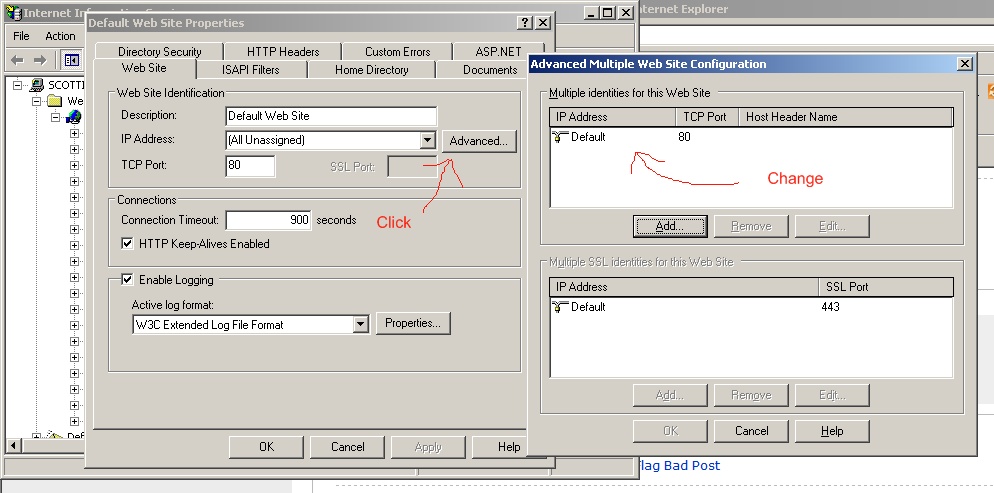
  • In IIS, make the site listen on the server’s LAN IP or “All unassigned” and remove any host‑header that limits the site to the name localhost. Sites bound only to loopback won't respond to remote browsers.
  • Give the desktop a stable LAN address (set a static IP or create a DHCP reservation in the Linksys admin using the NIC MAC).
  • Open an inbound HTTP rule (TCP port 80) in Windows Firewall rather than disabling the firewall entirely.

Quick, immediately useful bits:

hosts file (on the laptop) to map a friendly name:
192.168.1.100 myapp.local
( file: C:\Windows\system32\drivers\etc\hosts )

Basic tests and checks:

ping 192.168.1.100
telnet 192.168.1.100 80
netstat -an    (on the desktop to confirm listening on :80)

Notes and cautions: any hard‑coded “localhost” URLs or host‑header requirements inside the PHP app will need changing (use relative URLs or the server’s LAN name/IP), and exposing the site to the Internet requires router port‑forwarding and extra security. The above expands on ’s and ’s points and targets the common gaps that stop local access from working.

Recommended Answers

All 10 Replies

Yes. You need to browse to the internal IP of the machine running IIS. You can find your IP Address by opening the command prompt and running the following command:

C:\>ipconfig /all | find "IP Address"
        IP Address. . . . . . . . . . . . : 10.2.1.215

You would then browse to You also may need to open that port in your windows firewall. If the site does not work try disabling the windows firewall from your control panel and testing it again.

thanks will try soon . My laptop have wifi , but my Desktop have no wifi . I have a Linksys wireless router .

How i configure my Desktop with Linksys router to access my localhost web using my laptop .

Do you mean the IP that IIS listens on for a particular website? Yes, you can. Go in to the IIS configuration screen and right click on the website you want to change the listening IP for. Take a look at the attached screenshot.

thanks , great help . plz help me on this also

i have a php web on my IIS , address is ' http://localhost/myapp/index.php ' .

My question is, can i access the site on my Laptop using LAN or wifi if yes , plz tell me how . Please help me

Do u have a web server in ur local network?

Which OS are u using on your computer or laptop?

Note that you donot need to do any configuration on your LinKSys Wireless Router if you only want to allow access to this site from any computer within ur local network.

All you need to have is a DNS Server within your local network,
and add the domain name to IP address of the site in its DNS Server. Than you can simply use the web browser(IE or Firefox)
on any other computer or laptop within the local network to access this local site.

i am using windows xp professional in both systems

thanks , great help . plz help me on this also

Help you with what? I answered your questions I thought?

i am using windows xp professional in both systems

Ok, so its a home based network,right?

Yes right . so what i have to do . Plz

Yes right . so what i have to do . Plz

Do u want to access that site from ur local network?

Be a part of the DaniWeb community

We're a friendly, industry-focused community of developers, IT pros, digital marketers, and technology enthusiasts meeting, networking, learning, and sharing knowledge.