Skype used to have a setting that would allow me to block all unsolicited contact requests. Shortly after Microsoft acquired Skype this feature was removed. I used to get 2-3 requests per week and it was easy enough to delete-and-report-abuse although I suspect nobody ever actually looked at these reports. However, I am now getting 5-10 requests per day from users with obviously bot-generated accounts. I've checked google and the Skype forums and it is apparent from the comments that many other people are having the same problem and are pissed off. Microsoft/Skype does not participate in any discussions about blocking so I can only assume that it is to Microsoft's benefit somehow to allow this spamming to continue.

Previous versions of Skype have spawned hacks to do things like remove ads. Is anyone aware of any hack out there that will re-enable the "block all but my contacts" feature?

Dani AI

Generated

Short answer: there is no supported, safe “re-enable the old global block-all” hack — use the built‑in privacy controls, remove discoverability, and block/report contacts as they appear. ’s experience (many automated requests) is common; was right to look in Privacy. The steps below give the fastest, legitimate way to cut most of the noise without installing unofficial clients.

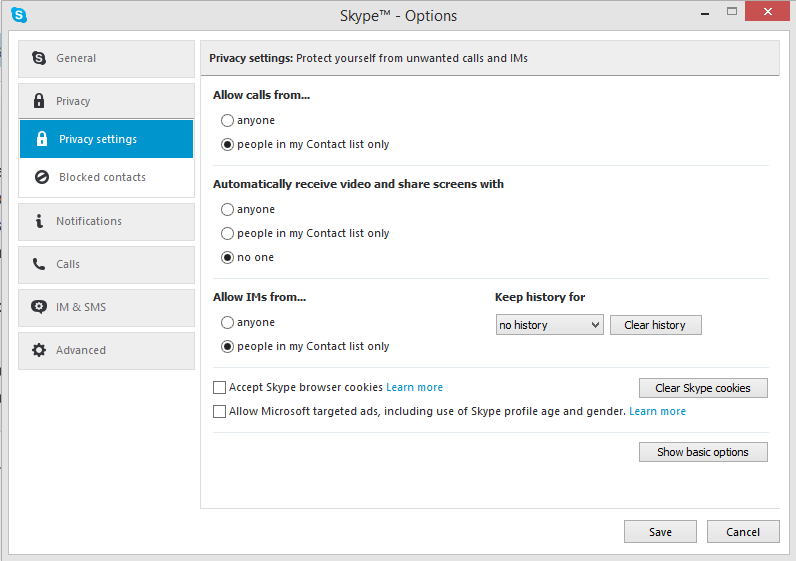
Practical checklist (do these in the Skype app or web settings): update Skype, open your profile -> Settings -> Contacts -> Privacy, then turn off “Appear in search results.” This stops people finding you by Skype search. Remove phone and email from your profile and turn off contact syncing on mobile so other users who sync their address books cannot be suggested your account. Details: How do I opt out of being visible in Skype search results?. For how contact syncing can surface people from address books, see Microsoft’s contact‑sync notes. Microsoft contact sync and non‑user data processing.

When unsolicited requests arrive: block and report each account (open the contact/profile and choose Block contact and Report abuse or use “Report a concern” on the offending message). Reporting helps Microsoft detect spam patterns even if it feels slow. See Microsoft’s block/report instructions: How do I block, unblock, or report abuse in Skype?.

Do not use unofficial “hacks” or patched clients — they risk account compromise and violate Microsoft guidance; always get Skype from official channels and follow the safety advice. Protecting your online safety, security and privacy.

If this thread is being read years later: Skype consumer was retired on May 5, 2025 and Microsoft recommends moving to Microsoft Teams Free (contacts and chats can migrate). If you still see spam after tightening settings, migrating to a different, actively‑managed client (or creating a fresh account used only for known contacts) is a practical fallback. Skype is retiring — what you need to know.

Recommended Answers

All 3 Replies

Skype 7.8.64.102, In menu Skype - Privacy.

Although sometimes some get through anyway.

I'm so used to Skype auto-updating that I didn't realize there was a newer version available. I'll give it a try, although I see there are no new settings under Privacy so I expect the spamming to continue. Here's hoping though. Thanks.

New version is the same as the old one. Still getting multiple spams per day. I have to wonder why Microsoft thinks this is a good thing.

Be a part of the DaniWeb community

We're a friendly, industry-focused community of developers, IT pros, digital marketers, and technology enthusiasts meeting, networking, learning, and sharing knowledge.