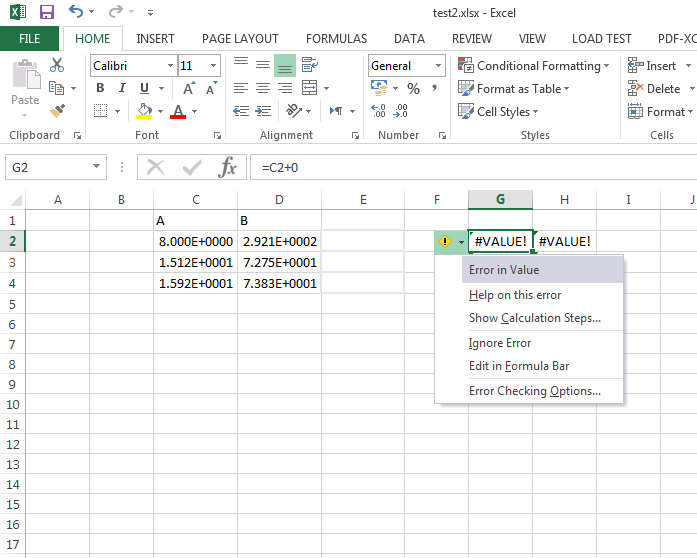
Hi, I could import some numbers from notepad to excel 2010, and after right click the cells were converted to General from scientific format. However, when I drag the notepad file to Excel 2013 they cannot be converted to General format. I tried different ways to convert them from text to numbers but they dont work. Even there is no Error button next to the cells to convert them to numbers. What is the way in Excel 2013 to have numbers format when the values are imported from text file?

Dani AI

Generated

Locale/decimal mismatch is the most common reason imported numbers stay as text in Excel 2013. As discovered, changing the system decimal separator will fix files whose decimal point character doesn’t match Excel’s settings; note that ’s “Format → Number” only changes display formatting and will not turn text into real numeric values.

Simple, non‑destructive fixes (in this order):

  1. Use Data → Text to Columns → Delimited → Next → Next. In step 3 set the column data format to General (or click Advanced to force the decimal/thousands separators that match the file) and Finish.
  2. Change Excel‑only separators: File → Options → Advanced → uncheck “Use system separators” and set Decimal/Thousands to match the incoming data. This avoids changing Windows settings.
  3. Quick conversion: put 1 in a blank cell, copy it, select the text cells and do Paste Special → Multiply. (This fails if separators don't match.)
  4. Use a helper formula like =VALUE(A1) and paste values over the originals.

Invisible characters and non‑breaking spaces are frequent culprits when numbers look normal but won’t convert. A compact cleaning/conversion formula that handles NBSP and stray spaces is:

=VALUE(TRIM(SUBSTITUTE(A1,CHAR(160),"")))

Troubleshooting checklist: enable error checking (File → Options → Formulas → Error‑checking rules → “Numbers stored as text”) to get the green triangle; confirm the import wizard didn’t force the column to Text; and for recurring imports use Power Query/Get & Transform (Power Query was available as a free add‑in for Excel 2013) so column type and locale can be set at import time. Changing Windows region settings is a fast fix but will affect other applications, so prefer the Excel‑only options for a targeted solution.

The problemwas fixed using Control Panel > Region & language > Additional Settings > Numbers > and changinf (,) to (.) in Decimal.

go to fromat then choose number,

Be a part of the DaniWeb community

We're a friendly, industry-focused community of developers, IT pros, digital marketers, and technology enthusiasts meeting, networking, learning, and sharing knowledge.