Hello..

good day evryone, i encounter a problem with my save as form..i use savefiledialog..the result is that the page is saved..but when i open the word doc, it is empty..there is no data whatsoever..

i dont use database..it is suppose to save the the data that i filled in my form but no data was save in the document(word aplication).

Dani AI

Generated

A short, practical note to bridge what happened in the thread: was right that opening/creating a file without writing any content will produce an empty document, and hit the common null-reference issue when the Word application object was not instantiated. Below are workable options that avoid hand-typing every field and that are safe for a typical WinForms desktop app.

One simple, low-dependency approach is to walk the form controls, build a single text/HTML string and save that file (Word will open HTML or plain text). Use each input control`s Tag to store the friendly label so you do not need to hard-code names. Example collector (VB.NET):

Private Function CollectFormData(container As Control) As String
    Dim sb As New System.Text.StringBuilder()
    For Each c As Control In container.Controls
        If TypeOf c Is TextBox OrElse TypeOf c Is ComboBox OrElse TypeOf c Is RichTextBox Then
            Dim label As String = If(String.IsNullOrWhiteSpace(Convert.ToString(c.Tag)), c.Name, Convert.ToString(c.Tag))
            sb.AppendLine(label & ": " & c.Text)
        ElseIf TypeOf c Is CheckBox Then
            Dim cb As CheckBox = DirectCast(c, CheckBox)
            Dim label As String = If(String.IsNullOrWhiteSpace(Convert.ToString(cb.Tag)), cb.Name, Convert.ToString(cb.Tag))
            sb.AppendLine(label & ": " & If(cb.Checked, "Yes", "No"))
        ElseIf c.Controls.Count > 0 Then
            sb.AppendLine(CollectFormData(c))
        End If
    Next
    Return sb.ToString()
End Function

After collecting, save to the path returned by SaveFileDialog (check DialogResult.OK) — either as a small HTML wrapper (so Word shows line breaks and simple formatting) or as plain text.

If a true .docx is required (no warnings, better layout), use Open XML SDK or a library like DocX (no Office install needed). Office Interop is fine for desktop apps but needs Office installed, proper COM cleanup and is not recommended on servers. When using Interop, release COM objects explicitly:

If doc IsNot Nothing Then
    System.Runtime.InteropServices.Marshal.ReleaseComObject(doc)
    doc = Nothing
End If
If app IsNot Nothing Then
    app.Quit()
    System.Runtime.InteropServices.Marshal.ReleaseComObject(app)
    app = Nothing
End If
GC.Collect()
GC.WaitForPendingFinalizers()

Practical tips: set each input`s Tag to its label to automate mapping; avoid saving plain-text passwords; for an exact visual copy of the form consider DrawToBitmap and saving the image (then insert into Word) if you need the layout preserved.

Recommended Answers

All 13 Replies

Hi Post some of your code and we can see where it is going wrong...

    Private Sub SaveAsToolStripMenuItem_Click(ByVal sender As System.Object, ByVal e As System.EventArgs) Handles SaveAsToolStripMenuItem.Click
        'it is running with no error but the word document is empty.
        SaveFileDialog1.FileName = "untitled"
        SaveFileDialog1.Filter = "Word(.docx)|*.docx"
        SaveFileDialog1.RestoreDirectory = True
        Me.SaveFileDialog1.ShowDialog()
        If (SaveFileDialog1.FilterIndex = 2) Then
            SaveFileDialog1.OpenFile()
        End If

Exactly! your code will create an empty word file. you need to add your data to the MS word file programmatically

hehe..(feel so stupid)..hee..i guess it..but, i dont know how..do know any good links.. ^^

try this

Imports Microsoft.Office.Interop.Word

wordapp = New Word.Application
worddoc = New Word.Document
    'create word file
worddoc = wordapp.Documents.Add()
worddoc.Activate()
    'save data
wordapp.Selection.TypeText("YOUR DATA")
    'save as
wordapp.Dialogs(WdWordDialog.wdDialogFileSaveAs).Show()
    'close app
worddoc.Close()
wordapp.Quit()
worddoc = Nothing
wordapp = Nothing

i tried this

dim wordapp As Word.Application
dim worddoc As word.Document

worddoc = wordapp.Documents.Add()
worddoc.Activate()
wordapp.Selection.TypeText("YOUR DATA")
wordapp.Dialogs(wdWordDialog.wdDialogFileSaveAs).Show()
worddoc.Close()
wordapp.Quit()

worddoc = Nothing
wordapp = Nothing

i couldn't save anything..there is a warning : Varible 'wordapp' is used before it has been assigned a value. A null reference exception could result at runtime.

opss..my bad..its

dim wordapp As New Word.Application
dim worddoc As New word.Document

worddoc = wordapp.Documents.Add()
worddoc.Activate()
wordapp.Selection.TypeText("YOUR DATA")
wordapp.Dialogs(wdWordDialog.wdDialogFileSaveAs).Show()
worddoc.Close()
wordapp.Quit()

worddoc = Nothing
wordapp = Nothing

Now..its wordking..Thank you so much..but, what if i wanted to save my form..i mean, like typical registration form to save as word..when i ahve already filled in the form..is it possible for me to get everything on the word page??or i need to do hard coding of the form?? or can i just capture the form page?

by data i mean plain text,now the question is where do your write your data, textbox or richtextbox? if so
wordapp.Selection.TypeText(textbox)
or
wordapp.Selection.TypeText(richtextbox)

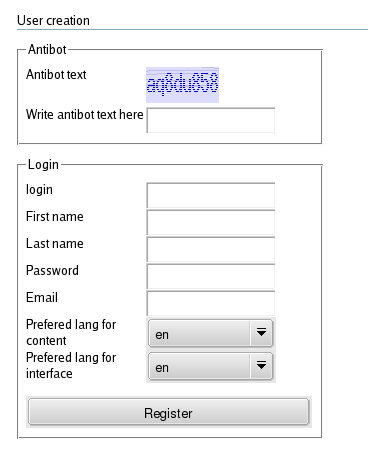
Thank you..its not just plain text..its the whole form page..example : Click Here..is there a way??links??tutorials??anything that can be usefull??..

thank you so much..

im assuming your "textbox"s are named textbox1 and textbox2 and so on..

dim wordData as string
wordData = "Login : " & textbox1.text & vbnewline &_
"First Name : " & textbox2.text & vbnewline &_
"Last Name : " & textbox3.text & vbnewline &_
"Password : " & textbox4.text & vbnewline &_
"Email : " & textbox5.text & vbnewline &_
"Content Lang : " & Combobox1.text & vbnewline &_
"interface Lang : " & Combobox2.text

wordapp.Selection.TypeText(wordData)

Alright..Thanks a lot..i appreciate your help..Actually, i was hoping that i wouldn't have to code everything one by one..because there is lots of data, in the form..the one with the links above, is just an example..But thanks anyway..

Is there a more convienient way??..
thank you..

hmm dont know about that...actually if you use a datagridview itll be less coding for you other than that u gonna have to code everything
gd luck

hmm..Okay.Thank you..Thank you..

Be a part of the DaniWeb community

We're a friendly, industry-focused community of developers, IT pros, digital marketers, and technology enthusiasts meeting, networking, learning, and sharing knowledge.