In Visual Studio 2015, VB, in Windows 10, I have a small program where I use the arp -a command
to pick up the mac and I/P addresses of connected devices on my lan. From everything I've read (and tried), the answer
somehow comes back to DNS.getHostEntry which throws a No Such Host when fed a cell's I/P and
I understand that, a cell phone is not a host. Does anyone know of the appropriate DNS or other type
command that, fed an I/P or MAC will return the device's name?

Thank you.

Dani AI

Generated

Short, practical explanation and what to try next.

Routers normally show a “device name” because they read whatever the client supplied to DHCP (the DHCP client-hostname / Option 12) or because they observe local name‑resolution protocols (mDNS/Bonjour, NetBIOS/LLMNR, UPnP/SSDP) and put that into the web UI — not because the MAC/IP intrinsically contain a human name. Dns.GetHostEntry performs DNS-style lookups (including reverse PTRs on an IP) and will throw “No such host” when a PTR is not present or when the network uses non‑DNS name services. (rfc-editor.org)

Concrete, repeatable ways to get the name from your VB app (ordered from easiest to more work):

  • Ask the router (best first): read its DHCP lease table (many firmwares/dnsmasq expose a lease file or an API) or use the router’s management API/HTML page and parse it. That lease entry usually contains the client hostname the client sent. (unix.stackexchange.com)
  • NetBIOS (Windows machines): run nbtstat -A <ip> and parse the name table. Works for older Windows SMB hosts. (learn.microsoft.com)
  • mDNS / Bonjour (phones, Apple devices, many IoT): send an mDNS query (224.0.0.251:5353) or use a Zeroconf library to discover hostname.local. (datatracker.ietf.org)
  • SNMP (network equipment): GET .1.3.6.1.2.1.1.5 (sysName) if the device runs an SNMP agent. (icir.org)
  • LLMNR or SSDP/UPnP discovery for devices that advertise themselves on the link (less universal, but useful in mixed environments). (learn.microsoft.com)

Practical VB.NET approach: if you need a quick solution, call the router (HTTP/snmp) or run a small external command and parse output (for example nbtstat -A <ip> or an snmpget) from your app. If reliability is important, implement multiple methods (DHCP-lease -> SNMP -> NetBIOS -> mDNS) and use the first successful result. This matches what suggested about DHCP Option 12 and OpenWrt: many routers simply display the DHCP-provided hostname, so asking the router (or reading its lease file) is the simplest, most consistent path for . (rfc-editor.org)

Quick tests to do now: run nslookup -type=PTR <ip> (tests DNS PTR), nbtstat -A <ip>, and check the router’s DHCP/leases page to see which protocol supplied the name — that will tell which programmatic method to use.

Recommended Answers

All 7 Replies

  1. MAC address: Read https://www.quora.com/What-info-can-you-get-from-mac-address
    So no, you can't get the device name.
  2. IP address: https://www.quora.com/What-information-can-be-gleaned-purely-from-an-IP-address
    Again no device name.
  3. https://en.wikipedia.org/wiki/Domain_controller covers a bit but is not in play here.
    Now if the machine information is surrendered say to some domain controller, then you ask there.

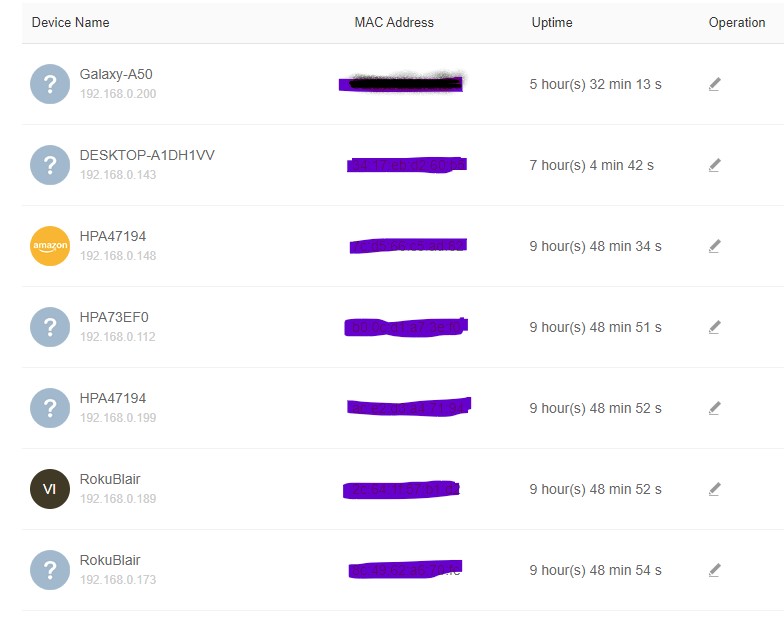
When I log into my router and have it show me connections, I'm presented with a list that includes: Mac, I/P and device name.
If the router has access to the device name,

MacList.jpg

Two more points, then I'll stop asking.
The dns.gethostentry(ip of cell on LAN) worked in 2018 when I first developed my app. Since, it retruns No Such Host.
Second, there are about 6 online apps that use mac to look up vendor, NONE can find the vendor of my Galaxy iphone but the router did.
Someone has the answer........

  1. Your top post asked for "device's name".
  2. Later reply muses about dns.gethostentry failures. (not presented as "why does this fail now?")
  3. Later you may be asking but didn't something else.
  4. Finally you tell about the old MAC addresse to vendor lookup which as you can guess with some billion devices out now can less than 100% a sure thing.

I don't mind discussing something but please make it clear what we are going to discuss. What is the question.

The first post asked, "Does anyone know of the appropriate DNS or other type
command that, fed an I/P or MAC will return the device's name?" Your reply said that neither
piece (MAC or I/P) contains the device's name. Well, somehow, the router only has those
two pieces and spits back the devive name when I ask what's connected. If I cannot get a
device's name in Visual Studio 2015, in VB code, please just say so and I'll close this darm thread.
Don't make it more complicated that you have.

Again no to getting this with the IP or MAC address. But in the interest of answering how a router gets that information:
Read https://en.wikipedia.org/wiki/Dynamic_Host_Configuration_Protocol#Options and pay attention to Field 12.

Since your app can (eventually) get some IP and MAC address you might be able to get vendor information but for the name, it appears you have to ask the router. And that is going to change from router to router as there is no known API for that.

What you may want to research is the OpenWRT source code to see how they did this in that router code. I'm leaving such research up to you.

Thank you for your assistance, I DO appreciate it.

Be a part of the DaniWeb community

We're a friendly, industry-focused community of developers, IT pros, digital marketers, and technology enthusiasts meeting, networking, learning, and sharing knowledge.