Hi all,
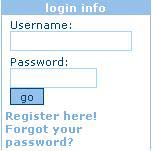
I am developing an website which is required to hide and show HTML. like if visitors user and password are correct then will show "You are logged in as "Namd " "Edit" "Logout" ,as
and if logout is pressed then "user name " "password " "forgot password ?" "registration"
as
very urgent . link www.csoftindia.net ,example :www.csoft.com
Subrata Nandi, Kolkata, West Bengal,India

subrata_ushasi 0 Unverified User

Dani AI
Generated
A quick, modern summary to sit above this thread (adds best practices that go beyond the original fix by and the solved logic issue reported by ).
Server-side display control
Keep the choice of which HTML to render entirely on the server: start the session, set a session flag when authentication succeeds, and check that flag at the top of the page to decide which block (login form or "logged in" panel) to output. Use session_start() and read/write $_SESSION rather than relying on ad-hoc request values. (php.net)
Practical pattern (check and escape)
<?php
session_start();
if (!empty($_SESSION['user_id'])) {
  // show logged-in HTML; escape any username before output
  echo htmlspecialchars($_SESSION['username'], ENT_QUOTES, 'UTF-8');
} else {
  // show login form (POST)
}
?>
Avoid $_REQUEST because its contents mix GET/POST/COOKIE and can be ambiguous; prefer explicit $_POST for form submissions. Always escape output for HTML contexts to prevent XSS. (php.net)
Security and backend checklist
- Store only hashed passwords (use PHP's
password_hash()/password_verify()), not plaintext. (php.net) - Prevent SQL injection with prepared statements (PDO or mysqli parameterized queries). (cheatsheetseries.owasp.org)
- Do not use the old
mysql_*extension — it is deprecated / removed; migrate to PDO or MySQLi. (wiki.php.net)
Logout and session hygiene
On logout, clear $_SESSION, delete the session cookie and destroy the session, and regenerate the session id after login to reduce fixation risk. Use session_regenerate_id() on successful login and session_destroy() on logout. (php.net)
Notes: these changes are small to add but make the login UI reliable and far more secure for long-term maintenance.
Recommended Answers
Jump to Post— pritaeas 2,276So what part are you having problems with ? Surely a web developer should be able to solve this.
Jump to Post— pritaeas 2,276You still haven't told what problem you have coding this... Show some code, with the problem you have.
All 8 Replies

pritaeas 2,276 Most Valuable Poster Moderator Featured Poster
So what part are you having problems with ? Surely a web developer should be able to solve this.
subrata_ushasi 0 Unverified User
First image is user and password: if visitor's user and password is correct then first image(actually HTML) will be hidden showing the second image(html) . when logged out using second image(actually html) then second will be hidden show the first image(html). Is it clear ?
Subrata
pritaeas 2,276 Most Valuable Poster Moderator Featured Poster
You still haven't told what problem you have coding this... Show some code, with the problem you have.
subrata_ushasi 0 Unverified User
ok again I am giving : Initially I had this html:
<tr>
<td width="1" bgcolor="#94C0E9"><img src="/img/ui/spacer.gif" width="1" height="1" border="0" alt="CSoft - Hybrid Graphics Editor and Raster to Vector Converter (R2V)"></td>
<td width="148" bgcolor="#ffffff" align="left" valign="top">
<table width="148" class="leftMenuText">
<form name="login" action="/include/logincheck.cfm" method="post">
<tr>
<td width="4"></td>
<td width="140">Username:<br><input class="inputbox" type="text" name="usr" size="15" maxlength="255"></td>
<td width="4"></td>
</tr>
<tr>
<td width="4"></td>
<td width="140">Password:<br><input class="inputbox" type="password" name="psw" size="10" maxlength="50">
<input type="hidden" name="menuid" value="2">
<input class="inputButton" type="submit" value="go">
</td>
<td width="4"></td>
</tr>
</form>
<tr>
<td class="logincontent" colspan="3">
<a href="/index.cfm?notPage=register&action=view&menuid=2">Register here!</a><br>
<a href="/index.cfm?notPage=password&action=view&menuid=2">Forgot your password?</a>
</td>
</tr>
</table>
</td>
<td width="1" bgcolor="#94C0E9"><img src="/img/ui/spacer.gif" width="1" height="1" border="0" alt="CSoft - Hybrid Graphics Editor and Raster to Vector Converter (R2V)"></td>
</tr>
when login is successful giving user and password then this html will be shown given below hiding the above html :
<tr>
<td width="1" bgcolor="#94C0E9"><img src="/img/ui/spacer.gif" width="1" height="1" border="0" alt="CSoft - Hybrid Graphics Editor and Raster to Vector Converter (R2V)"></td>
<td width="148" bgcolor="#ffffff" align="left" valign="top">
<table border="0" width="100%" cellspacing="4" cellpadding="0" bgcolor="#ffffff">
<tr>
<td class="leftLogin" align="center">
Logged in as:<br>
<b>
subrata nandi
</b>
<br>
<br>
<a href="/index.cfm?notPage=register&action=edit&menuid=2">Edit</a>
<!-- <a href="/login/register/edit.htm#2">Edit</a> --->
<!-- <a href="/login/register/edit_2.htm">Edit</a> -->
|
<a href="/include/logout.cfm">Log out</a>
<!-- <a href="/login/logout/logout.htm">Log out</a> -->
</td>
</tr>
</table>
</td>
<td width="1" bgcolor="#94C0E9"><img src="/img/ui/spacer.gif" width="1" height="1" border="0" alt="CSoft - Hybrid Graphics Editor and Raster to Vector Converter (R2V)"></td>
</tr>
when logged out ,this will show the login portion again hiding the logout portion
SUBRATA
subrata_ushasi 0 Unverified User
here is the code
<?php
if(!empty($_REQUEST['txtuser']) && !empty($_REQUEST['txtpassword']))
{
$txtuser=$_REQUEST['txtuser'];
$txstpassword=$_REQUEST['txtpassword'];
$usersql="select * from register where email='$txtuser' and password='$txstpassword'";
$userqry=mysql_query($usersql);
$userrow=mysql_num_rows($userqry);
$userres=mysql_fetch_array($userqry);
if($userrow>0)
{?>
<tr>
<td width="1" bgcolor="#94C0E9"><img src="/img/ui/spacer.gif" width="1" height="1" border="0" alt="CSoft - Hybrid Graphics Editor and Raster to Vector Converter (R2V)"></td>
<td width="148" bgcolor="#ffffff" align="left" valign="top">
<table width="148" class="leftMenuText">
<form name="login" action="/include/logincheck.cfm" method="post">
<tr>
<td width="4"></td>
<td width="140">Username:<br><input class="inputbox" type="text" name="usr" size="15" maxlength="255"></td>
<td width="4"></td>
</tr>
<tr>
<td width="4"></td>
<td width="140">Password:<br><input class="inputbox" type="password" name="psw" size="10" maxlength="50">
<input type="hidden" name="menuid" value="2">
<input class="inputButton" type="submit" value="go">
</td>
<td width="4"></td>
</tr>
</form>
<tr>
<td class="logincontent" colspan="3">
<a href="/index.cfm?notPage=register&action=view&menuid=2">Register here!</a><br>
<a href="/index.cfm?notPage=password&action=view&menuid=2">Forgot your password?</a>
</td>
</tr>
</table>
</td>
<td width="1" bgcolor="#94C0E9"><img src="/img/ui/spacer.gif" width="1" height="1" border="0" alt="CSoft - Hybrid Graphics Editor and Raster to Vector Converter (R2V)"></td>
</tr>
<?php
else
{
?>
<tr>
<td width="1" bgcolor="#94C0E9"><img src="/img/ui/spacer.gif" width="1" height="1" border="0" alt="CSoft - Hybrid Graphics Editor and Raster to Vector Converter (R2V)"></td>
<td width="148" bgcolor="#ffffff" align="left" valign="top">
<table border="0" width="100%" cellspacing="4" cellpadding="0" bgcolor="#ffffff">
<tr>
<td class="leftLogin" align="center">
Logged in as:<br>
<b>
subrata nandi
</b>
<br>
<br>
<a href="/index.cfm?notPage=register&action=edit&menuid=2">Edit</a>
<!-- <a href="/login/register/edit.htm#2">Edit</a> --->
<!-- <a href="/login/register/edit_2.htm">Edit</a> -->
|
<a href="/include/logout.cfm">Log out</a>
<!-- <a href="/login/logout/logout.htm">Log out</a> -->
</td>
</tr>
</table>
</td>
<td width="1" bgcolor="#94C0E9"><img src="/img/ui/spacer.gif" width="1" height="1" border="0" alt="CSoft - Hybrid Graphics Editor and Raster to Vector Converter (R2V)"></td>
</tr>
<?php }
}
?>
SUBRATA
Edited by Dani because: Formatting fixed
pritaeas 2,276 Most Valuable Poster Moderator Featured Poster
Use code tags next time please.
The logic of your if's appear to be in the wrong order, and your curly brackets appear in the wrong place. It should be something like this:
if(!empty($_REQUEST['txtuser']) && !empty($_REQUEST['txtpassword']))
{
  $txtuser=$_REQUEST['txtuser'];
  $txstpassword=$_REQUEST['txtpassword'];
  $usersql="select * from register where email='$txtuser' and password='$txstpassword'";
  $userqry=mysql_query($usersql);
  $userrow=mysql_num_rows($userqry);
  $userres=mysql_fetch_array($userqry);
}
else
{
  $userrow = 0;
}

if ($userrow == 0)
{
  // NOT LOGGED IN CODE HERE
}
else
{
  // LOGGED IN CODE HERE
}
Fill in the blanks.
Edited by pritaeas because: n/a
subrata_ushasi 0 Unverified User
Thanks pritaeas ,Solved.
pritaeas 2,276 Most Valuable Poster Moderator Featured Poster
Please consider to mark this thread as solved.
Be a part of the DaniWeb community
We're a friendly, industry-focused community of developers, IT pros, digital marketers, and technology enthusiasts meeting, networking, learning, and sharing knowledge.