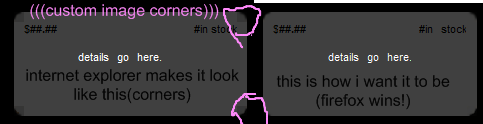
my page i screen capped what its doing in firefox and ie. ie its displaying wrong. can anyone help me what do i ned to change to make it display right? heres the image:

Dani AI

Generated

Short, practical checks before chasing CSS tricks.

I looked at the markup you posted — — and the first things to rule out are valid HTML and standards mode. I noticed an extra/unclosed <b> in your snippet; malformed tags can make IE mis-render nested elements. Validate the page with the W3C validator (https://validator.w3.org/) and ensure you have a standards-mode DOCTYPE (see https://developer.mozilla.org/en-US/docs/Glossary/Doctype).

If HTML/DOCTYPE are fine, try giving the offending wrapper "layout" in IE. A common quick fix is to apply an IE-only layout trigger such as zoom: 1 (or an explicit width/overflow) to the corner container that looks wrong. For example:

/* apply only where needed */
.tr { zoom: 1; }

That often fixes background-position/stacking misbehavior in IE6/7 without changing structure. Another approach is to simplify the corner technique (use a single container with controlled padding, CSS sprites, or modern border-radius with an image fallback).

Suggested workflow: 1) validate HTML and fix tags, 2) try zoom:1/overflow:hidden on the problematic wrapper, 3) remove nested wrappers temporarily to isolate which one breaks, 4) if still stuck, post a minimal example including DOCTYPE and a screenshot so and others can test quickly.

Recommended Answers

All 2 Replies

What code are you using to create the effect?

<div class="bl"><div class="br"><div class="tl"><div class="tr">
<table cellspacing="0" cellpadding="0" border="0" width="100%"><tr><td style="text-align:left;color:black;font-family:arial;font-size:8pt">
$<b>##.##<b></td><td style="text-align:right; color:black;font-family:arial;font-size:8pt"><b>#</b>in stock</td></tr></table>
<br>
details go here.
<br><br><br><br>

</div></div></div></div>
<div class="clear">&nbsp;</div>

///from stylesheet:
.bl {background: url(bl.png) 0 100% no-repeat #404040; width: 20em}
.br {background: url(br.png) 100% 100% no-repeat}
.tl {background: url(tl.png) 0 0 no-repeat}
.tr {background: url(tr.png) 100% 0 no-repeat; padding:10px}
.clear {font-size: 1px; height: 1px}
Be a part of the DaniWeb community

We're a friendly, industry-focused community of developers, IT pros, digital marketers, and technology enthusiasts meeting, networking, learning, and sharing knowledge.