(I know this is the C++ section but since Im not sure where to put this...)
I have a movie clip that with ActionScript I would like to do a gotoandStop on (for example) frame 3 of Layer 1 but I would like to keep playing Layer 2. How do I do this?

(I know this is the C++ section but since Im not sure where to put this...)
I have a movie clip that with ActionScript I would like to do a gotoandStop on (for example) frame 3 of Layer 1 but I would like to keep playing Layer 2. How do I do this?
Short version: is on the right track — layers in the authoring view are not independent timelines at runtime. To keep one animation running while another "freezes", the running animation must live in its own timeline (a separate symbol or loaded SWF) rather than just a different layer of the same clip.
Important detail that often trips people up: symbol type matters. A Graphic symbol is frame-synced to its parent timeline and will pause when the parent pauses. A MovieClip symbol has its own timeline and plays independently. In the Animate/Flash IDE, convert the artwork on the layer you want to keep animating into a MovieClip symbol, place an instance on the stage, give it an instance name, and control it from the parent timeline or code. See Adobe’s notes on symbols and the MovieClip class for the behavior and API details: and MovieClip reference.
Practical tips:
If the child clip still stops, check for any global or parent frame scripts that call stopping methods (or older AS2 helpers), verify the instance name/path is correct, and confirm the symbol type in the Properties panel.

The short answer here is you can't! At least not like this. When you call stop() at a particular frame in the timeline in a movieclip, it stops playback at that frame for all layers in that movieclip.
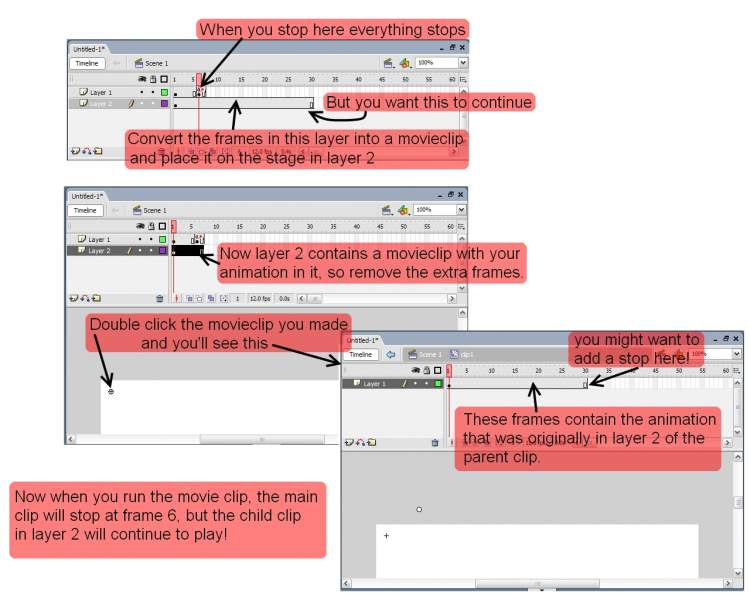
But if you put the frames for the animation in layer 2 into a separate movieclip and then drag the instance of the movieclip onto the stage in layer 2.
So layer 1 contains whatever you currently have and layer 2 now has a child movieclip containing your other animation; then where you've put a stop in layer 1 of the parent clip, the parent clip will stop playing. But the child movie-clip on layer 2 should continue playing as it has it's own separate timeline.
Not sure if I've explained this well enough, but it's kinda difficult to explain clearly!
Hopefully the attached image should help to explain things a bit better....
I've used frame 6 as a stopping point, just to space things out a bit in the image to give you an idea of what I mean.
In the child movie clip you create you might want to add explicit calls to play() and stop() at the start and end frames of the animation, to ensure that it plays and also to ensure it stops when finished. (unless you want it to repeat indefinitely, in which case you can omit the call to stop() at the end!)
I hope that vaguely made sense!
We're a friendly, industry-focused community of developers, IT pros, digital marketers, and technology enthusiasts meeting, networking, learning, and sharing knowledge.