Hello,

I'm migrating a site from Joomla to wordpress.
I hope you can help me with my problem..

Check this Image: http://i1235.photobucket.com/albums/ff429/rakwel10/samp1.jpg
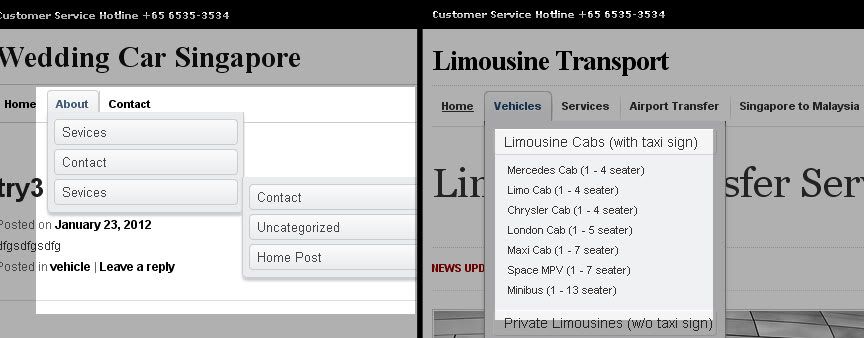
Focus on the navigation. I want to copy the navigation of the one on the right-side. sadly, my the current output is the one on the left-side.

How can I put the submenu of the submenu in a one dropdown hover?
to see the site I am copying, here is the link http://limousinetransport.com

I hope you can help me.
Thanks alot!

Rakwel

Dani AI

Generated

Your markup is fine — the nested ul.sub-menu structure WordPress outputs is exactly what you want. The visual difference between the two examples is purely CSS (and sometimes a menu script): the theme is positioning deeper .sub-menu elements as flyouts (absolute, shifted right) instead of letting them flow inside the first dropdown. To get a single, stacked dropdown like the example site, override those positioning rules.

Try adding this to your child theme or Appearance → Customize → Additional CSS:

/* top-level menu items keep relative positioning so dropdown can be absolute */
#menu-mainnav > li { position: relative; }

/* first-level dropdown (the panel that appears under a top item) */
#menu-mainnav > li > .sub-menu {
  position: absolute;
  left: 0;
  top: 100%;
  min-width: 220px; /* adjust to taste */
}

/* keep nested sub-menus inside that same dropdown flow (stacked) */
#menu-mainnav .sub-menu .sub-menu {
  position: static;
  left: auto;
  top: auto;
  display: block; /* show nested items stacked under their parent */
  margin: 0;
  padding-left: 12px; /* visual indent for deeper levels */
}

/* alternative: collapse deeper levels until their parent is hovered */
/* #menu-mainnav .sub-menu .sub-menu { display: none; }
   #menu-mainnav .sub-menu li:hover > .sub-menu { display: block; } */

Touch and keyboard note: :hover-only solutions break on touch devices. Add a small click/tap toggle (below) or use the theme’s mobile menu. Example jQuery toggle:

jQuery(function($){
  $('#menu-mainnav li:has(.sub-menu) > a').on('click touchstart', function(e){
    var $li = $(this).parent();
    if (!$li.hasClass('open')) { e.preventDefault(); $li.addClass('open'); }
  });
});

Testing checklist for : open DevTools, inspect a .sub-menu and look for position, left, top rules — override the most specific selector you find (or increase specificity in your CSS). Avoid using !important unless necessary. Put overrides in a child theme or the WP custom CSS area and clear caches after changes.

This is the structure of my navigation. Its the standard navigation structure of wordpress twentyeleven theme

Go toggle plain text to see it better...

<nav id="access" role="navigation">
	<h3 class="assistive-text">Main menu</h3>
		<div class="skip-link"><a class="assistive-text" href="#content" title="Skip to primary content">Skip to primary content</a></div>
		<div class="skip-link"><a class="assistive-text" href="#secondary" title="Skip to secondary content">Skip to secondary content</a></div>

		<div class="menu-mainnav-container">
			<ul id="menu-mainnav" class="menu">
				<li id="menu-item-67" class="menu-item menu-item-type-post_type menu-item-object-page current-menu-item page_item page-item-43 current_page_item menu-item-67"><a href="http://localhost/WeddingCarSG2/?page_id=43">Home</a></li>
				<li id="menu-item-68" class="menu-item menu-item-type-post_type menu-item-object-page menu-item-68"><a href="http://localhost/WeddingCarSG2/?page_id=29">About</a>
					<ul class="sub-menu">
						<li id="menu-item-99" class="menu-item menu-item-type-post_type menu-item-object-page menu-item-99"><a href="http://localhost/WeddingCarSG2/?page_id=74">Sevices</a></li>
						<li id="menu-item-98" class="menu-item menu-item-type-post_type menu-item-object-page menu-item-98"><a href="http://localhost/WeddingCarSG2/?page_id=87">Contact</a></li>
						<li id="menu-item-76" class="menu-item menu-item-type-post_type menu-item-object-page menu-item-76"><a href="http://localhost/WeddingCarSG2/?page_id=74">Sevices</a>
							<ul class="sub-menu">

								<li id="menu-item-90" class="menu-item menu-item-type-post_type menu-item-object-page menu-item-90"><a href="http://localhost/WeddingCarSG2/?page_id=87">Contact</a></li>
								<li id="menu-item-96" class="menu-item menu-item-type-taxonomy menu-item-object-category menu-item-96"><a href="http://localhost/WeddingCarSG2/?cat=1">Uncategorized</a></li>
								<li id="menu-item-97" class="menu-item menu-item-type-taxonomy menu-item-object-category menu-item-97"><a href="http://localhost/WeddingCarSG2/?cat=9">Home Post</a></li>
							</ul>
						</li>
					</ul>
				</li>
				<li id="menu-item-100" class="menu-item menu-item-type-post_type menu-item-object-page menu-item-100"><a href="http://localhost/WeddingCarSG2/?page_id=87">Contact</a></li>
			</ul>
		</div>			
</nav>
Be a part of the DaniWeb community

We're a friendly, industry-focused community of developers, IT pros, digital marketers, and technology enthusiasts meeting, networking, learning, and sharing knowledge.