I can't seem to figure out why a certain portion of my home page elements are getting styled after the page loads. It's just a small delay (less than a second), but I would like to fix the issue. I've attached a before and after picture. Any tips would be appreciated. Is this an issue because I am apllying this style property: "list-style-image" and hence the delay in downloading the image? According to Chrome's dev tools, the images are downloaded before the "Load Event" fires. So, what am I missing?

My site's homepage: http://www.itgeared.com/
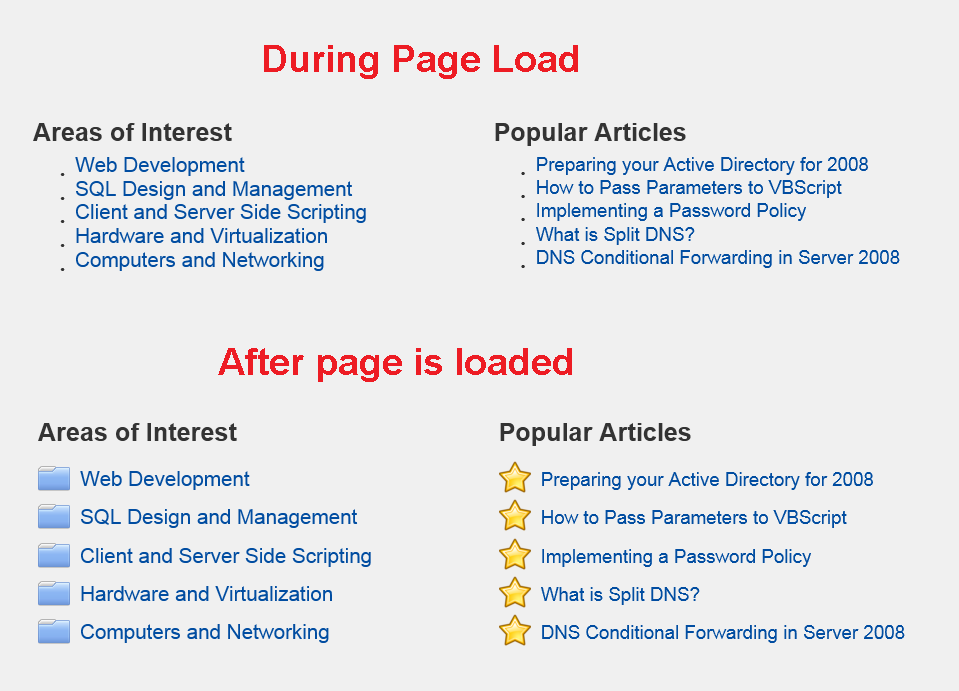
snip

HTML sample for this section:

<div class="def" id="defRightTop">
    <span class="defSpan">Popular Articles</span>
    <ul class="def" id="defFavorites">
        <li><a href="#">Preparing your Active Directory for 2008</a></li>
        <li><a href="#">How to Pass Parameters to VBScript</a></li>
        <li><a href="#">Implementing a Password Policy</a></li>
        <li><a href="#">What is Split DNS?</a></li>
        <li><a href="#">DNS Conditional Forwarding in Server 2008</a></li>
    </ul>
</div

CSS for this section:

.defSpan {font-size:1.75em;font-weight:bold;}
#defTopHeading {font-size:1.75em;margin-top:-10px;}              
#defFavorites {
list-style-image: url('../images/website/favorite.png')}

#defRightTop{
float:right;width:53%;}

.def li {
margin-bottom:0px;}

.def a {
font-weight:normal;
font-size:1.3em;
position:relative;
bottom:7px;
border:1px solid transparent;
padding:1px;
background-color:transparent;
margin-bottom:10px;}

.def a:hover {
color: #333333;
text-decoration: none;
border:1px solid #CCCCCC;
padding:1px;
background-color:#E6E6E6;}

Dani AI

Generated

A couple of focused, low-effort approaches that avoid the “marker appears late” jank and keep the semantic list intact.

Start by replacing the browser marker with a CSS pseudo-element so the layout can reserve the icon space immediately. This avoids the browser waiting to paint a list marker after an external resource finishes:

.fav-list { list-style: none; padding-left: 0; }
.fav-list li { position: relative; padding-left: 26px; }

.fav-list li::before {
  content: "";
  position: absolute;
  left: 0;
  top: 50%;
  transform: translateY(-50%);
  width: 18px; height: 18px;
  background: url('/images/icons-sprite.png') no-repeat 0 0;
  background-size: auto;
}

For very small icons, avoid an extra request entirely by embedding the image as a data URI (base64 PNG or compact SVG). That guarantees the icon is available as soon as the CSS is parsed:

.fav-list li::before {
  background-image: url('data:image/png;base64,PUT_BASE64_HERE');
}

Other practical tips when debugging and hardening this area:

  • Add explicit width/height for the marker area so the browser never needs to reflow when the image appears.
  • Use DevTools’ Network throttling to reproduce the flash and check the waterfall for any late-loading CSS/JS that might delay style application.
  • Consider inline SVG or an icon font for zero-request scaling and crisp rendering; keep semantics by using real <ul>/<li> markup.
  • A small head preload helps in modern browsers: <link rel="preload" as="image" href="/images/icons-sprite.png">.

Credit to for the original debug notes and to for pointing toward resource strategies; the above focuses on eliminating the repaint/reflow rather than restructuring the markup.

Recommended Answers

All 5 Replies

Looks indeed like the initial loading of the images. No longer an issue once the website/images are cached.

Thanks for looking into this. Is there a better approach in your opinion? Possibly using one sprite instead of 4 images, then just placing the image in front of the list items instead of swapping out the bullet itself? since the images files are so small, i didnt think this would be an issue.

I would be interested in your thoughts before I spend the time going down this path to simply have the same result or worse.

A single sprite could work, or a separate domain for your images (or a CDN) so they will load simultaneously.

I'll work on this some more and give that a try, thanks!

So, after further investigation and trying different techniques, it appears that something wtih the use of lists+styling+images, is slow to render. I proceeded to resolve this issue by replacing the list element with images next to hyperlinks. Styled them in a similar manner. Problem solved.

Be a part of the DaniWeb community

We're a friendly, industry-focused community of developers, IT pros, digital marketers, and technology enthusiasts meeting, networking, learning, and sharing knowledge.