Hello! I am modifying a user panel for someone, I have been asked to center an element on the page. It is assigned with the class "joins" i've looked through all of the css files and I can't seem to find where it is styled. is there someway i can figure out what file it is styled in with chrome developer tools or something? Cause I cannot find where it is styled! Thanks for any help, means alot!

Dani AI

Generated

@great job tracking this down, , and thanks to for pointing people toward DevTools. A few concise workflows and quick checks will save time next time the rule seems to be hiding.

  • Project search first: run a repo-wide text search for .joins (IDE search, grep -R, or your OS file search). If your CSS is compiled/concatenated, search the generated bundle too.
  • DevTools global search (Ctrl+Shift+F) will scan all loaded sources and is handy for classes that come from external bundles; see Chrome DevTools search.
  • If nothing shows, check inline <style> tags, script-inserted styles, or preprocessor files (.scss, .less). Also look for source maps if the site uses SASS/LESS so you can map back to originals.

Quick console check to inspect final values:

var el = document.querySelector('.joins');
getComputedStyle(el).getPropertyValue('display'); // or 'margin-left', etc.

That returns the computed values so you can see exactly what the browser is using.

Common centering fixes and why they fail:

  • Horizontal block center: element needs a set width and margin: 0 auto;.
  • Inline-level or text content: text-align: center; on the parent.
  • Modern layout: display: flex; justify-content: center; (and align-items: center for vertical).
  • Absolutely positioned: left: 50%; transform: translateX(-50%);.

If a center rule is present but not working, check for display type, float, position, width (100% prevents margin centering), higher-specificity selectors or !important, and media queries that change rules. For a short tutorial on centering patterns, see MDN’s centering guide: .

Can you provide a URL?

I found it in the file, but it would still be useful to know how to find it quickly.
Here is the link if you really need it:
I don't even know what it is, i'm just redesigning stuff lol.

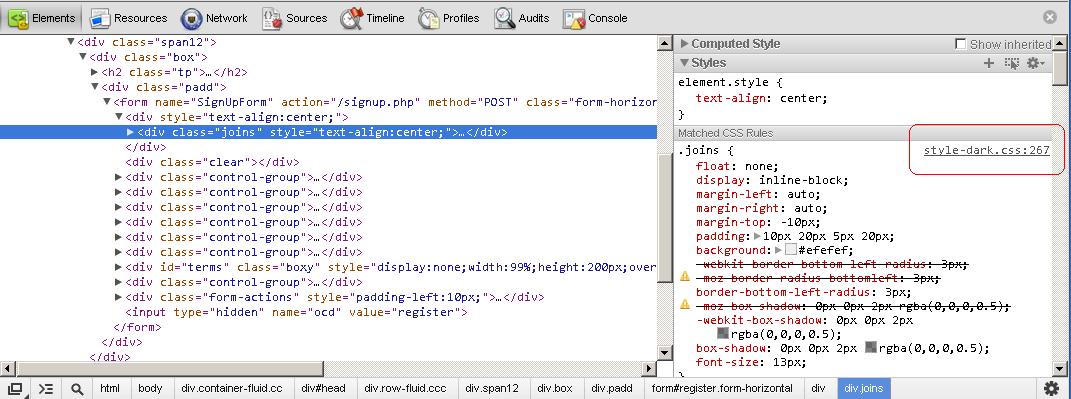
So yes, Google Chrome's Dev tools is a big help for this kind of stuff. If you see in the picture that I posted, on the right side, the tool indicates exactly where in the CSS file the styles are coming from.

capture5

I surrounded the information with a red box in the picture. In chrome, if you click on that link, it takes you to the contents of the style sheet.

OH! Thanks for that, big help I'm sure I will need that a few more times. Thanks!

Be a part of the DaniWeb community

We're a friendly, industry-focused community of developers, IT pros, digital marketers, and technology enthusiasts meeting, networking, learning, and sharing knowledge.