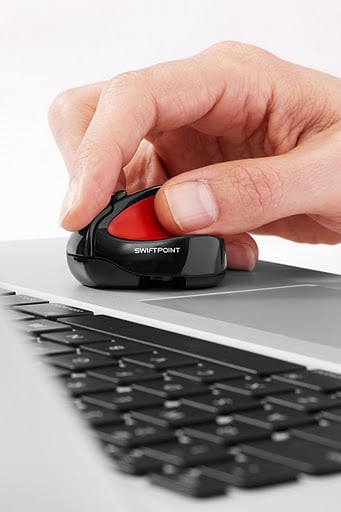
The Swiftpoint Mouse is primarily designed with one purpose in mind, and that is to replace the touchpad on your laptop or netbook. Indeed, unlike any mouse I've ever used (and that includes the smallest of portable units) the Swiftpoint can be comfortably operated within the confines of the palmrest alongside the existing touchpad. Actually, it's even more amazing than that as I am currently using this clever bit of geek design quite comfortably on the very small area of palmrest next to the touchpad on my netbook - and that's an area of just a couple of square inches.
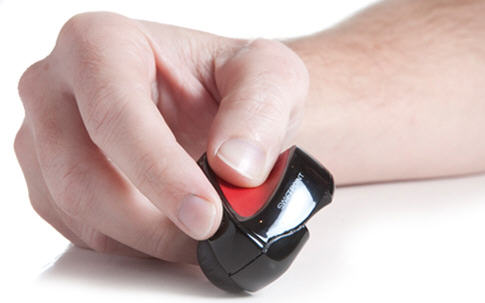
The efficiency with which the Swiftpoint works in such constrained circumstances is not just down to the small size of the device at just 57mm x 42mm and weighing less than an ounce, but also courtesy of the innovative design. Instead of holding it like a traditional mouse, or cradling it like a trackball, you grip the Swiftpoint as if it were a pen. Sure, it takes a while to get used to the idea of this (in fact it took me all of a couple of minutes to be perfectly comfortable working this way) but boy is it worth getting your head, and your fingers, around. A word of warning though, a left-handed friend of mine was totally unable to use the Swiftpoint so it's for right handed folk only.
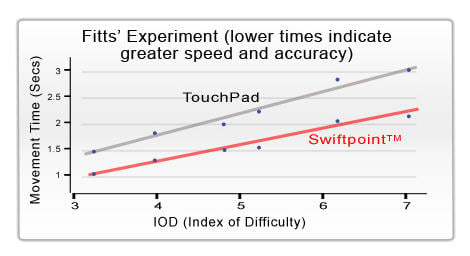
Whether you measure the success of such a thing by how comfortable it is in use, how portable or how efficient, there is little bad that can be said about it. One independent test of a group of university students suggested the Swiftpoint Mouse is in the region of 30 to 40 percent more efficient than a touchpad. And don't think that you are just getting the bare bones of a mouse with this thing, in the petite form there's even a scroll wheel.
The ease of use goes beyond the pen-like grip and an ability to work in the smallest of spaces. How about the fact that it only takes a 30 second rapid charge to provide enough power to run for an hour, and a full 90 minute charge sees the Swiftpoint running for a couple of weeks or more. Oh, and the charging is done via a micro USB 'dock' which protrudes just enough from your laptop for you to clip the mouse onto it - making it a useful storage place for when you are not using the mouse. The dock also serves as the wireless receiver for the mouse, providing a 30 feet of active range. The ultimate measure of how good the Swiftpoint is, though, the simple fact that ever since I've had one the touchpad of my netbook has remained a finger free zone.
But it's not all sweetness and light, and the biggest problem I have with this small mouse is the size of the outlay: at £59.99 here in the UK where I live, that represents about 20 percent of the cost of the netbook I am using it with. There's no denying that it's a great mouse, and there's no doubting it's a far better device than the somewhat unresponsive touchpad built into the netbook itself, but justifying the price is where the doubts start to creep in. Especially considering the US pricing of $69.99 works out to around £40 at which point it starts to become a lot more acceptable. That said, given the time of year, the Swiftpoint mouse is the ideal little gadget to add to your Santa wish list, or maybe just buy as a much deserved treat for yourself this festive season.
You can see the Swiftpoint Mouse in action here: [youtube]nswGDGy599w[/youtube]