I run a tight ship. I mean I thought I run a tight ship. I have a hardware firewall with latest upgrades, software firewall, anti-virus, anti-spy, registry-lock, etc. updated frequently. I run them daily, I don't click on links directly, I don't visit dubious sites from this particular machine, and I don't share things with the other machines...

Yet... Something just happened.

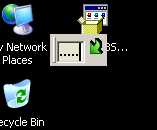
See that little attachement?

I get that pop-up intermitently. When hovering over the green arrow, it has a description show up "Finalize string". Sometimes the periods (dots) appear in a text field I am working in, and its own window does not show.

There is no process or hidden process that I can find when this window shows. Anyone have seen this before?

I ran three different anti-malware software packages... nothing.

What else could it be?
Dani AI

Generated

A compact troubleshooting primer for the intermittent “little attachment” overlay described by and echoed by others here. The behavior—an anchored-looking graphic that sometimes inserts dots into a text field but leaves no visible process—is most often an in-page overlay or an injected browser UI (script/extension/helper) rather than a separate Windows dialog. Below are focused, verifiable steps to identify and remove it.

Reproduce and inspect: capture a screenshot, open the browser’s Developer Tools (F12) and use the element picker. If the overlay highlights in the DOM it’s page/script-driven: right‑click the node, “Delete element” to test removal, then check the Network tab for the script or resource that created it. If nothing appears in the DOM, use Process Explorer to map window ownership (the crosshair “Find Window’s Process” tool) and look for injected DLLs. Links: Process Explorer · Autoruns.

Isolation and removal: disable all browser extensions/add-ons and test with a clean profile or a portable browser. Run targeted cleaners such as Malwarebytes and AdwCleaner to remove common injectors. If the overlay is site-specific (as suggested), blocking at the browser level with an element blocker like uBlock Origin or adding the offending host to the hosts file is effective.

Further checks and cautions: inspect startup items and scheduled tasks with Autoruns, test in Safe Mode with Networking, and try a separate Windows user to determine whether the injector is per-user. As observed, overlays sometimes reveal a tiny close control only when hovered—use the inspector to locate that element. Avoid clicking unknown overlays; collect DOM or network evidence before removing or taking aggressive remediation steps.

Recommended Answers

All 8 Replies

I had a similar problem, it wasn't the box that you mentioned but it was a video of a grandma kicking a baby, there were no processes/hidden processes to speak of and no installed programs nor registry entries. How I got rid of it was pure luck, normally the mouse moves over it like its part of the background but one time I saw something flash when I moved over it so I tried a couple more times and a frame appeared around it with a small almost invisible X in the corner and click... gone. Don't know if there is a similar situation with your bug.

i need help with the same as the 1st bug
HELP me! please

its to do with IE8 i think

i only got it after trying IE8 beta

IE8 beta must be just a glorious browser. :)

its not IE8 becuase im using Firefox and i got it.

wierd

I have this also,and use IE7. I believe it has to do with the web site. Because I don't get it on all sites.
It's just another means of advertising income.

I have this also,and use IE7. I believe it has to do with the web site. Because I don't get it on all sites.
It's just another means of advertising income.

Please can you actually say which virus/bug you have and what do you mean in the last sentence?

Anyway... i may have killed it because it is now not appearing!!!:-O
What i did: Run a total computer scan with "Kaspersky 7.0". It's not free by the way...

Can you tell me if you solve it the same way i did. It would be helpful.
Thanks:twisted:

Be a part of the DaniWeb community

We're a friendly, industry-focused community of developers, IT pros, digital marketers, and technology enthusiasts meeting, networking, learning, and sharing knowledge.