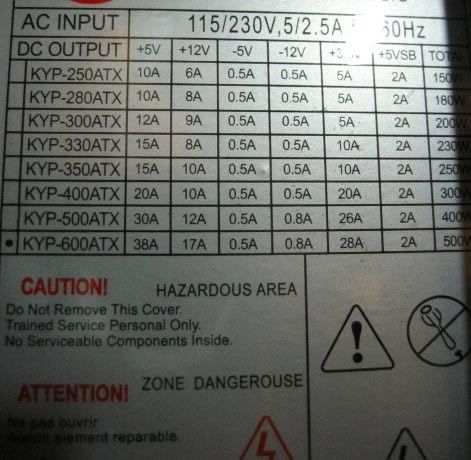
This sounds like such a silly question, but is there a way for me to tell how many watts my current power supply is?
I'm interested in getting a new video card but I don't know if I meet the requirements for that :\

Dani AI

Generated

A short, practical summary and what the thread missed.

As advised, the PSU sticker is the starting point, and ’s caution about very high‑end cards is useful context. The label shows total wattage and the DC rail specs, but three things matter beyond the headline wattage: which 12‑volt rail(s) the card will draw from, whether the PSU actually has the needed physical power connector, and the real-world health/quality of the supply (age and budget brands can under‑deliver).

Connector clarification (the source of the OP’s confusion). The “hard disk drive power” plug is the standard 4‑pin peripheral Molex used by HDDs and optical drives; it is larger and different from the much smaller floppy (Berg) power plug. AGP boards that ask for a drive‑style power lead expect a Molex (or a proper Molex‑to‑GPU adapter rated for the current). Do not try to use a floppy power lead for a GPU.

Quick verification checklist (no bench tools required, then fallback options):

  • Identify the card’s extra power socket from the card/manual and confirm which physical plug it needs.
  • Open the case and count available Molex peripheral connectors; make sure one is free or available via a proper adapter.
  • Read the PSU label to see whether +12V capacity is shown as a single combined rating or split across multiple rails; if split, find the PSU model/spec sheet to confirm usable combined +12V output.
  • If margins look tight, use a PSU tester or multimeter to check +12V under load, or choose a known‑good replacement PSU — that’s the safest option when specs are borderline.

This covers the ambiguous bits in the replies and explains the “power dongle” note; it also highlights why a marginal difference on paper isn’t an automatic pass without checking connectors, rail layout, and PSU condition.

Recommended Answers

All 5 Replies

Not too sure if theres a way of finding out using any software, but you could take a look at the power supply. It will have a sticker on it which states the complete specs of the unit, including the total wattage and the wattage on each rail.

Not too sure if theres a way of finding out using any software, but you could take a look at the power supply. It will have a sticker on it which states the complete specs of the unit, including the total wattage and the wattage on each rail.

Just took a look, theres one sticker on it, I took a photo. http://img.photobucket.com/albums/v445/VivaDaWolf/ps.jpg

Does this mean I have a 500w ps? Not sure what all the other numbers mean :eek:.

Yes, your PSU is a 500W one. The rest of the numbers tell you how much current is available on the different rails. it's38Amps on +5V, 17Amps on +12V...etc etc etc.

So, I'd say you're good to go for a new video card. Which one did you intend to get, by the way?

Unless you are planning to buy an 8800 GTX, you should be ok. From personal experience the GTX takes about 175 watts of my 750 Watt power supply, with my other accessories, this pretty much drains about 600 watts :(

"BFG GeForce 6800 GS OC / 256MB GDDR3 / AGP 8x" which Im hoping..is okay >_< It's not so costly and I don't have a pci-e slot.

"

  • CPU with processor speed of 700MHz or higher
  • 128MB of RAM
  • CD or DVD-ROM drive
  • An available AGP 2.0 slot or higher
  • 35MB available hard disk space (50MB for full installation)
  • Microsoft® Windows® 98, ME, 2000, XP, NT4.0 with service pack 5 or 6
  • A minimum 350W system power supply (with 12V current rating of 18A or more)
  • An AGP compliant motherboard. Some motherboards violate the AGP specification and therefore this card may not physically fit in some systems
  • An available hard disk drive power dongle (smaller floppy disk drive connector is not sufficient)"

I dont know what the last part means :X And... looking at it again, it needs 18a... when mine is 17a? ... :-|

Be a part of the DaniWeb community

We're a friendly, industry-focused community of developers, IT pros, digital marketers, and technology enthusiasts meeting, networking, learning, and sharing knowledge.