Hi
I need to do a repair but find that my Toshiba Xp machine wont load the Product Recovery Disc.
I have since found that it wont load any discs at all.
Recently I connected my MP3 Player by USB to the machine and I am wondering if this could be related to the problem?
The idea was to charge up the MP3 Player.
When it was done I just disconnected it, but I am now wondering if there is a procedure to be gone through before disconnecting a USB device.
Sometimes I connect to Media Player and sometimes to Windows Explorer.
Any help would be appreciated, and I am more than happy to supply any further information.
The repair is to the .Net Framework, and I have been given instructions by Microsoft but, as I say, unable to load recovery disc.

Dani AI

Generated

Quick safety note based on ’s report that the Toshiba disc displayed “Wrong Machine”: do not run the recovery disc when it warns that message — OEM recovery media will overwrite the drive and can irreversibly delete data. The warning usually means the recovery image is tied to a particular model/service tag or that the disc isn’t a generic factory installer.

A concise, practical checklist to separate hardware from software causes:

  1. Check firmware/boot level first — enter the laptop Setup/Boot menu (common keys on Toshibas are F2 or a boot-menu key) and confirm the optical drive appears. If the BIOS does not see the drive, this is almost certainly a hardware issue.
  2. Test outside Windows — try a known-bootable disc (or a different OS rescue disc) and see whether it will boot. If it boots, the problem is Windows-level. If it doesn’t, the drive or its connection is suspect.
  3. Test the disc on another PC and test a known-good disc in the Toshiba. That discriminates between a bad media and a failing drive.
  4. In Windows check Device Manager (Control Panel → System → Hardware → Device Manager). Show hidden devices, uninstall any ghost CD/DVD entries, then Scan for hardware changes. Also review the System event log for IMAPI/ATAPI errors.
  5. If comfortable with a cautious registry step (back up first via File → Export), inspect the class key for CD/DVD devices at
    HKEY_LOCAL_MACHINE\SYSTEM\CurrentControlSet\Control\Class\{4D36E965-E325-11CE-BFC1-08002BE10318}
    and export the key before removing UpperFilters/LowerFilters values if present; reboot afterward.

Extra notes: connecting an MP3 player by USB and unplugging it normally won’t disable an optical drive, so it’s an unlikely root cause. If internal repair is unwanted or impractical, a USB external DVD drive is an inexpensive workaround for running recovery media. For the recovery-disc mismatch, obtain the correct media or guidance from Toshiba (provide model/service tag to support) rather than forcing the disc to run.

Recommended Answers

All 15 Replies

I have since found that it wont load any discs at all.


are you meaning it won't boot to the recovery ,dose the computer still work ,will it still boot to winxp , the toshiba disk will wipe harddrive and put it back to day one when you first bought it ,loss of all data .
if you need to boot to the recovery disk ,you may need to go into the bios setup to change the boot order to cdrom

Thanks.
Machine is working normally, just it won't load discs for some reason.
Even if I insert a film on disc it won't load.

ok, so its any disk not just the recovery disk as stated in first post ,what happens if you go to mycomputer and click on the cdrom icron with the disk installed .
you might just need the auto run fix tool
http://www.softwarepatch.com/windows/xp-autorun.html

Clicked on My Computer but did not see CD Rom icon.
Clicked on your link for Driver Detective.
While it found my machine, Toshiba, it did not list the model number, M50 L192, so I could not proceed.

Finally got model sorted on Driver Detective.
It advises that updates are needed, but this appears to be a service that you have to pay for.
Is that correct?
I wasn't looking for a paid service.

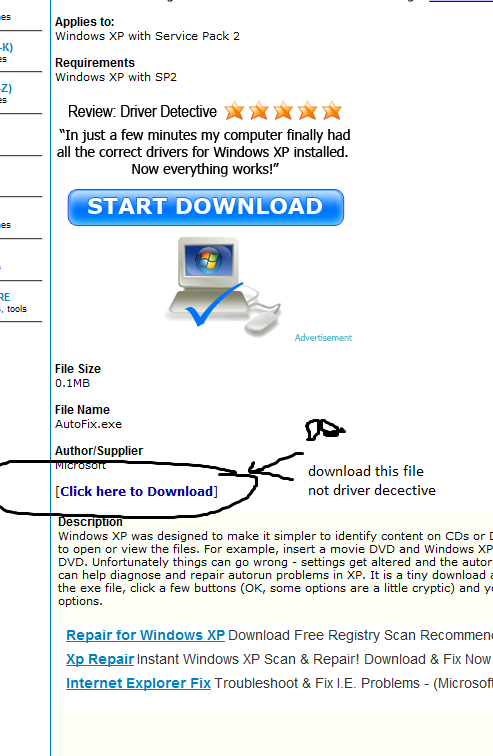
Hi, i suggester you download autofix.exe not driver detective ,sorry about the misunderstanding , driver dective is just an advertising on the page with the autorun exe ,see attached image

Sorry.
You did say autofix.
Ran that and rebooted, but discs or DVD's still aren't playing.
It is just 2 am herein Ireland so I will get some sleep and try again tomorrow.
Please let me know if you have any other suggestions.
Thanks again.

try this fix ,from microsoft site ,go to link and click run now

Thanks.
Said Fix It encountered a run time error and to try again later.
Will try again when I get home from work.
Hopefully error will be sorted by then.

After numerous attempts I am still getting
runtime error.
Ran registry fix, but that did not solve it.

hi, check this link and if you fee comfortable going into the registry to check on upper and lower filters .

Hi
Thanks for your patience.
I would be terrified of the registry but since I last wrote there has been a slight improvement, in that I am getting a message on the screen when the Toshiba Recovery Disc is inserted.
I'll just go through what it says;
Toshiba (D)
This disc contains more than one type of content.
What do you want windows to do?
Print the Pictures using photo wizard
Copy folders to a folder on my computer
Copy disc using Sonic record Now
Add Files Using Sonic
View, find, fix and share photos
Play using WMP
Take No Action.

There is a lot of talk about pictures for a recovery tool.
Maybe you could advise please.

Just got a Warning from the disc saying Wrong Machine - this disc is intended for Toshiba Personal Computers and your hard drive will be permanently deleted if you don't remove it!

The mystery deepens.
The machine was with Toshiba agent 3 years ago, while under guarantee, for a motherboard replacement and that is the recovery disc that came back with it.
Think I am going to have to talk to Toshiba.
Also, sometimes it is difficult to authenticate PC with windows - as if it is not recognised.
The machine was bought in PC World in Dublin, and serviced by local Toshiba agent.
I bought from them an extended warranty which expired earlier this year.

Hello,

Have you added any extra partitions, I remember when I was trying to restore factory settings it didn't like the fact I had added extra partitions; just a thought.

Have you backed up the disk just in case your attempts end up with you having a disk without an OS on?

- Let us know how it goes

No, I have made no alterations.
I really don't know what's going on.
Since the machine came back from Toshiba 3 years ago I have often had difficulty convincing Microsoft that I am using genuine Windows.
And now this.
Just as well that it is late at night because I feel like going to Toshiba right now and telling them what I think of them.
I restarted the laptop, as recommended in the message, and everything came back fine.
Toshiba will have a lot of explaining to do.

Be a part of the DaniWeb community

We're a friendly, industry-focused community of developers, IT pros, digital marketers, and technology enthusiasts meeting, networking, learning, and sharing knowledge.