striker_1 0 Light Poster

In windows XP most of viruses spread through Autorun (Autorun.inf) Function in windows. It is better to Disable Autoruns in Xp. I am not sure about windows Vista but In WindowsSeven and above this feature is already blocked so you dont need to do anything. Ok Here are the Two Mathods that show you "How to block autorun files".

Mathode 1 (Easy)

Use A Software to Block Autoruns. I recommend Panda USB Vaccine

Mathode 2 (A little bit Difficult)

1. Type regedit in RUN or Startmenu searchbox and press Enter. It'll open Registry Editor.

2. Go to following key:

HKEY_CURRENT_USER\Software\Microsoft\Windows\CurrentVersion\Policies\Explorer

If the above key doesn't exist, create it.

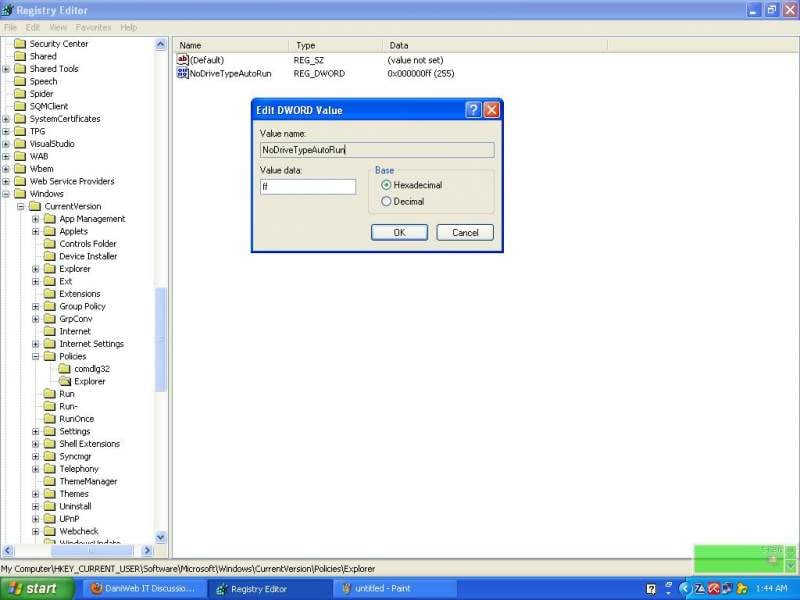
3. In right-side pane, create a new DWORD value NoDriveTypeAutoRun and set its value to FF ((As Shown in Screenshot in the attachment)

If the above key doesn't exist, create it.

5. If you want to restore the Autorun functionality, simply change the DWORD value to given blow:

Windows 2000, Windows Server 2003: 95

Windows XP, Windows Vista, Server 2008: 91


PS) If you want to disable Autorun functionality for all users in your system, use the "HKEY_LOCAL_MACHINE" instead of "HKEY_CURRENT_USER" mentioned in Step 2.
Dani AI

Generated

Good point from to target the autorun vector—the registry tweak and a small “USB vaccine” utility are commonly used. A few clarifications and practical alternatives will help make the change more reliable and reduce surprises on XP systems.

AutoRun versus AutoPlay: AutoRun is the mechanism that can cause a program listed in an autorun.inf file to launch automatically; AutoPlay is the dialog that suggests actions based on media content. Turning off AutoRun removes the automatic launch path but does not stop a user from manually running a malicious file, nor does it replace up-to-date patches and anti-malware. Disabling AutoRun is a strong mitigation against removable-media worms, but it is only one layer.

Platform options and verification: XP Pro can be hardened via Group Policy (the administrative templates include a policy to disable autoplay/autorun for drives). XP Home lacks the Group Policy editor, so the same outcome requires either a small helper utility or the registry approach already posted by . After making changes, audit the system with a trusted startup/autorun scanner (for example, Sysinternals Autoruns) to confirm there are no active autorun.inf entries or unexpected startup items.

Practical checklist and troubleshooting: keep Windows Update and antivirus signatures current; run an offline/rescue scan if autorun behavior persists; use a non-administrator account for daily work; enable visible file extensions so executables are obvious; avoid running unknown files from removable media. Persistent autorun activity after configuration usually indicates resident malware or third-party software that restores the behaviour—in that case a full cleanup from a rescue environment is advised.

Be a part of the DaniWeb community

We're a friendly, industry-focused community of developers, IT pros, digital marketers, and technology enthusiasts meeting, networking, learning, and sharing knowledge.