:!: Well... erm yea. Everytime I restart my computer my homepage changes to this exotic porn type website and some links (xxx porno type) into my favorite. Please help me. I have used the lavasoft adware remover many times and it did not help. Thanks!

Dani AI

Generated

Persistent homepage resets usually mean something on startup is reapplying the setting rather than a one-off browser preference change. The anti-spyware suggestions from and the update reminder from are sensible first steps, and ’s request for a HijackThis log is the usual diagnostic next move. If the homepage comes back after every reboot, the culprit is commonly a startup item, a scheduled task, a Browser Helper Object (BHO) or a registry/hosts change that runs at logon.

Quick checklist (safe to inspect before making changes):

  • Inspect Internet Explorer shortcut properties (Target should end in iexplore.exe with no extra URL).
  • Check startup entries (msconfig -> Startup) and Scheduled Tasks for unfamiliar items.
  • Verify proxy/LAN settings in Internet Options -> Connections -> LAN Settings.
  • Look at the hosts file and common IE start-page registry keys:
hosts file: C:\Windows\System32\drivers\etc\hosts
IE start page keys:
  HKCU\Software\Microsoft\Internet Explorer\Main\Start Page
  HKLM\Software\Microsoft\Internet Explorer\Main\Start Page
BHO location:
  HKLM\SOFTWARE\Microsoft\Windows\CurrentVersion\Explorer\Browser Helper Objects

Safe remediation workflow: boot into Safe Mode (F8), create a System Restore point or export the registry before edits, then run fully updated anti-malware and a rootkit scanner. Produce a HijackThis log to identify entries such as O2 (BHOs), O4 (run at startup), and R1/R0 (start page) — these codes point to where the change is happening. Disable suspicious startup items in msconfig first rather than deleting; once identified, remove the responsible file/registry entry and retest.

Prevention and cautions: avoid deleting unknown registry keys without a backup, consider creating a restricted user account for the person blamed (safer browsing), and if the infection resists removal a repair install or fresh profile/OS install may be faster and cleaner. The thread replies already covered good scanner choices and the basic browser-homepage change; the steps above focus on finding what re-applies the setting on restart.

Recommended Answers

All 11 Replies

Windows xp

I need help, im quite young and get blamed for this stuff :[

Please learn how to post before asking a question.

Rule Number 1: NEVER EVER name a thread "URGENT." Be descriptive in your thread names.
Rule Number 2: NEVER double/tripple post like that. Use the "edit" button. What you're doing is just spamming.

If you disobey these rules your questions will be ignored by others and you will be warned. Keep doing it afterwards and you'll be banned.

Download & install Adaware, update it & in settings make sure to tick; scan within archives, deep scan registry & then in 'Tweak' tick automatically try to unregister objects prior to deletion. Run the scan & place a check next to everything it finds & remove them.
Download Spybot S & D, update & run it. Remove everything it finds. Within this program there is an option to 'immunise'. do this. There is also a link to spywareblaster, follow the link, download & install it, then update it. This program runs in the background to keep those little bugs out.


If that doesn't fix it, download HijackThis & unzip it into it's own folder (not a temporary one) then run it & press the scan button. When the scan is finished the scan button will change to 'save.' Save the log to a text file & copy it then paste it back here.

Are there any other things that are on your computer that you did not download or install? such as, a promt @ start up asking for your state or area code? Are there any internet shortcuts that come up on your desktop dispite removal?


"We hates porn viruses, we hates them forever!" :evil:

If you're going to use Adaware make sure you have the latest version from

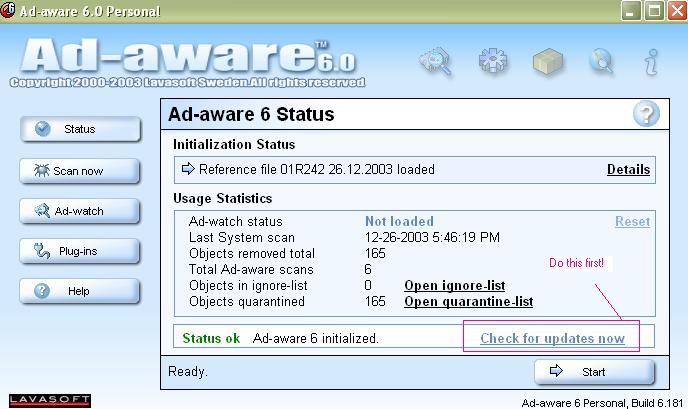
Adaware 6 is the right version...when you launch it there's an option to "Check for updates now", make sure you do that...this is the reference file for Adaware and you want it to be able to catch as much as possible.

Have you tried changing the starting page in extra-->internet-options?

:!: Well... erm yea. Everytime I restart my computer my homepage changes to this exotic porn type website and some links (xxx porno type) into my favorite. Please help me. I have used the lavasoft adware remover many times and it did not help.

Some hijackers are more persistent than others. We need more inforrmation. See my article link (in my signature) to find out more about using HijackThis so that we can see what's going on.

darnnnnnnnnnn

Meep, sorry about that post. Earlier I was having trouble posting messages.

So, are you still having problems??

Be a part of the DaniWeb community

We're a friendly, industry-focused community of developers, IT pros, digital marketers, and technology enthusiasts meeting, networking, learning, and sharing knowledge.