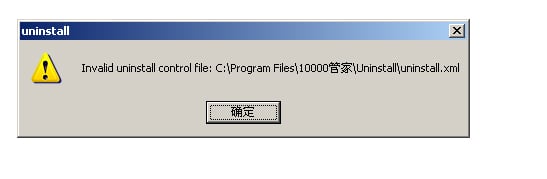
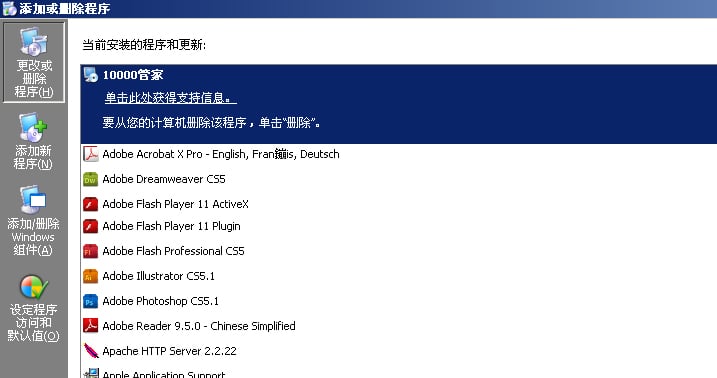
my PC was installed a software which is developed by China telecom, I don't want it at all, and maybe it can scan my PC. but I can't remove or delete it. I try to open my PC in safe mode, and delete it, but it seems that I don't deleted it at all. now no matter in safe or normal mode, I was not allowed to delete it. pls see the picture attached and help me delete it.

this is the software in my control panel

this is the picture when I delete it.
Dani AI

Generated

A concise, safe checklist to try before doing a full reinstall. confirmed a reinstall worked, which is the surest fix, but the steps below (which build on ’s scan suggestion and ’s manual approach) can remove stubborn ISP/OEM software while keeping your files.

  1. Make a full backup and a system image or restore point first.
  2. Identify the exact program name (as shown in Programs and Features) and look up its uninstall string in the registry. From an elevated Command Prompt you can search the Uninstall keys to find the entry and uninstall command.
  3. Stop and remove related services and drivers before deleting files. Look for services with the program name in Services (services.msc). From an elevated prompt you can stop and delete a service once you are sure it is the right one:
    sc stop "<ServiceName>"
    sc delete "<ServiceName>"
  4. Take ownership of stubborn folders, grant yourself full control, then remove them:
    takeown /f "C:\Program Files\<Vendor>" /r /d y
    icacls "C:\Program Files\<Vendor>" /grant Administrators:F /t
    rd /s /q "C:\Program Files\<Vendor>"
  5. Check Startup entries and Scheduled Tasks for reinstallers. A trusted startup manager (forensics tools like Autoruns are commonly used) shows hidden entries that Control Panel misses.
  6. If the item immediately reappears, search for installer tasks, drivers under C:\Windows\System32\drivers, or an OEM recovery script. If you are uncomfortable editing the registry, stop and get help.

A registry cleaner can help remove orphaned keys but always export the registry branch before editing. If the software persists after all these steps, a repair install or clean reinstall is the reliable final option.

Recommended Answers

All 4 Replies

Sometimes you have to do this the hard way:

  1. Remove all binaries and directories for the "tool".
  2. Remove all registry entries for it.
  3. Reboot, and see if it re-installs itself.

If in #3 it re-installs itself, then you have more work to do. This may not be simple, and certainly a terrible waste of your time, but necessary.

If you do a manual delete then you might want to use the registry cleaner feature of ccleaner to do the registry cleanup for you.

thank you all for the input, I remove it by reinstalling the sysytem.

Be a part of the DaniWeb community

We're a friendly, industry-focused community of developers, IT pros, digital marketers, and technology enthusiasts meeting, networking, learning, and sharing knowledge.