Picture: http://i1144.photobucket.com/albums/o493/NoCodeMonkey/SAM_0069.jpg

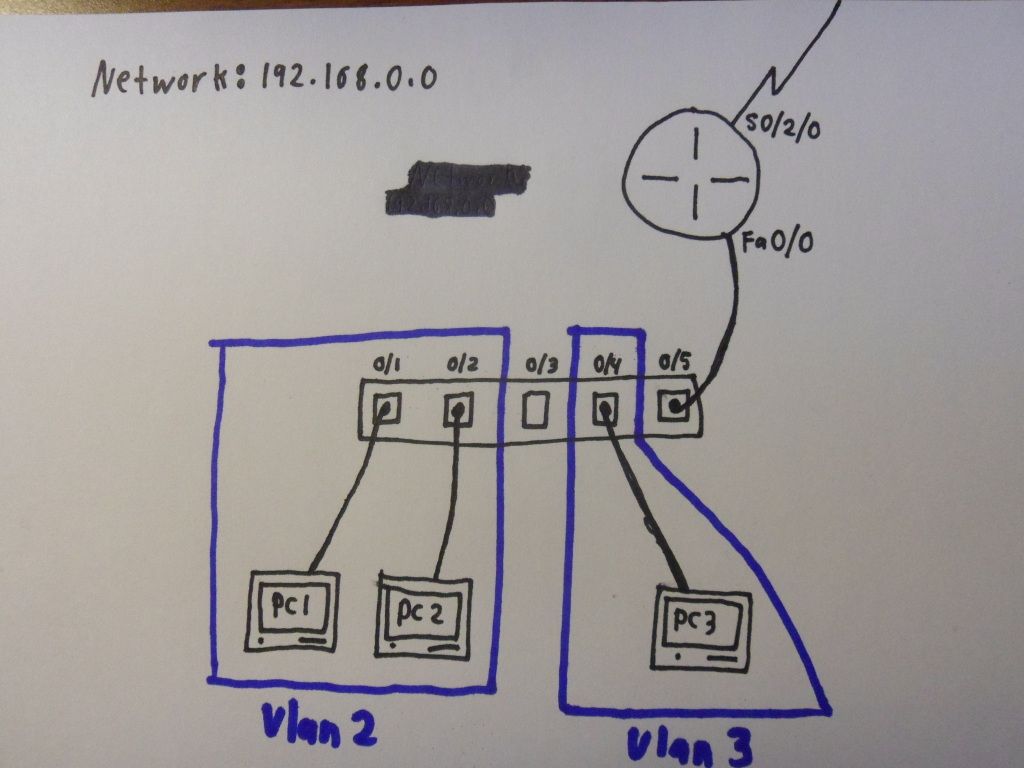
Ok so Im confused, In the pic I have 2 vlans (VLAN2, and VLAN3) and the network address of this network is 192.168.0.0. Router has an ip address of 192.168.0.1 for fa0/0, and is connected to VLAN1 (the default) to f0/5 with an ip address of 192.168.0.2 for VLAN1. When i have VLAN2 and VLAN3 do i have to give them a different address for a different network [EX. VLAN2 = 192.168.1.0] and give the hosts on that network that network rage of addresses?

Dani AI

Generated

Short answer: yes — each VLAN should be its own IP subnet and the router must provide a gateway for each. As pointed out, with your 2811 + 2950 you’ll typically run a “router‑on‑a‑stick”: make the switch↔router link a 802.1Q trunk and create router subinterfaces for VLAN tagging. Below is a concise, practical example using the networks you suggested (VLAN1 = 192.168.0.0/24, VLAN2 = 192.168.1.0/24, VLAN3 = 192.168.2.0/24). Adjust addresses to suit your plan.

Example router (2811) — subinterfaces become each VLAN’s gateway:

enable
conf t
interface FastEthernet0/0
 no ip address
 no shutdown

interface FastEthernet0/0.1
 encapsulation dot1Q 1 native
 ip address 192.168.0.1 255.255.255.0

interface FastEthernet0/0.2
 encapsulation dot1Q 2
 ip address 192.168.1.1 255.255.255.0

interface FastEthernet0/0.3
 encapsulation dot1Q 3
 ip address 192.168.2.1 255.255.255.0

end
write memory

Example switch (Catalyst 2950) — create VLANs, assign access ports, trunk to router (your diagram used fa0/5 to the router):

enable
conf t
vlan 2
 name VLAN2
vlan 3
 name VLAN3

interface range FastEthernet0/1 - 4
 switchport mode access
 switchport access vlan 2

interface range FastEthernet0/6 - 9
 switchport mode access
 switchport access vlan 3

interface FastEthernet0/5
 switchport mode trunk
 switchport trunk allowed vlan 1,2,3
! (2950 may not accept "switchport trunk encapsulation dot1q" — if it does, add it; otherwise just set mode trunk)

interface Vlan1
 ip address 192.168.0.2 255.255.255.0
exit
ip default-gateway 192.168.0.1
end
write memory

Quick checks/troubleshooting:

Router: show ip interface brief, show running-config interface FastEthernet0/0
Switch: show vlan brief, show interfaces trunk, show running-config
Hosts: default gateway = VLAN IP (e.g. VLAN2 hosts -> 192.168.1.1)

If hosts can’t reach gateway, verify the port to the router is actually a trunk, the VLANs exist on the switch, and the router subinterfaces are up. Avoid leaving a conflicting IP on the physical router interface; save configs after changes.

Recommended Answers

All 5 Replies

VLAN 2 & 3 would be on their own subnets such as 192.168.1.0/24 and 192.168.2.0/24. However, with only one router interface, the connection between the switch and the router would need to include tagging for vlans 2 and 3. You would need to assign addresses to the router in each of those VLANs as well. These addresses become the default gateway for each subnet.

so what would be the commands used?

Command on what? Switch or router config? What type of hardware do you have?

2811 router

2950-24 switch

I just need to see how u include tagging for vlans 2 and 3 and assign addresses to the router in each of those VLANs you talked about.

Cisco.. sorry, will need someone else to assist on this thread with the specific commands.

Be a part of the DaniWeb community

We're a friendly, industry-focused community of developers, IT pros, digital marketers, and technology enthusiasts meeting, networking, learning, and sharing knowledge.