What is a telnet password and is it automatically type 7? If not how do I make the telnet password a type 7? Pls help I am confused with it. Thanks

king03 0 Junior Poster in Training
Dani AI
Generated
Short answer up front: the Cisco “type 7” label is an IOS config obfuscation (weak, reversible) and has nothing to do with Telnet’s 7‑bit NVT character set that mentioned. In practice: set VTY/console passwords with the line commands, use enable secret (not the old enable password), and either use the session-limit feature or reduce active VTY lines to enforce “max 2 users.” (tintin.mudhalla.net)
How to do this in Packet Tracer (examples — replace placeholders):
conf t
hostname AMY
line console 0
 password <CONSOLE_PW>
 login
line vty 0 4
 password <VTY_PW>
 login
enable secret <STRONG_SECRET>
service password-encryption
end
Note: service password-encryption causes the password lines to appear as type 7 (obfuscated) in the config, but that is reversible — don’t rely on it for real security; prefer enable secret. (cisco.com)
To cap remote sessions at 2 you have two common options (use whichever your IOS image supports):
! Preferred if supported:
line vty 0 4
 session-limit 2

! Fallback if session-limit not available:
line vty 0 1
 transport input ssh
line vty 2 4
 transport input none
The second method effectively disables extra vty lines. (cisco.com)
Security note: Telnet is plain text; for labs Packet Tracer will let you telnet, but on real equipment use SSH (set hostname/ip domain, create a username with secret, generate RSA keys, then transport input ssh on vty). Example steps are in Cisco’s SSH guide. (cisco.com)
If any command errors in Packet Tracer, post the exact error and IOS image version — that helps identify unsupported commands (older images often lack session-limit). Mentioning your topology names (AMY / AU) just means use hostname to set each router’s name.
Recommended Answers
Jump to Post— rubberman 1,355Huh? I don't know what you are talking about, unless you are referring to 7-bit ASCII key codes, which would make sense. I have done complete telnet implementations for real-time operating systems (both client and server side, device drivers, and all the rest of it) back in the early 1990's. …
All 2 Replies

rubberman 1,355 Nearly a Posting Virtuoso Featured Poster
Huh? I don't know what you are talking about, unless you are referring to 7-bit ASCII key codes, which would make sense. I have done complete telnet implementations for real-time operating systems (both client and server side, device drivers, and all the rest of it) back in the early 1990's. According to the DDN Protocol Handbook, the official source repository for all TCP/IP specifications, in the telnet section (RFC 854, Volume 2, page 575) it says this:
Page 5-578: Although a TELNET connection through the network is intrinsically full duplex, the NVT (Network Virtual Terminal) is to be viewed as a half-duplex device operating in a line-buffered mode. That is, unless and until options are negotiated to the contrary.
Nowhere do I find anything that limits it to 7-bits, although that may be implied in that a telnet session can be ascii (7 bits) or binary (8 bits), and that can be negotiated (RFC 856, pages 2-595-598, Telnet Binary Transmission). I think that from what you seem to be saying is that the router expects a telnet connection stream to be non-binary (ascii) only, so you need to set your terminal emulator / telnet client to run in that mode (7-bits / character).
Finally, the entire telnet spec is almost 165 pages in length, and these are 8 1/2 x 11 typewritten pages. :-) FWIW, a telnet client will be able to negotiate all of this when it connects to the server (router in your case), unless Cisco left the negotiation protocol out of their software for binary/non-binary support, which would be a MAJOR violation of the standard and specifications. At worst it should at least tell the client that it must not transmit binary data. The default setting for the binary data transmission capability is OFF (WON'T TRANSMIT-BINARY / DON'T TRANSMIT-BINARY).
Edited by rubberman because: n/a
king03 0 Junior Poster in Training
Huh? I don't know what you are talking about, unless you are referring to 7-bit ASCII key codes, which would make sense. I have done complete telnet implementations for real-time operating systems (both client and server side, device drivers, and all the rest of it) back in the early 1990's. According to the DDN Protocol Handbook, the official source repository for all TCP/IP specifications, in the telnet section (RFC 854, Volume 2, page 575) it says this:
Page 5-578: Although a TELNET connection through the network is intrinsically full duplex, the NVT (Network Virtual Terminal) is to be viewed as a half-duplex device operating in a line-buffered mode. That is, unless and until options are negotiated to the contrary.
Nowhere do I find anything that limits it to 7-bits, although that may be implied in that a telnet session can be ascii (7 bits) or binary (8 bits), and that can be negotiated (RFC 856, pages 2-595-598, Telnet Binary Transmission). I think that from what you seem to be saying is that the router expects a telnet connection stream to be non-binary (ascii) only, so you need to set your terminal emulator / telnet client to run in that mode (7-bits / character).
Finally, the entire telnet spec is almost 165 pages in length, and these are 8 1/2 x 11 typewritten pages. :-) FWIW, a telnet client will be able to negotiate all of this when it connects to the server (router in your case), unless Cisco left the negotiation protocol out of their software for binary/non-binary support, which would be a MAJOR violation of the standard and specifications. At worst it should at least tell the client that it must not transmit binary data. The default setting for the binary data transmission capability is OFF (WON'T TRANSMIT-BINARY / DON'T TRANSMIT-BINARY).
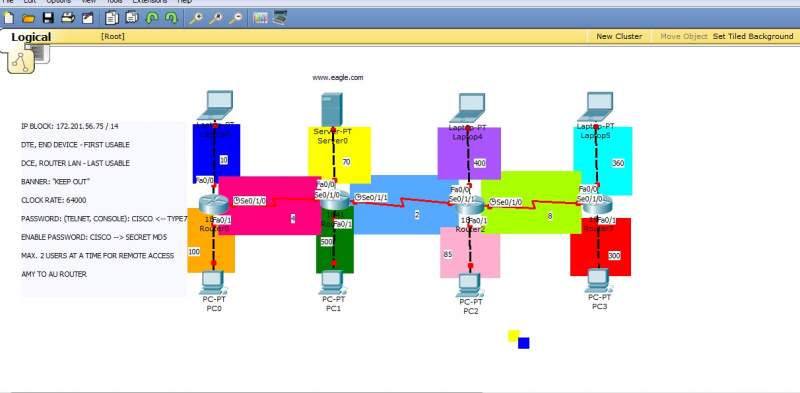
How do I put password in packet tracer? and also what is a AMY and AU router?? Here is the complete instructions our prof gave us when he left for a meeting. Also how do you make it max of 2 users at a time for remote access? Boss please explain me how to do those lines in red only. I've also provided a snapshot of my network for an easy reference. Need your expert's advice sir. Thank you very much!
IP BLOCK: / 14
DTE, END DEVICE - FIRST USABLE
DCE, ROUTER LAN - LAST USABLE
BANNER: "KEEP OUT"
CLOCK RATE: 64000
PASSWORD: (TELNET, CONSOLE): CISCO <-- TYPE7
ENABLE PASSWORD: CISCO --> SECRET M05
MAX. 2 USERS AT A TIME FOR REMOTE ACCESS
AMY TO AU ROUTER
Be a part of the DaniWeb community
We're a friendly, industry-focused community of developers, IT pros, digital marketers, and technology enthusiasts meeting, networking, learning, and sharing knowledge.