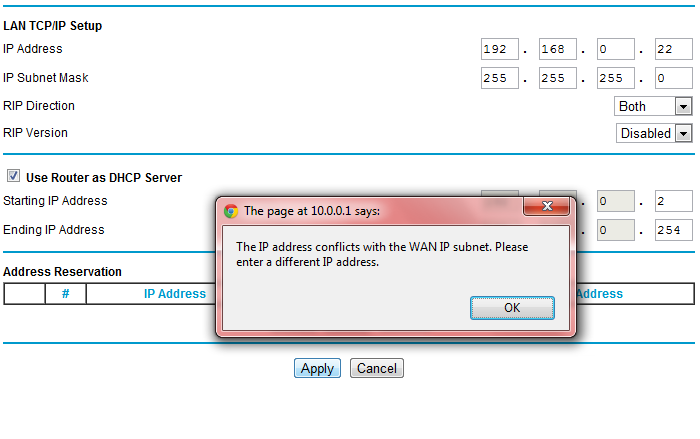
Hello guys, im trying to change my LAN Setup settings on my netgear router because machines connected to it are giving out IP's which are on a totally different subnet, hence i cant connect to stuff like networked printers, but i keep on getting an IP address conflict with WAN IP error.

I can't configure the routers LAN IP Setup to assign 192.168.0.0 IPs to my machines. It currently assigns 10.0.0.1 IPs and when I try to change it to 192.168.0.0 it says "IP address is conflicts with the WAN IP subnet, please enter a different IP address."

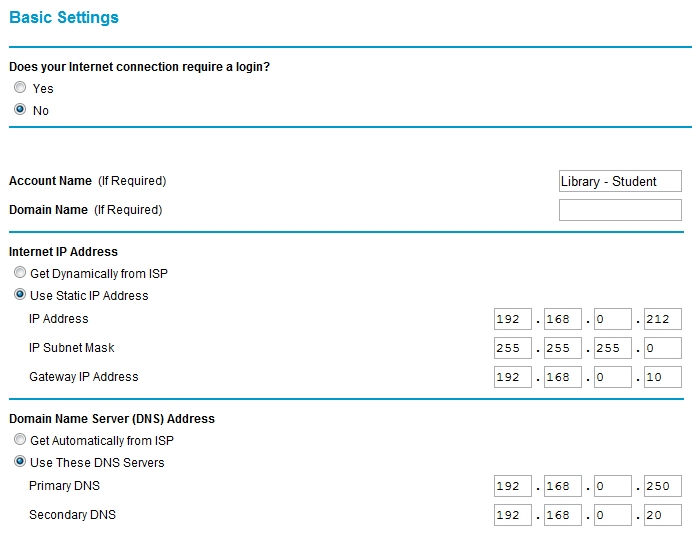
Please view my screenshots and advice on how i can resolve this.
a1b

Dani AI

Generated

That error means the LAN network you are trying to use overlaps with the network on the WAN side (typically coming from an ISP modem/router). Consumer firmware blocks this because routing/NAT cannot work when both sides share the same subnet. On many ISP gateways the default is 192.168.0.0/24, so any attempt to use that same /24 on your LAN will be rejected. Also note: 192.168.0.0 is the network address, not a valid host; the router’s LAN IP should be a host address (for example, .1), with DHCP handing out the rest.

You have a few clean ways to resolve it:

After changes, renew client leases and give printers either static IPs or DHCP reservations to keep them reachable.

So, this netgear device is going to have two interfaces. In this case a LAN and WAN. If the device is telling you that there is a conflict, it most likely due to the fact that your WAN interface is using that subnet range already. You should have a WAN "tab" when you are logged into the device so that you can examine the complete configuration.

If this router is connected to a modem on premise, you should be able to log into the modem and change that configuration, if you really need to have that subnet on your LAN side.

Can you just choose a different LAN subnet range...? say 192.168.1.x/24?

Be a part of the DaniWeb community

We're a friendly, industry-focused community of developers, IT pros, digital marketers, and technology enthusiasts meeting, networking, learning, and sharing knowledge.