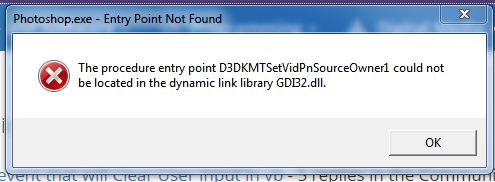
when I try to open photoshop.exe this notice apper :
the procedure entry point D3DKMTSetVidPnSourceOwner1 could not be located in the dynamic link library GDI32.dll
plese help me
Captureصي.PNG Captureصي.PNG Captureصي.PNG

Dani AI

Generated

As and already suspected, that error is the OS/DLL loader telling you some code in Photoshop’s process is calling a Windows API your copy of Windows doesn’t provide. Below are practical, ordered checks to isolate whether this is a bad/corrupt install, a stray DLL or plugin, or a real OS incompatibility. (learn.microsoft.com)

  1. Verify the Photoshop binary is legitimate
  • Right‑click photoshop.exe → Properties → Digital Signatures. The signer should be Adobe; no signature or a stranger’s name is a red flag. If it’s unsigned or altered, reinstall from your original/official media. (support.microsoft.com)
  1. Look for local copies of system DLLs (do this before downloading anything)
  • Open the Photoshop install folder and search for gdi32.dll or other system DLLs. If you find a copy there, move/rename it (backup first) and retry — apps will load a DLL from their folder before the system folder, which can cause this mismatch. (learn.microsoft.com)
  1. Repair Windows system files (run as Administrator)

    sfc /scannow

    If SFC reports unfixable files, capture the log and follow the Microsoft guidance for repair steps. (support.microsoft.com)

  2. Quick plugin / log triage

  • Temporarily move the Plug‑ins and Required\Plug‑ins folders out of the Photoshop program folder and try launching.
  • Check Event Viewer → Windows Logs → Application for the faulting module name (it tells you which DLL actually failed).
  1. Other safe steps and cautions
  • Do not download single DLLs from random sites. Replacing DLLs from unknown sources often breaks things or brings malware; prefer official Windows/DirectX updates or Adobe installers. (learn.microsoft.com)
  • On Win7, installing the Platform Update (KB2670838) can add newer graphics components that sometimes help graphics-related components — try it only if other steps fail. (support.microsoft.com)

If these checks point to a tampered or incompatible Photoshop build, reinstall with a verified Windows‑7 installer (or upgrade Windows to a version the build expects). If needed, reset Photoshop preferences or use a PSUserConfig.txt tweak for GPU/WinTab only after Photoshop will at least start. ()

Recommended Answers

All 4 Replies

Hi,

which Windows version are you using? Version 7 and previous, for example, miss this procedure.

I'm using windows 7

shows Windows 7 so I worry you have a HACKED VERSION. Adobe's installer should detect the OS and tailor the install to match what OS is used.

But there are folk that download hacked/cracked CS6 and they are the ones I see getting into trouble.

commented: Yep! +0
Be a part of the DaniWeb community

We're a friendly, industry-focused community of developers, IT pros, digital marketers, and technology enthusiasts meeting, networking, learning, and sharing knowledge.