iPhone, iPad Users Soon to Share With Windows and Android Users

Updated VanessaRyan 0 Tallied Votes 336 Views Share

Because it is unrealistic for companies to mandate a particular kind of smartphone for all their mobile employees, a new app will soon makes it possible for iPhone and iPad users to have the same access to their companies mobile "line-of-business" applications as employees carrying Android or Windows mobile devices.

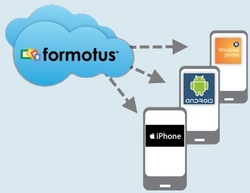
The new app, Design Once, Deploy Anywhere , is currently in development, according to news released this week by Formotus and its network of partners. This app will present a new strategy for mobile business development by bypassing the traditional Web-based apps that "trap the user in a mobile browser, or use multiple native application development efforts. Instead, the Formotus app uses native client software on each device and then creates custom solutions as business forms that install from the cloud and act like apps. This enables Apple device users to have access to the same mobile business forms that are compatible with Microsoft Office. In fact, these forms are created using InfoPath, the Office application for form design.

The advantage this app has over browser-based forms is that it's designed for occasional use, so it doesn't require constant connectivity. According to Formotus, multiple drafts of multiple forms can be opened, edited and saved locally as XML files on the mobile device. Completed forms are then sent to an outbox where they queue to be sent over-the-air to their destination when connectivity is available. And SharePoint connectivity is built-in and works anywhere, either by a host partner or in the cloud with Microsoft SharePoint Online (BPOS). No proxy servers or add-ins are required on the back end and no browser is needed on the mobile device.
Dani AI

Generated

called out a practical trend: the headline is cross‑platform parity, but the real question for enterprise deployments is how the solution behaves in production. The announcement is useful as a starting point; the decision should be driven by operational, security, and maintainability criteria rather than marketing alone.

A practical evaluation checklist:

  • Security and identity: confirm support for corporate identity providers, TLS in transit, and encryption at rest. Check single sign‑on, token lifetimes, and account provisioning workflows.
  • Sync and offline behavior: clarify how drafts are stored, how many queued items are tolerated, retry/backoff behavior, and the conflict resolution policy.
  • Data fidelity and validation: verify client and server validation, mapping to back‑end schemas, and the export/backup format for archived records.
  • UX and input ergonomics: test form rendering on representative screen sizes, keyboard/field focus, image and attachment handling, and accessibility features.
  • Integration and networking: validate behavior through corp firewalls, proxies, VPNs, and any on‑premise connectors; measure bandwidth and latency impacts.
  • Lifecycle and vendor risk: require versioning, update delivery, logging/audit capabilities, SLAs, and an exit plan that preserves forms and data.

Recommended rollout practices include a small pilot covering typical user roles and weak‑network scenarios, automated and manual test cases for conflict and error modes, and simple metrics (completion time, failure rate, retries, battery/data impact). Governance items such as audit trails, retention policies, and regulatory compliance should be defined up front. These operational checks make the difference between a promising announcement and a reliable enterprise solution.

Be a part of the DaniWeb community

We're a friendly, industry-focused community of developers, IT pros, digital marketers, and technology enthusiasts meeting, networking, learning, and sharing knowledge.