Hi,
Is there a way to comment multiple line of code in vb.net at once? means not inserting ' in front of each line in case i want to comment 20 lines that will be tedious job?
TIA
Samir Ibrahim
Hi,
Is there a way to comment multiple line of code in vb.net at once? means not inserting ' in front of each line in case i want to comment 20 lines that will be tedious job?
TIA
Samir Ibrahim
Short answer: VB.NET does not have a C-style block-comment token (no / ... /). You can only write single-line comments with the apostrophe ('), or let the IDE/tools hide/disable many lines for you. (learn.microsoft.com)
As an alternative to typing ' on every line, use Visual Studio’s comment/uncomment commands. Select the lines and press Ctrl+K, Ctrl+C to comment, Ctrl+K, Ctrl+U to uncomment; the same commands are available under Edit → Advanced → Comment Selection / Uncomment Selection. If you prefer toolbar buttons, they live on the Text Editor toolbar (right‑click the toolbar area and enable “Text Editor” to show them). (learn.microsoft.com)
If you want to remove a large block from compilation temporarily (not just visually comment it), wrap it in a conditional-compilation block such as:
#If False Then
' code temporarily disabled
#End If That code is excluded from the compiled output (useful for quick toggles), but remember this is a compiler directive — use it when you intend to exclude code, not as a documentation comment. (learn.microsoft.com)
Troubleshooting tips: if the comment buttons are missing or the shortcuts do nothing, check that the Text Editor toolbar is visible, or remap/check the keys under Tools → Options → Environment → Keyboard (look for Edit.CommentSelection / Edit.UncommentSelection). If you use a different editor (VS Code, older VS versions, or custom bindings) the toggle shortcut can differ (for example VS Code commonly uses Ctrl+/). These steps answer ’s question about the toolbar name and expand on what and started—toolbar/shortcut for quick commenting, or #If blocks when you need to exclude code. (stackoverflow.com)
References: Visual Studio keyboard shortcuts, #If...Then...#Else directives (VB).
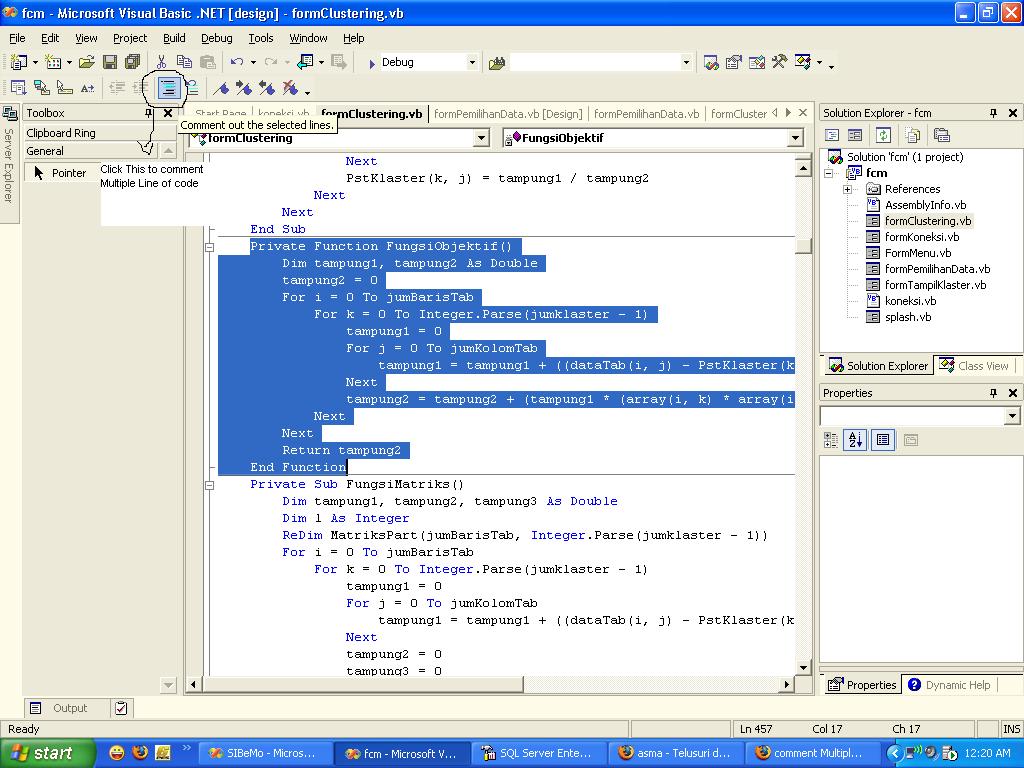
Jump to Post— Jx_Man 987First block all line of code then press the button on bar. See the pic
First block all line of code then press the button on bar. See the pic
There is no way that I know of separate from what is built into Visual Studio. (i.e. there is no \* */ or anything)
In Visual Studio 2005 there is the option to comment and uncomment multiple lines of code. Type your lines just as you need then you highlight them, on the text editor toolbar there are two buttons for this one to comment the other to uncomment. They are just to the right of the indenting buttons.
wht was that tool bar name
Please do not resurrect old threads. If you have any questions please ask. .... You are welcome to start your own threads.
Thread Closed.
We're a friendly, industry-focused community of developers, IT pros, digital marketers, and technology enthusiasts meeting, networking, learning, and sharing knowledge.